01What happens in the Water Flyboard Ride trend
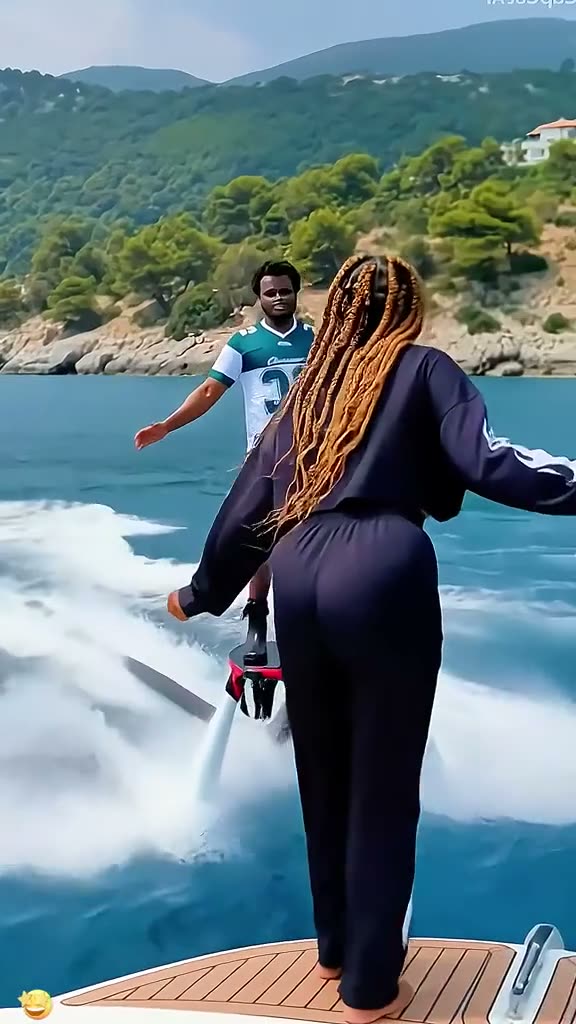
Water Flyboard Ride is a six-second vertical scene beside a yacht. One rider rises on a water-propelled board, another person joins, and the pair settle together above the water. The AI Trend Club version uses two distinct adult photos for those two roles while keeping the board, water spray, yacht, and camera framing in place.
The scene is short and easy to follow because it changes from one rider to two. The water jets and board carry the action. You can watch the linked original before deciding whether the two-person setup fits the clip you want to make.
| Time | Beat |
|---|---|
| Shot 1 | One rider stands at the yacht edge as water jets lift the board. |
| Shot 2 | A second rider steps onto the same board. |
| Shot 3 | The two riders settle together above the water. |
02How to make the Water Flyboard Ride AI video from two photos
The Water Flyboard Ride AI video tutorial uses one separate photo for each rider. AI Trend Club follows the selected clip and the two role assignments, so there is no written prompt to prepare. The page shows the linked source and the credit amount before you start. You can review both first, then choose whether to submit the photos.
- Open the trend pageGo to the Water Flyboard Ride page and watch the linked original. The reference scene shows a rider rising beside a yacht before another rider joins the board.
- Start the create flowPress Create your own to open the existing browser flow. You do not need to install an app or write a prompt for this trend.
- Add two photosChoose two different adult photos, one for the first rider and one for the second. Confirm that you have permission to use both photos, then check that each image is assigned to its intended role.
- Choose the resolutionSelect 480p for 277 credits or 720p for 415 credits. The exact amount appears on the button before you spend anything, so check the selected option and your balance there.
- Make and downloadTap Make my video. The result is ready in a few minutes. Download it with the trend sound or silent, in vertical 9:16 framing for TikTok, Reels, or Shorts.
03The photos that work
This recipe has two rider roles, so use two distinct adult photos and assign one photo to each person. The two images keep separate identities in the scene.
- Use one adult photo for the first rider.
- Choose a different adult photo for the second rider.
- Assign a separate photo to each role.
- If both riders look like the same person, use two different photos.
- If the second rider is missing, check that the second role has its own photo.
- If a render fails, credits come back automatically; the page suggests trying a clearer photo.
04The Water Flyboard Ride AI prompt
AI Trend Club uses the linked video as the guide, so there is no prompt field to fill in on the site. If you want to try a similar edit in another video model that accepts reference clips and photos, use a short description that keeps the two rider roles separate.
Recreate the short water-board sequence beside a yacht. The person in the first reference photo replaces the first rider as water jets lift the board near the boat. The person in the second reference photo replaces the rider who steps onto that same board. Keep the two identities distinct throughout. Preserve the yacht edge, board, water spray, rider positions, and camera framing. Show the pair settling together above the water. Keep the action quick and do not add another person, a new location, titles, or a watermark.05CapCut template or AI video?
A CapCut template can arrange footage that you record yourself. It does not put your face into the yacht and water-board scene from the linked original. An AI video uses your two photos as the rider identities and follows the source scene, so the board, water spray, yacht, and sequence remain the reference for the edit. The result is a new AI version guided by the clip, not the original post presented as your own recording.
The trend page runs in a browser and does not require another app or a prompt. Its download can include the trend sound or be silent. You can add captions or choose a sound in CapCut after downloading, if that is how you want to prepare your own post. Keep the two photo roles clear so each rider remains a separate person in the result.
06Is the Water Flyboard Ride AI video free?
Watching the original clip and reading the trend page are free. Generating the video is not free. A new account receives 25 welcome credits, enough for a few images but not enough for a Water Flyboard Ride video. One video uses 277 credits at 480p or 415 credits at 720p. A failed video returns its credits automatically, and the page shows the exact cost before you submit.
The lowest priced way to cover either resolution is the $6.99 Week pass with 800 credits. The $9.90 pack of 1,000 credits is another option. A pass or pack is not required to watch the original or read this guide. Check the price, credit balance, and resolution together on the create button before you decide to spend.
| Option | Price | Credits |
|---|---|---|
| Week pass | $6.99 | 800 credits |
| 1,000 credits | $9.90 | 1,000 credits |
07Post it
The download can include the trend sound or stay silent. Credit @user4947097136093 and link to the original TikTok when you post your version. Make clear that your result is an AI edit based on the source scene, rather than presenting the original rider footage as your own. Keep the caption focused on the playful shift from one rider to two.
- One rider becomes two above the water.
- A board, water spray, and a ride together.
- Two friends in one imagined flyboard scene.
08Questions
- What is the Water Flyboard Ride trend?
- It is a six-second vertical clip of one rider rising on a water-propelled board beside a yacht before a second rider joins.
- How do I make the Water Flyboard Ride video?
- Press Create your own, add two photos, assign one to each rider, and tap Make my video. There is no prompt to write.
- How many photos do I need?
- Use two distinct adult photos, one for each rider role.
- Which AI makes this video?
- It uses an AI video model guided by the original clip.
- Who made the original?
- TikTok creator @user4947097136093 posted the selected original on Nov 19, 2026, and the trend page links to the post.