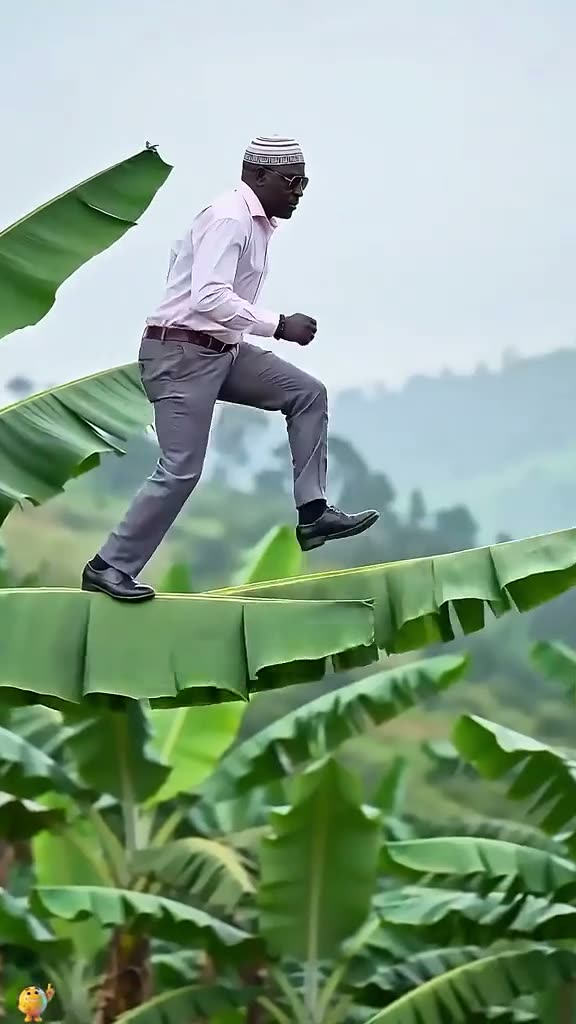
01What happens in the Banana Tree Run trend
The Banana Tree Run is a short visual gag built around an impossible path. An adult runner steps and leaps across enormous banana leaves, with the hillside and plants making the person look unusually high above the ground. The camera stays to the side, so the whole body and the leaf path remain easy to read. On AI Trend Club, one adult photo supplies the runner while the scene follows the linked creator clip.
The current reference is a vertical clip with a short sequence. It is silent, and the page credits the linked TikTok post by @user4947097136093. The remake recipe focuses on replacing the runner and keeping the oversized plants, the side view, and the running movement. It is a playful visual edit, not a guide to climbing or walking on real leaves.
| Part of the clip | What the viewer sees |
|---|---|
| The setting | Large banana plants and a sloped path fill the background. |
| The action | One adult runs and leaps from leaf to leaf. |
| The framing | A side view keeps the full-body movement in the vertical scene. |
02How to make the Banana Tree Run AI video
The trend page uses its linked video as the movement reference. You do not need to write a prompt on AI Trend Club. Add one full-body adult photo, review the resolution and credit amount shown on the create button, then decide whether to submit. The browser flow keeps the photo, reference scene, and price together so you can check the setup before spending credits.
- Open the trend pageVisit the Banana Tree Run page and watch the linked original to understand the side-on leap and the oversized leaves.
- Start the create flowChoose Create your own. The page opens the browser-based maker, so there is no separate app to install.
- Add one adult photoUse a clear full-body photo for the runner role. Confirm that you have permission to use the image before uploading it.
- Check the resolution and priceChoose 480p or 720p. The button shows the exact credit amount for the selected setting before anything is spent.
- Make and downloadTap Make my video after checking the details. The clip is prepared in a few minutes and downloads in the original vertical framing.
03Choose a photo that keeps the run readable
Because the reference depends on a full-body jump, the input photo should show enough of the person for the model to place the legs and feet into the pose. A clean photo with space around the body gives the edit a clearer identity reference. The source is viewed from the side, but a front or three-quarter photo can still work if the face and body are visible.
A simple background helps the person stand out from the banana leaves. Avoid group photos, cropped portraits, filters that hide the face, and clothing that blends into the plants. The model can change details while matching the reference, so check the preview and finished clip before downloading or sharing.
- Use one adult photo that you have permission to edit.
- Include the full body, especially the legs and feet.
- Keep the face visible and the person separated from other people.
- Choose an image with enough space around the body for a jumping pose.
- Review the result for unusual hands, feet, or contact with the leaves.
04The Banana Tree Run AI prompt
AI Trend Club follows the linked video and does not ask you to enter a prompt. If you are trying a different video model that accepts a reference clip and a photo, a description like this can make the intended replacement clear:
Use the uploaded photo of one adult as the identity reference for the runner. Replace only the runner in the reference video. Keep the giant banana plants, sloped path, side-on camera view, natural scale of the leaves, and the repeated running and jumping movement. Keep the full-body action readable from beginning to end. Preserve the short vertical framing. Do not add another person, text, a logo, or a watermark. Keep the result silent.05How the AI remake differs from editing the original
A manual video edit could cut the creator clip, place titles on top, or change its speed. The AI Trend Club workflow instead uses a photo to put a new person into the reference scene. The leaves, camera angle, path, and movement guide the result, while the uploaded photo guides the runner's appearance. It creates a new short clip rather than handing you an edited copy of the creator's post.
That distinction matters when you share the result. The linked original remains the work of its creator, and the page keeps the source credit visible. The generated version can vary from the reference: the face, clothing, leaf positions, and exact leap may not match perfectly. Treat the video as an AI recreation and check that it represents you the way you intend.
06Credit prices and payment options
The create button displays the amount for the resolution you choose before you submit. The current quote for this recipe is:
| Choice | Credits or price |
|---|---|
| 480p video | 231 credits |
| 720p video | 346 credits |
| Week pass | $6.99 for 800 credits |
| Month pass | $19.99 for 2,500 credits |
| Year pass | $149.99 for 3,000 credits |
| 1,000-credit pack | $9.90 |
| 3,300-credit pack | $29.90 |
| 8,000-credit pack | $69.90 |
07Download and share the clip
The generated clip is silent, like the selected source excerpt. Add your own sound when posting if you want music or a spoken track. The original framing is vertical 9:16, which fits TikTok, Reels, and Shorts. Watch the download once with the sound you plan to use so you can check that the leap and the track begin together.
Use the original creator credit when a post or caption compares your result with the reference. Avoid presenting the AI recreation as footage of a real run above a banana plantation. If the model changes the face or loses the full-body pose, try a clearer input photo or keep the result private rather than posting a version you do not recognize.
- Keep the linked source credit with any comparison to the original.
- Add audio on the social platform because the download is silent.
- Check the full-body jump and leaf placement before sharing.
- Use the result only with permission for the photo you uploaded.
- Describe it as an AI recreation if you post it publicly.
08Questions
- How many photos do I need?
- Use one clear full-body photo of an adult for the runner.
- Do I need to type a prompt on AI Trend Club?
- No. The linked video guides this recipe, so the site does not ask you to write a prompt.
- Does the video include music?
- No. The clip downloads silently. Add your own sound when you post if you want audio.
- How much does it cost?
- The current button shows 231 credits at 480p or 346 credits at 720p before you submit.
- Can I use a cropped selfie?
- A full-body image is more useful for this jumping scene because the person’s legs and feet need to be visible.