01What happens in the Homesick Memorial trend
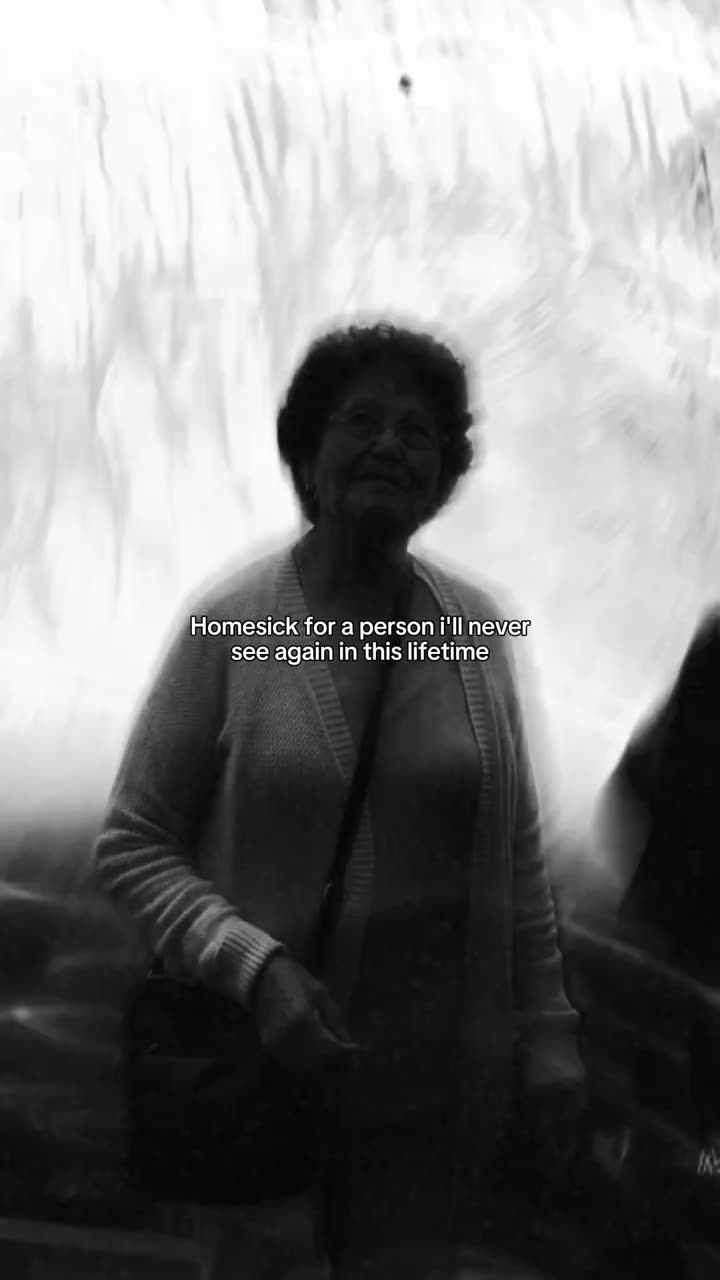
The Homesick Memorial trend shows one black-and-white portrait in a vertical clip. It holds in soft focus, shifts slightly, and carries a short line about missing someone. The original comes from TikTok creator @marysarenae, who posted it on Nov 19, 2026. When checked on Nov 22, 2026, it had 811K views and 168K likes.
The remake lets one photo take the portrait lead’s place. The page keeps the reference’s upright pose, outdoor setting, soft monochrome look, slight tremble and existing caption. The generated video stays silent.
| Time | Beat |
|---|---|
| Shot 1 | A black-and-white portrait appears with a short line about missing someone. |
| Shot 2 | The portrait holds in soft focus and trembles slightly. |
| Shot 3 | The same upright figure stays in the outdoor frame. |
02How to make the Homesick Memorial AI video from one photo
The page uses the existing video workflow. You do not need to write a prompt or install an app. The reference clip and trend page are free to view. Follow the steps below and review the price shown by the site before you submit.
- Open the trend pageWatch the original and read the creator credit. Press Create your own when you are ready.
- Add one photoUpload one portrait of yourself that you have permission to use. Confirm the photo belongs in this personal remake.
- Choose a qualitySelect 480p or 720p. The page shows the exact credit cost beside the choice before you spend.
- Check the requestThe built-in prompt follows the reference portrait, caption, framing and soft black-and-white look. There is no prompt box to fill in.
- Make and downloadTap Make my video. It is ready in a few minutes. Download the silent result, then add a sound in TikTok or CapCut if you want one.
03The photo that works
Use one adult portrait of yourself. The trend is set up around a single person in the reference, and the result keeps that person’s appearance while changing the lead in the clip.
- Choose one portrait where your face is visible.
- Use a photo you have permission to edit.
- Upload yourself as the person who takes the lead’s place.
- Do not add another photo; this page takes one.
- Do not use a pet photo for this person-only workflow.
04The Homesick Memorial AI prompt
AI Trend Club fills in the prompt for this page, so you do not need to write one. If you want to try the same idea in another video model that accepts a reference clip and photo, use the sample below as a starting point. Keep the request tied to the source scene.
Use the reference clip as the guide for a short vertical portrait scene. Place the person in the reference photo in the same upright position as the person in the black-and-white source. Keep the outdoor background, soft focus, slight camera tremble and existing caption. Let the portrait hold on screen with a gentle push that follows the reference timing. Keep the same monochrome look. Do not add another person, a new caption or a watermark. Keep the video silent, with no soundtrack, song, music, dialogue or audio.05CapCut template or AI video?
A CapCut template can help you arrange clips or photos that you recorded yourself. It does not place your photo into the original portrait scene. This page uses an AI video workflow guided by the reference clip, so the person in your photo takes the portrait lead’s place while the scene and framing stay in place.
The prompt is already prepared on AI Trend Club. You add one photo, choose the video quality and submit. The page runs in your browser, and there is no separate app to install. You can still use CapCut after download to add text or a sound. The generated video is private to your account.
06Is the Homesick Memorial AI video free?
You can view the trend page and original clip without paying. A new account receives 25 welcome credits, enough for a few images but not enough for a trend video. This remake costs 415 credits at standard quality (480p) or 623 credits at HD (720p). The price appears before you make the video.
The Week pass is the lowest-cost entry shown here and includes 800 credits. The 1,000-credit pack is another option. A failed video returns its credits automatically.
| Option | Price | Credits |
|---|---|---|
| Week pass | $6.99 | 800 |
| 1,000 credits | $9.90 | 1,000 |
07Post your Homesick Memorial video
The remake is silent, so add the sound you want in TikTok or CapCut after downloading. Credit @marysarenae for the original idea and link to the source post if you share your version. Keep the context clear: this is an AI remake made from your photo, not original footage of the person being remembered.
Caption ideas: “A quiet portrait for someone I miss.” “Holding a memory close today.” Both keep the focus on a personal remembrance without claiming that the generated clip is real footage.
08Questions
- Which AI makes the Homesick Memorial video?
- AI Trend Club uses an AI video model guided by the original clip. The page prepares the prompt and lets you add one portrait.
- Can I make the video on my phone?
- The workflow runs in your browser, so there is no app to install. Open the trend page and use Create your own.
- Can I use a pet photo?
- This page is set up for one adult person. Use a portrait of yourself that you have permission to edit.
- How many credits does it take?
- The video costs 415 credits at 480p or 623 credits at 720p. The site shows the price before you submit.
- Who made the original?
- TikTok creator @marysarenae posted it on Nov 19, 2026. We link to it above.