01What happens in the Yes Yes I Love You trend
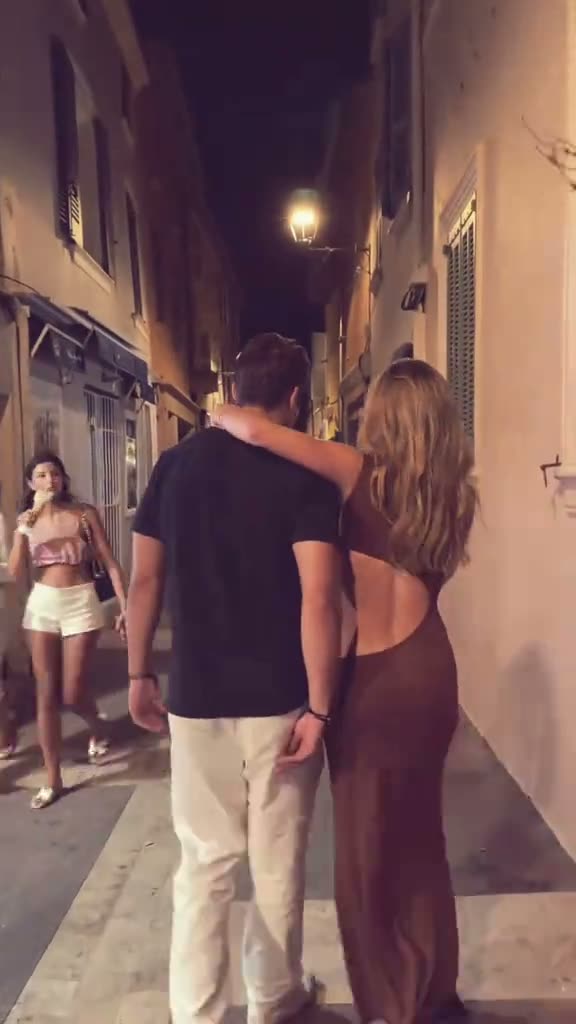
Yes Yes I Love You starts with two adults walking close together under warm street lights. They keep an arm over each other’s shoulders, lift their arms and move into a playful run. The following camera stays with them through the ending lift.
The page uses the clip by @ha_templates as its movement reference. Its version takes two separate adult photos, one for each role, while preserving the night street and camera movement. The output is silent. This guide describes a video remake, not the original post and not a promise that every generated frame will match the reference exactly.
| Shot | Beat |
|---|---|
| Shot 1 | Two adults walk close together under warm street lights. |
| Shot 2 | They keep an arm over each other’s shoulders and lift their arms. |
| Shot 3 | The following camera tracks their playful run and ending lift. |
02How to make the Yes Yes I Love You AI video from two photos
Open the trend page and press Create your own. The browser flow does not require a separate app or a prompt. Add one adult photo for each role, check which photo is assigned to which person, and confirm you have permission to use both images. The quality button shows the credit amount before you submit.
The source is a vertical 14-second clip. The page offers a silent remake, so it will not download with the source sound. If you want a sound with the post, add a trending sound in TikTok or CapCut after the video is ready. Rendering can take a few minutes, and queue times vary.
- Open the trend pageWatch the linked example and review the night-run sequence.
- Start your versionPress Create your own to open the video flow in your browser.
- Add two separate photosUse one adult photo for each role and confirm you have permission for both.
- Choose the quality480p uses 646 credits; 720p uses 968 credits. Check the amount on the button before you spend.
- Make and downloadTap Make my video. The output is silent; add a sound in TikTok or CapCut if you want one.
03Choose two photos and assign each role
This page uses two separate adult photos. One photo fills the first role and the other fills the second role. Use a different clear photo for each person, then check that the roles are assigned to the intended people before making the video. The sequence depends on two distinct identities rather than one blended photo.
If the people look alike in the result, the page’s troubleshooting note says to use a different clear photo for each role. If the roles change places, check the assignment again. Use only photos you have permission to use. The generated movement can vary, so review the result before you save or post it.
- Choose two separate adult photos.
- Use a different photo for each role.
- Check that each photo is assigned to the intended person.
- Confirm you have permission to use both photos.
- Review the result before sharing it.
04The Yes Yes I Love You AI video prompt
The site uses the page’s reference recipe, so there is no prompt to write on AI Trend Club. If you want to describe a similar scene in another video model that accepts a reference clip and two photos, start with the prompt below. Use separate reference photos for the two adults.
Create a short vertical video guided by the reference clip. Use the person in the first reference photo for the adult on the left and the person in the second reference photo for the adult on the right. Keep their identities separate. Begin with the pair walking close together on a warm-lit night street with one arm over the other’s shoulders. Let them lift their arms, then follow them into a playful run and ending lift. Keep the tracking camera and street setting. Make a silent video with no lyrics, dialogue, captions, or watermark.05CapCut template or AI video?
A CapCut template can arrange clips or photos you record or select. It does not put two new people into the original night-street scene. The AI video workflow uses the linked clip as a movement guide and the two uploaded photos as separate adult roles.
That difference changes what you need to prepare. A template works with the media you bring to it. This video uses the existing camera movement and scene while the two photos guide the people in the remake. The output from this page is silent, so sound remains a separate choice after downloading. You can add captions or a trending sound in TikTok or CapCut if you want to edit the finished clip.
06Is the Yes Yes I Love You video free?
Watching the reference and reading this page are free. Making the video uses credits. A new account receives 25 welcome credits, which is enough for a few image edits but not enough for this video. The Yes Yes I Love You uses 646 credits at 480p or 968 at 720p. The page shows the exact total before submission. If a render fails, its credits come back automatically.
The lowest current purchase that covers the standard version is the Week pass, with 800 credits for $6.99. A 1,000-credit pack costs $9.90 and covers either listed resolution. Check the credit total on the page before spending. Opening the guide or watching the linked original does not start a video job.
| Option | Price | Credits |
|---|---|---|
| Week pass | $6.99 | 800 |
| 1,000 credits | $9.90 | 1,000 |
07Post it with the original credit
The output is silent. Add a trending sound in TikTok or CapCut if you want audio, then credit @ha_templates and link the original post when you can. That keeps the reference and the remake easy to tell apart.
The shoulder-to-shoulder walk gives the clip a close, affectionate feel, and the quick run makes the ending playful. A short caption can describe the shared scene without quoting song lyrics or suggesting the creator’s original video is yours.
- A close walk, then a playful run.
- Two photos, one night-street scene.
- A shared ending under the street lights.
08Questions
- How many photos do I need?
- Use two separate adult photos, one for each person in the scene.
- Is there a CapCut template?
- The guide covers the AI video workflow on this page. A CapCut template arranges media you select; it does not place the two photos into the linked reference scene.
- Which AI makes the video?
- An AI video model guided by the original clip. The page’s materials do not name a specific model for this trend.
- How much does it cost?
- It uses 646 credits at 480p or 968 at 720p. The exact amount appears before you submit.
- Who posted the original?
- @ha_templates posted the linked TikTok on Oct 18, 2026. The trend page links to the post.