01What happens in the Bing Bing Bing Kicking trend
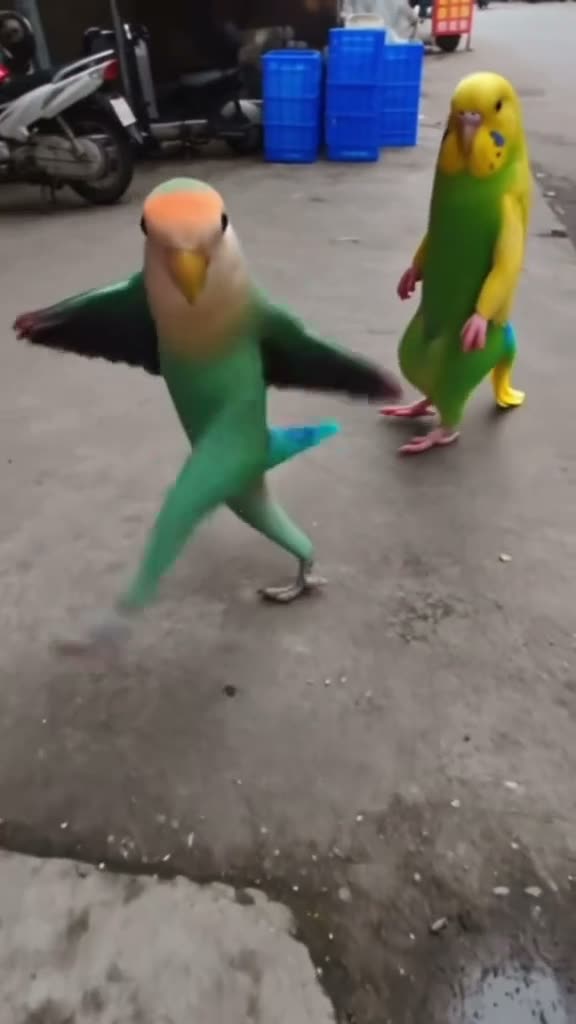
The Bing Bing Bing Kicking clip puts two colorful parrots in an ordinary street setting. The green-and-peach bird stands in the foreground on the left and lifts a leg, while a yellow-and-green parrot remains on the right. Their contrasting colors and alternating movement make the short scene easy to recognize. The AI Trend Club recipe lets one pet photo take the place of the left bird while keeping the second parrot in the shot.
The linked TikTok post is credited to @jakeyang04. The selected clip is vertical and silent. The remake keeps the street, the positions of both birds, and the close camera movement. It does not turn the scene into a pet training demonstration, and it does not replace both parrots with the uploaded animal.
| Part of the clip | What to look for |
|---|---|
| Foreground | The green-and-peach parrot is on the left. |
| Second bird | The yellow-and-green parrot remains on the right. |
| Movement | The birds lift their legs in a short alternating dance. |
02How to make the Bing Bing Bing Kicking AI video
This page uses the reference clip to guide the street scene and bird movement. It does not ask you to write a prompt. Add one photo of your pet, review the exact credit amount on the resolution button, and submit only when the setup looks right. The recipe is designed for a pet as the lead, while the separate parrot on the right stays part of the reference scene.
- Open the trend pageWatch the linked original so you can see which parrot is replaced and where the second bird stands.
- Start the makerPress Create your own to open the browser-based flow. You do not need to install an app or write a prompt for this recipe.
- Choose a pet photoAdd one clear photo of your cat or dog. Confirm that you have permission to edit the image before uploading it.
- Review the priceSelect 480p or 720p and read the credit amount displayed on the button before you submit.
- Create and downloadTap Make my video after checking the details. The generated clip is ready in a few minutes and keeps the vertical framing.
03Choose a pet photo that fits the scene
Use a photo where your pet's face and body are easy to see. A clear head, shoulders, and front legs give the model more information for a dancing pose. Keep the pet in the center of the image and avoid a busy crop that cuts off the paws. The reference has a close view of the lead bird, so a photo taken from a similar height can help the replacement feel grounded in the street.
The second parrot is meant to stay in the scene. A single-pet input helps keep the roles separate: your uploaded animal guides the left foreground character, and the yellow-and-green bird remains on the right. The result may change the pet's markings or posture. Check the full clip before sharing and make sure the animal still looks like yours.
- Use one photo of a cat or dog you have permission to edit.
- Keep the face, body, and front legs visible.
- Avoid group photos that make it unclear which animal should lead.
- Choose a crop with open space around your pet.
- Review the second parrot and street background after generation.
04The Bing Bing Bing Kicking AI prompt
AI Trend Club uses the linked video as the guide and has no prompt box for this trend. If you are adapting the idea in a different video model that accepts a reference clip and a pet photo, spell out which bird is replaced and which remains:
Use the uploaded pet photo as the identity reference for the green-and-peach parrot in the left foreground. Replace only that bird with the uploaded cat or dog. Keep the separate yellow-and-green parrot on the right, the ordinary street setting, the relative positions of both animals, the close camera movement, and the short alternating kicking dance. Keep the uploaded pet natural and recognizable. Do not add another animal, captions, text, a logo, or a watermark. Make the result silent.05What the AI recreation changes
A manual editor could crop the original post or add a title, but that would not make your pet the dancer. This recipe uses the pet photo to guide the lead animal and the creator clip to guide the scene and action. It makes a new clip rather than giving you a copy of the original post. The right-side parrot remains a separate character, so the prompt and photo should not turn the scene into a solo pet video.
This is a visual remake, not a claim that a real cat or dog performed a rehearsed trick. The output may change fur markings, leg shape, or the timing of the dance. Compare the result with the reference and check that both animals remain in their intended places. The source work stays credited to the linked creator.
06Credit prices and payment options
The site shows the amount for the selected resolution before you spend credits. Check the button each time because the displayed price is the amount for the recipe and setting you picked.
| Choice | Credits or price |
|---|---|
| 480p video | 553 credits |
| 720p video | 830 credits |
| Week pass | $6.99 for 800 credits |
| Month pass | $19.99 for 2,500 credits |
| Year pass | $149.99 for 3,000 credits |
| 1,000-credit pack | $9.90 |
| 3,300-credit pack | $29.90 |
| 8,000-credit pack | $69.90 |
07Download and share the pet dance
The downloaded video is silent. Add your own sound when you post if you want a track with the kicking movement. Its vertical 9:16 shape fits TikTok, Reels, and Shorts. Watch the file once before publishing to see whether the legs, colors, and second bird still read clearly after the model's changes.
Use an image of an animal you have permission to edit. Do not describe the result as real pet footage if it was generated. If the animal's face has changed too much or the right-side parrot disappears, use a clearer photo or keep that result private. When you mention the source, link to the creator's post and describe yours as an AI version.
- Keep the yellow-and-green parrot visible in the final version.
- Add audio on the social platform because the file downloads silently.
- Check your pet's face and markings before sharing.
- Use the photo only with permission to edit it.
- Credit the linked creator when comparing your version with the reference.
08Questions
- What photo should I upload?
- Use one clear photo of your cat or dog, with the face and body visible.
- Will the video replace both parrots?
- The recipe replaces the green-and-peach parrot on the left and keeps the yellow-and-green parrot on the right.
- Does the download include music?
- No. The generated clip is silent. Add sound when you post if you want audio.
- How many credits does it use?
- The current quote is 553 credits at 480p or 830 credits at 720p. The button shows the amount before you submit.
- Can I upload a photo of any pet?
- This recipe is set up for a cat or dog photo. Use an image you have permission to edit.