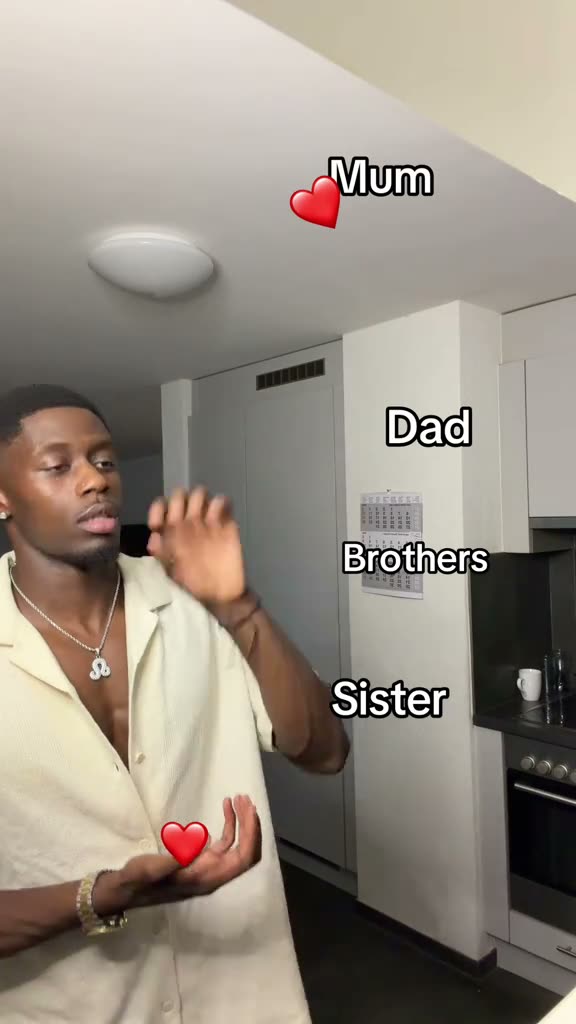
01What happens in the Mom Dad Sister Brother Heart trend
The Mom Dad Sister Brother Heart trend is a short family dedication made with hand gestures and small red hearts. One person faces the camera, sends a heart toward each family label, and finishes with a larger heart gesture.
The AI video follows that same order. Your adult photo takes the lead role while the room, camera framing, labels, and heart sequence stay with the reference.
| Time | Beat |
|---|---|
| Shot 1 | One person faces the camera with family labels beside them. |
| Shot 2 | Small red hearts appear near the labels as the creator moves one hand. |
| Shot 3 | The creator continues the same hand gesture in the vertical room scene. |
| Shot 4 | A larger heart gesture finishes the sequence. |
02How to make the Mom Dad Sister Brother Heart AI video from one photo
There is no prompt field in this flow. The reference clip guides the room, labels, hand movement, and timing, while your photo supplies the lead. The generated result can vary from one run to another, so check the labels and gestures before you share it.
- Open the trend pageGo to the Mom Dad Sister Brother Heart page on AI Trend Club. The original clip and its source credit are there to review before you begin.
- Start your videoPress Create your own. The site opens the video maker in your browser, so there is no app to install.
- Add one adult photoAdd one adult photo for the single lead role. Confirm that you have permission to use the photo before continuing.
- Choose a resolutionThe standard 480p video costs 461 credits. The 720p HD video costs 692 credits. Check the button before you spend, because it shows the exact amount for the option you selected.
- Make and downloadTap Make my video. It is usually ready in a few minutes. Download the result when it appears in My videos; this remake is silent, so you can add the trend sound when you post.
03The photo that works
Use one adult photo for the person who faces the camera in the reference. The setup has one lead role, so add one image rather than a second role photo.
- Use a photo of an adult for the lead.
- Add only one photo for this one-person setup.
- Use a photo you have permission to use.
- Keep the family labels unchanged if you want to follow the same reference.
- If a label is unclear in the result, try another render.
- If the hearts appear out of order, keep the small hearts first and the larger heart last.
04The Mom Dad Sister Brother Heart AI prompt
AI Trend Club does not ask you to write a prompt. If you want to test another video model that accepts a reference image, you can start with this description.
Create a vertical 9:16, 10-second family-heart clip in one unchanged indoor room. Place the person in the reference photo in the same centered position, facing the camera, with the same family labels beside them. Keep the label order and spelling. Show the person lifting one hand and flicking small red hearts toward the labels in sequence. Hold the framing steady while each heart appears. Finish with the larger heart gesture and the same final expression. Preserve the original timing and simple background. Keep the clip silent, with no music, dialogue, extra text, extra people, or watermark.05CapCut template or AI video?
A CapCut template arranges footage that you record yourself. It does not place your face into the original room and shots. An AI video uses the reference clip to guide the scene, then puts your photo into the lead role so the family labels and heart gestures follow the same sequence.
The AI Trend Club download for this page is silent. After you download it, you can add subtitles or the trend sound in CapCut. You can also add the sound in TikTok when you post. The original clip stays linked on the trend page, with credit to its creator.
- Choose a CapCut template if you want to edit your own recorded clips.
- Choose the AI video flow if you want your photo to take the lead in the reference scene.
- Add the trend sound after downloading the silent result.
06Is the Mom Dad Sister Brother Heart AI video free?
You can watch the original clip and read the trend page for free. A new account receives 25 welcome credits. That is enough for a few images, but not enough for this video. The standard 480p version uses 461 credits, and the 720p HD version uses 692 credits. Failed videos return their credits automatically.
The Week pass is the lowest-cost entry listed for this tutorial, and its 800 credits cover either resolution once. The 1,000-credit pack also covers either resolution. You can compare both options before purchasing, and the maker shows the video cost on its button before you submit. The 25 welcome credits do not cover either video resolution.
| Option | Price | Credits |
|---|---|---|
| Week pass | $6.99 | 800 |
| 1,000 credits | $9.90 | 1,000 |
07Post it
The download is silent. Add the trend sound in TikTok or CapCut, then credit the original creator in your caption as @_davidoux_. The idea is a quick dedication to family, with small hearts leading to one larger heart.
- Small hearts for my family, one big heart for everyone.
- For the people who always have my heart.
- A little heart for each of my favorite people.
08Questions
- What is the Mom Dad Sister Brother Heart AI video?
- It recreates a short family-heart sequence from one adult photo. The person gestures toward family labels before finishing with a larger heart.
- Is there a Mom Dad Sister Brother Heart AI template?
- AI Trend Club has a one-photo video flow for this trend. It follows the original scene and gestures, and there is no prompt to write.
- Which AI makes the Mom Dad Sister Brother Heart video?
- It uses an AI video model guided by the original clip. The page does not name a specific model.
- Can I make it on my phone?
- The video maker runs in a browser and does not require an app. Open the trend page in your browser to start.
- Who made the original?
- The selected original is by @_davidoux_ on TikTok. The trend page links to that post and credits the creator.