01What happens in the Pet Seal Filter trend
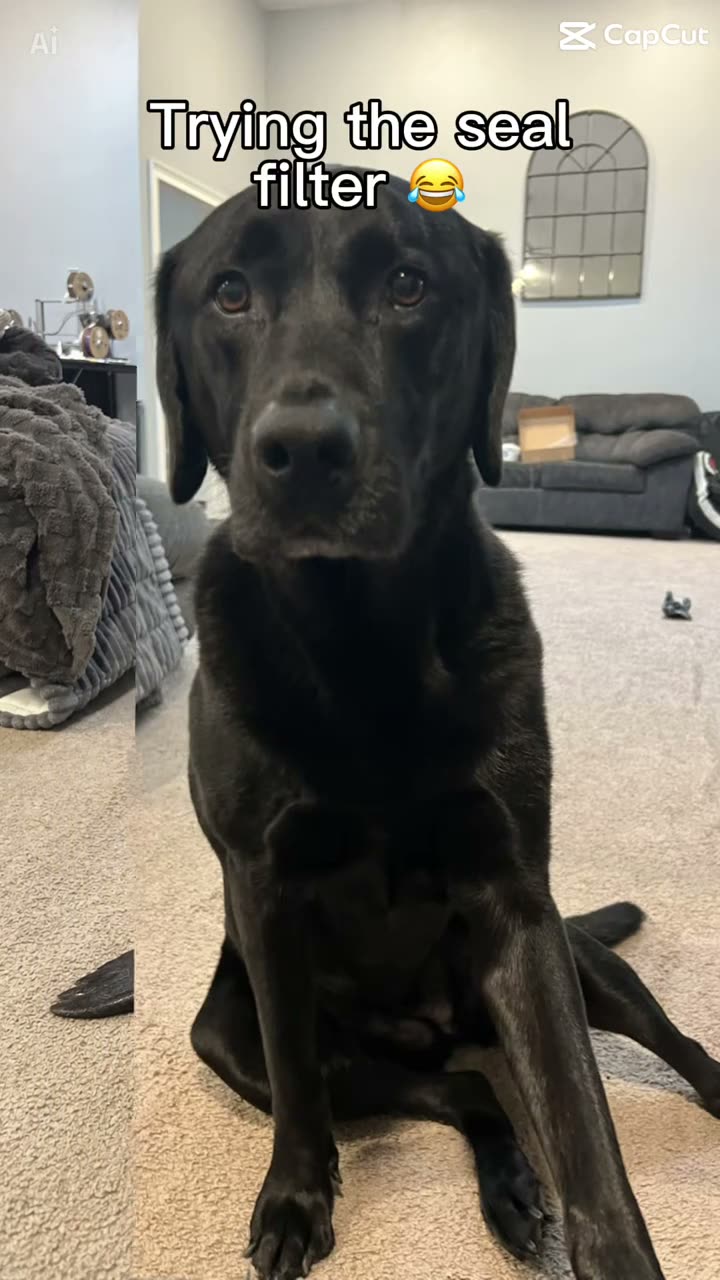
Pet Seal Filter turns a familiar pet face into a playful seal-shaped scene. The linked example by @sablespins shows a black dog sitting in a living room while its lower body changes shape. The site workflow uses one photo of your own dog or cat and makes a silent video that follows the same seated pose and room.
The shape change is the whole joke. The pet remains recognizable above the seal-like lower half, then holds the finished look for a moment. The steady camera makes the change easy to see. The linked post is one example of the effect, and this guide credits that creator rather than claiming the site made the original.
| Shot | Beat |
|---|---|
| Shot 1 | A black dog sits facing the camera in a living room. |
| Shot 2 | The dog's lower body changes into a seal-like shape. |
| Shot 3 | The seated pet holds the finished look in the same room. |
02How to make the Pet Seal Filter AI video from one photo
Open the Pet Seal Filter trend page and press Create your own. AI Trend Club runs in a browser, so you do not need a separate app or a prompt. Add one pet photo, confirm that you have permission to use it, and review the credit amount beside the quality choice before you submit.
The clip follows the original's vertical framing and lasts 9 seconds. The export is silent. If you want the trending sound, add it after downloading in TikTok or CapCut. The page and the linked source can be viewed without generating a video. A render can take a few minutes, and queue times can vary.
- Open the trend pageReview the linked original and the three scene beats.
- Start your versionPress Create your own to open the browser flow.
- Add one pet photoUse a clear photo of your own dog or cat and confirm you have permission to use it.
- Choose the quality480p uses 415 credits; 720p uses 623 credits. The button shows the amount before you spend.
- Make and downloadTap Make my video. The result is silent, so add a sound in TikTok or CapCut if you want audio.
03Choose a photo that shows your pet
The page accepts one clear photo of your own dog or cat. The photo supplies the pet that appears in the seated living-room scene. Keep the pet's face and front legs visible so the reference remains easy to recognize, and include the body in frame so the seal-shaped change has room to read.
If the seal shape is hard to see, the page's troubleshooting note says to choose a clear pet photo and keep the body in frame. If the pet looks different, use a photo where its face and front legs are visible. Upload a photo you have permission to use. The result can vary, so inspect the face and body before saving or sharing it.
- Use one clear photo of your own dog or cat.
- Keep the pet’s face and front legs visible.
- Keep the body in frame so the seal shape is visible.
- Check that the pet remains recognizable in the result.
- Confirm you have permission to use the photo.
04A Pet Seal Filter AI prompt to try elsewhere
AI Trend Club carries the recipe in the trend page, so you do not need to write a prompt there. If you want to describe a similar scene in another video model that accepts a reference clip and a pet photo, this prompt is a starting point. The result depends on the model and controls you use.
Create a short vertical video guided by the reference clip. Show the pet in the reference photo sitting in the same living room, facing the camera. Keep the pet's recognizable head and front legs while its lower body gradually takes on a smooth seal-like shape, then hold the finished look. Keep the camera fixed and preserve the room. Keep the animal natural, with no injury or extra pets. Remove source captions and logos. Return a silent video with no text, music, dialogue, or watermark.05CapCut template or AI video?
A CapCut template arranges clips or photos that you record or select. It does not place your pet into the original living-room scene. The AI video workflow on this page uses the linked clip as a guide and the pet photo as the subject, while the seated pose, room and seal-like change guide the result.
The page does not ask you to write a prompt. It also does not add the original soundtrack to the exported video. If you want sound or captions, you can make those edits after downloading in CapCut or choose a sound in TikTok. Keep the creator credit with the post so viewers can trace the reference back to @sablespins.
06Is the Pet Seal Filter video free?
Watching the linked clip and reading this page are free. Making the video uses credits. A new account receives 25 welcome credits, enough for a few image edits but not enough for this video. The Pet Seal Filter uses 415 credits at 480p or 623 at 720p. The exact amount appears before you submit. If a video render fails, its credits come back automatically.
The lowest current purchase that covers the standard version is the Week pass. It gives 800 credits for $6.99. A 1,000-credit pack costs $9.90. You can look at the price and credit total before you decide whether to continue; the page does not charge you just for viewing the tutorial.
| Option | Price | Credits |
|---|---|---|
| Week pass | $6.99 | 800 |
| 1,000 credits | $9.90 | 1,000 |
07Post the clip with clear credit
The downloaded version is silent. Add a trending sound in TikTok or CapCut if you want audio, then credit the linked original by @sablespins. That makes it clear which post you used as the scene reference and helps people find the creator’s example.
The joke is the contrast between a familiar pet face and the seal-shaped lower body. Keep your caption short and describe that change without implying the original clip is yours.
- Same pet face, seal-shaped finish.
- My pet joins the seal filter.
- A familiar look with a playful change.
08Questions
- What is the Pet Seal Filter trend?
- It is a pet effect where a seated dog’s lower body becomes seal-like while its head still looks like the dog.
- Can I use a cat photo?
- Yes. The page accepts one clear photo of your own dog or cat.
- How much does the video cost?
- It uses 415 credits at 480p or 623 at 720p. The page shows the exact amount before you submit.
- Does the video include the original sound?
- No. The export is silent. Add a trending sound in TikTok or CapCut after downloading if you want audio.
- Who posted the original?
- @sablespins posted the linked TikTok on Oct 18, 2026. The trend page links to that post.