01What happens in the Bob Haircut Prank trend
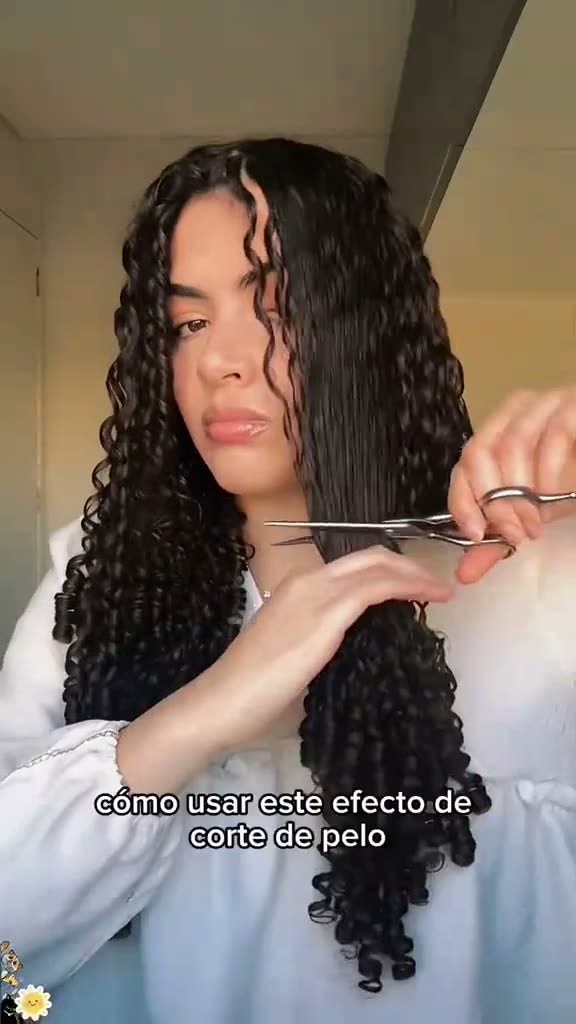
The Bob Haircut Prank is a short haircut reveal built around two visible snips. A curly-haired adult holds scissors beside long hair, one side shortens, and the second cut reveals a bob. People may describe the idea as a bob haircut filter prank, but this page makes a video that follows the original scene. It does not ask you to write a prompt on the site.
The same lead stays in the frame while the hairstyle changes. The room, scissors, curl texture, and two-part reveal guide the edit. The table follows the source clip in order, so you can compare the sequence with the video on the trend page.
| Time | Beat |
|---|---|
| Shot 1 | The adult holds scissors beside one side of long, curly hair. |
| Shot 2 | The first side becomes shorter while the other side remains long. |
| Shot 3 | The scissors move across, and the hairstyle appears as a bob. |
02How to make the Bob Haircut Prank AI video from one photo
The AI Trend Club page uses one portrait to place your photo in the lead's role. You can review the trend clip and the instructions on the page before starting. The scissors and the haircut sequence stay central to the edit, while your photo takes the lead's place.
- Open the trend pageGo to the Bob Haircut Prank page and watch the short source clip so you know how the two cuts and reveal are arranged.
- Choose one portraitAdd one clear portrait with long hair. Confirm that you have permission to use the photo before you continue.
- Use the built-in flowPress Create your own. There is no prompt to write on AI Trend Club. Check the selected photo and keep the two-cut reveal in mind when reviewing the result.
- Check the credit priceChoose 480p for 231 credits or 720p for 346 credits. The page shows the exact amount on the button before you spend anything.
- Make and downloadTap Make my video. It is ready in a few minutes. You can download the vertical clip with the trend sound or silent.
03The photo that works
The source scene depends on a clear view of long hair and the sides of the face. Use a portrait that lets the haircut reveal read clearly, and make sure you are allowed to use the person’s image. The video flow uses a person as the lead.
- One clear portrait with long hair
- A visible face and the sides of the hairstyle
- Even lighting so the face is easy to see
- Permission to use the photo
- The original two-cut sequence as the reference for review
04The Bob Haircut Prank AI prompt
On AI Trend Club, you do not need to write a prompt. If you want to try the same idea in another video model that accepts a reference clip and photo, you can start with the wording below. It describes the visible action and leaves the result open to the model.
Use the person in the reference photo as the lead in a short haircut reveal. Begin with the person holding scissors beside one side of long, curly hair. Keep the room, front-facing view, blouse, scissors, and hand movements from the reference clip. Show the first side becoming shorter while the other side stays long. Move the scissors across, then reveal a chin-length bob. Keep the two cuts in their original order and make the change playful. Add no words, logo, or watermark.05CapCut template or AI video?
A CapCut template can arrange footage you record yourself. It cannot place your face inside the haircut scene from the original clip. An AI video uses your photo as the lead in the source scene, following the scissors, room, and two-cut reveal. Choose based on whether you want to assemble your own footage or make a version that follows the reference.
The trend page provides the AI video flow and includes the original sound. After downloading, you can use CapCut to add captions or the trend sound if you want to adjust the post. The original clip remains credited on the trend page, and your output is a separate edit using the photo you provide.
06Is the Bob Haircut Prank AI video free?
Watching the source clip and opening the trend page are free. A new account receives 25 welcome credits, enough for a few images but not enough for this trend video. The video costs 231 credits at 480p or 346 credits at 720p. The site shows the selected price before you submit, and credits for a failed video come back automatically.
The Week pass costs $6.99 and includes 800 credits, which covers one standard video at either listed quality. The 1,000 credits pack costs $9.90. Compare the displayed credit total with your balance before making a choice. You do not need to buy a plan just to inspect the tutorial or the original clip.
| Option | Price | Credits |
|---|---|---|
| Week pass | $6.99 | 800 credits |
| 1,000 credits | $9.90 | 1,000 credits |
07Post it
The original sound is included in the downloaded clip. If you refer to the source, credit @fflora77 and link to the original post. Keep your caption focused on the quick change from long curls to a bob, and make clear that your post is an edited version.
- Two snips, one bob reveal.
- The same face, a shorter style.
- A quick before-and-after haircut moment.
08Questions
- What is the Bob Haircut Prank AI video?
- It is a short haircut reveal where scissors appear to cut one side of long hair, then the other, into a bob.
- How many photos do I need?
- Use one clear portrait with long hair and a visible face. Confirm that you have permission to use it.
- Which AI makes the Bob Haircut Prank video?
- It uses an AI video model guided by the original clip.
- Does the video include the trend sound?
- Yes. The trend page includes the original sound, and the download can include it or be silent.
- Who made the original?
- The linked clip was posted by @fflora77. The trend page links to that post.