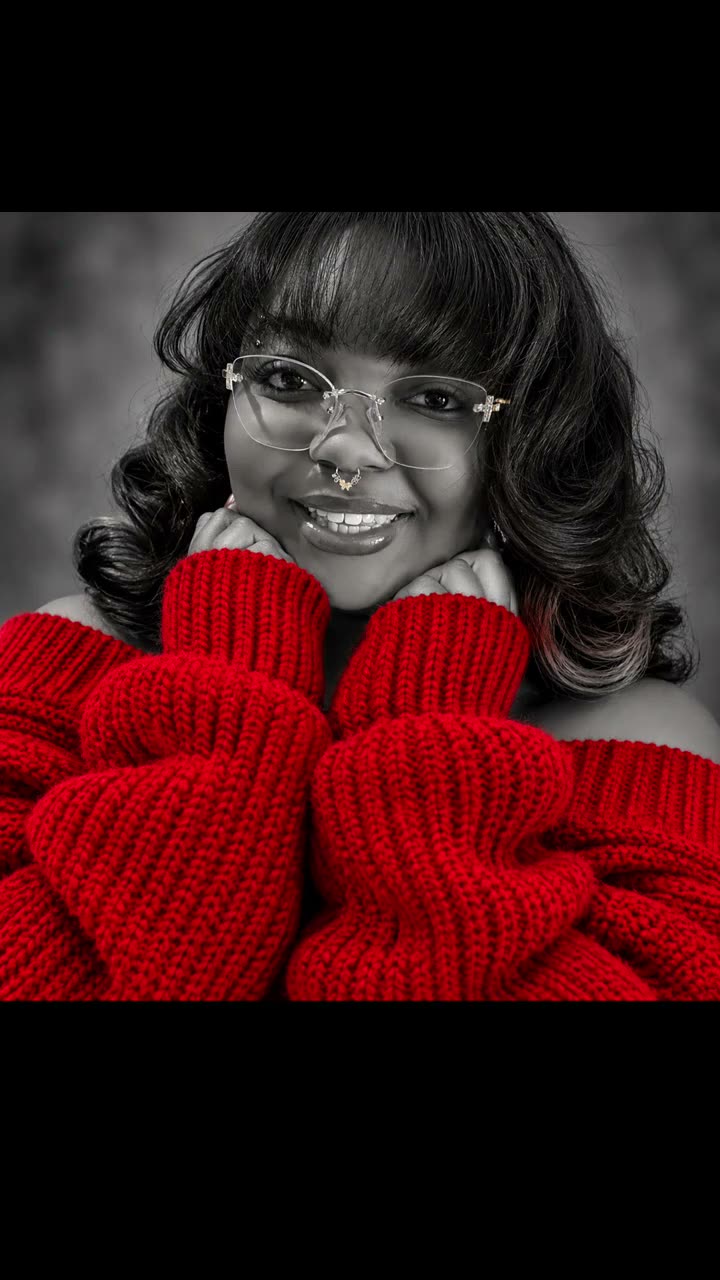
01What the ChatGPT Sweater Portrait trend shows
The ChatGPT Sweater Portrait is a still studio photo in black and white, with one exception: an oversized chunky-knit sweater that stays in color. The sleeves are pulled up over the hands and held in front of the mouth and chin, so only the nose and the eyes show above the knit. The whole picture is about the eyes, and the sweater color is the one loud thing in it.
The look spread in November 2026 as a copy-and-paste ChatGPT prompt, shared in captions and comments. The clip on our trend page is an excerpt from a green-screen tutorial by @fashionablenerd, posted Nov 12, 2026, which had 392,300 views and 11,300 likes when we checked. In the part we show, one red result goes from a smile to the classic sleeves-over-the-mouth pose.
| Time | Beat |
|---|---|
| Shot 1 | A black-and-white studio portrait where only the chunky red sweater keeps its color. |
| Shot 2 | She smiles with the knit cuffs resting at her chin. |
| Shot 3 | The sleeves come up over her mouth, so only the eyes and nose show above the knit. |
| Shot 4 | The tutorial holds on that pose, the look everyone copies. |
02How to make the ChatGPT Sweater Portrait from one selfie
On AI Trend Club this is a photo edit, not a video. The prompt is already written and filled in for you, so the only choice you have to make is the color. You do not need a ChatGPT account: the page uses its own prompt and image editor. AI Trend Club is not affiliated with OpenAI or ChatGPT.
- Open the trend pageGo to the ChatGPT Sweater Portrait page on AI Trend Club and look at the original so you know the pose and crop the edit aims for.
- Press Edit your photoThe image editor opens with the sweater portrait prompt already in the box.
- Add one chest-up photoUpload one clear photo of one adult, face to the camera and eyes open. Use your own photo or one you have permission to edit.
- Pick your sweater colorThe prompt says deep red. Replace those two words with the color you want, for example deep purple, hot pink or mustard yellow.
- Create one still imageOne portrait costs 5 credits, and the price shows before you submit. Look at the result, then save it or try another color.
03The photo that works
In the finished portrait your mouth is hidden, so the eyes carry the likeness. Give the editor a photo where it can clearly see your whole face first.
- One adult, chest up, looking into the camera.
- Eyes open, sharp and in daylight.
- Your hair styled the way you want it in the portrait: the prompt keeps your hairstyle and length.
- No sunglasses and no hand over your face.
- One person only, not a group photo.
- Heavy beauty filters carry into the result, so a plain photo looks more natural.
04The ChatGPT sweater prompt, rewritten for any editor
You do not need to copy anything to use the trend page: this prompt is filled in for you, and you can edit it in the box before you create. If you want to try the same look in another image editor that accepts a reference photo, this is the prompt we use. It is written from scratch for our editor, not copied from the viral ChatGPT captions, and it keeps the parts that matter: one color only, sleeves over the mouth, your own face and hair.
Use the uploaded photo as the identity reference for one adult. Create one ultra-realistic black-and-white studio beauty portrait of the same person, framed from the chest up in a vertical 4:5 crop. The person wears an oversized chunky cable-knit sweater in deep red, and that sweater is the only color in the whole image; skin, hair, eyes and background stay black and white. Both long sleeves are pulled up over the hands, and the hands hold the cuffs in front of the mouth and chin so only the nose and smiling eyes show above the knit. Keep the face, eye shape, eyebrows, hairstyle, hair length and age exactly as in the photo, with natural skin texture and no beauty filter. Soft, even studio light, plain mid-gray backdrop, sharp focus on the eyes. One person only. No text, logo, frame or watermark.05Which sweater color should you pick?
The posts in this trend use red, purple, hot pink and yellow most often. Many people pick a color that suits them or matches their eyes. Because everything else in the picture is gray, the color you choose decides the mood: a deep red or burgundy feels warm and seasonal, purple and pink feel soft, and yellow feels bright and playful.
To change it, edit only the words deep red in the prompt. Keep the sentence that says the sweater is the only color in the image; that line is what keeps your skin, eyes and background in black and white. If a run comes back with color in the wrong place, try once more before changing anything else. Each new run costs 5 credits, and no two runs come out exactly the same.
This page makes one still picture. It does not animate your portrait. If you want it to move later, you can use the photo in one of our video trends.
06Is the ChatGPT Sweater Portrait free?
Looking at the trend page and the prompt is free. Creating the portrait costs 5 credits per image. A new account starts with 25 welcome credits, which covers a few tries at the current price, so you can test two or three colors before you pay for anything.
Credits are shared across the site. If you want more after the welcome credits, the cheapest options are the Week pass and the 1,000 credits pack.
| Option | Price | Credits |
|---|---|---|
| Week pass | $6.99 | 800 |
| 1,000 credits | $9.90 | 1,000 |
07Post it
The portrait works as a new profile picture or a seasonal post. If you post it as part of the trend, say it is an AI edit and credit @fashionablenerd, whose tutorial helped the look travel.
Caption ideas: Picked the color that matches my eyes. Sweater weather, but make it a studio shoot. Black and white, except for the part that matters.
08Questions
- What is the ChatGPT sweater trend?
- A still portrait in black and white where only an oversized chunky-knit sweater is in color, with the sleeves pulled up over the mouth so the eyes and nose show above the knit. It started as a ChatGPT prompt shared on TikTok.
- Do I need ChatGPT to make it?
- No. This page uses its own prompt and image editor, so no ChatGPT account is needed. AI Trend Club is not affiliated with OpenAI or ChatGPT.
- Is there a free AI sweater generator?
- New accounts get 25 welcome credits, and one Sweater Portrait costs 5 credits, so you can try it a few times without paying. After that it uses credits like every image on the site.
- Can I change the sweater color?
- Yes. The prompt says deep red. Replace those two words with any color before you create the image.
- Will it keep my face?
- The prompt asks the editor to keep your face, eyes, hair and age, but generated details can vary. Use a sharp chest-up photo and look at the result before you share it.
- Who made the original?
- The clip on our page is an excerpt of a TikTok tutorial by @fashionablenerd from Nov 12, 2026. Earlier posts of the same look came from @shakeishahunter7 and @dar.starr28.