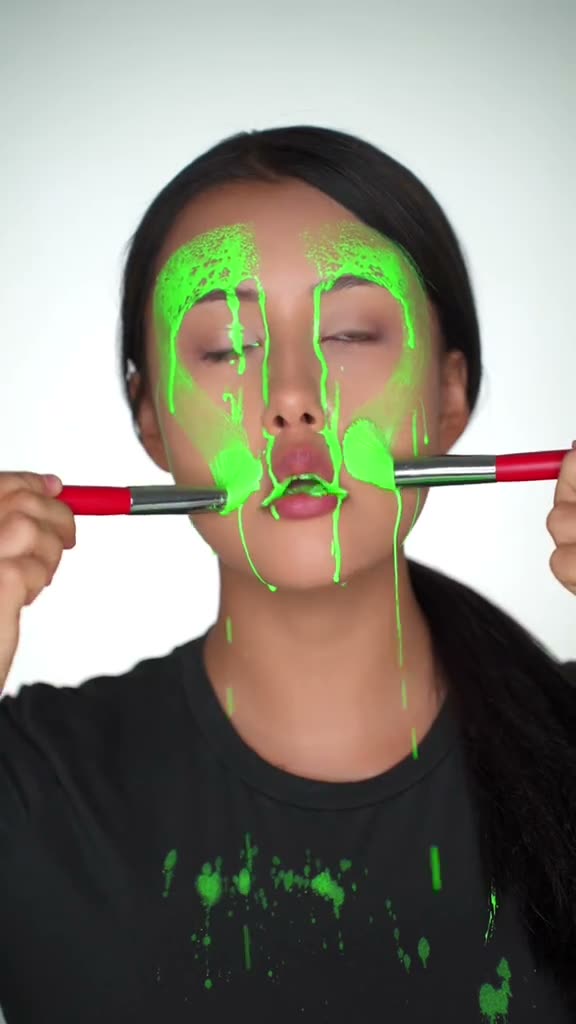
01What happens in the Glitch Makeup trend
The Glitch Makeup trend begins with an adult creator painting bright green lines across the face. A hard cut reveals a silver-haired look with neon circuit-style makeup. The linked example is a short vertical clip, and the AI remake uses one adult photo for the lead while keeping the close framing and change of look.
| Time | Beat |
|---|---|
| Shot 1 | The creator holds makeup brushes and paints green lines across the face. |
| Shot 2 | More green marks appear in the close face framing. |
| Shot 3 | A hard cut shifts to a silver-haired look. |
| Shot 4 | Neon circuit-style makeup completes the portrait. |
02How to make the Glitch Makeup AI video from one photo
To make a Glitch Makeup video, open its trend page and use the built-in recreation flow. AI Trend Club has no prompt field for this template. Add your own photo, choose a resolution, and check the credits shown on the button before you spend them.
- Open the trend pageGo to the Glitch Makeup page and review the linked example.
- Press Create your ownOpen the existing video flow for this makeup transition.
- Add your photoUse one clear, front-facing adult photo and confirm you have permission to use it.
- Choose resolution and creditsPick 480p for 692 credits or 720p for 990 credits. The button shows the cost before you spend.
- Make your videoPress Make my video. The site says it is ready in a few minutes, and you can download the silent vertical clip.
03The photo that works
This remake uses one adult face photo for the creator role. The key detail is a face that stays recognizable through the green paint gesture and the silver-haired makeup change. Use the checks listed with the trend rather than expecting every makeup detail to stay identical.
- Choose a clear adult portrait facing the camera.
- Keep the face and eyes visible.
- If the face is hard to recognize, try a clearer adult portrait.
- The paint gesture may vary in the generated motion.
- Small makeup details may change while the overall transition stays.
- If the render fails, the credits come back automatically; try a clearer photo.
04The Glitch Makeup AI prompt
There is no prompt to write on AI Trend Club. If you are using a separate video model that supports a reference image, the description below gives it the order of the face-paint and makeup-change shots. It names the lead by the reference photo rather than by a real person.
Show the person in the reference photo in a close, face-centered makeup scene. Begin as the person holds a makeup brush and paints bright green lines across the face. Keep the camera close while more green marks appear. Use a sharp cut to reveal a silver-haired version of the same person with neon circuit-style makeup. Hold on the final portrait long enough to read the change. Keep one adult lead, preserve the same face through both looks, and use the paint gesture followed by the sudden visual transition.05CapCut template or AI video?
A CapCut template arranges video clips you record, such as a makeup routine with a cut between two looks. It does not place your face into the linked example’s scene. The AI video flow takes one adult portrait and uses the original clip as a guide for the face-paint action, close framing, hard cut, and silver-haired finish.
The download is silent, so add the trending sound yourself in TikTok or CapCut if you want audio. CapCut can also add captions or other edits once the generated clip is ready. This result represents an AI makeup look, not makeup applied in real life. Review the face and small makeup details before sharing, since those details can vary.
06Is the Glitch Makeup AI video free?
Watching the example and opening the trend page are free. A new account gets 25 welcome credits, which cover a few images but not a trend video. This template uses 692 credits at 480p or 990 credits at 720p. A failed video returns its credits automatically.
The lowest listed purchase is the $6.99 Week pass with 800 credits. It covers the 480p version, while the 720p choice needs nearly the full 1,000 credits pack. That pack costs $9.90 and includes 1,000 credits. The resolution button shows the exact cost before you begin, so check it before confirming.
| Option | Price | Credits |
|---|---|---|
| Week pass | $6.99 | 800 |
| 1,000 credits | $9.90 | 1,000 |
07Post it
The video is silent after download. Add the trend sound in TikTok or CapCut, then credit the linked example creator as @noeminikita in your caption. The format works as a bold digital makeup change, with the bright paint and hard cut making the new portrait easy to spot.
- Green paint, then a new digital look.
- A sharp cut into circuit-style makeup.
- Trying a glitch makeup trend with one photo.
08Questions
- Is there a Glitch Makeup AI template?
- The trend page offers a one-photo AI video flow for the green paint and silver-haired makeup transition. It is a recreation guided by the linked scene, not a CapCut template.
- Which AI makes the Glitch Makeup video?
- It uses an AI video model guided by the original clip. AI Trend Club supplies the scene setup, and there is no prompt to write there.
- Can I make this makeup glitch tutorial on my phone?
- Yes. The site runs in the browser and does not require an app install. Open the trend page on your phone and press Create your own.
- Who posted the linked example?
- The linked example is credited to @noeminikita. The page lists the post date as Sep 11, 2026.
- Does the generated clip include music?
- No. The download is silent. Add the trend sound in TikTok or CapCut after the video is ready.