01See how the three portrait layers fit
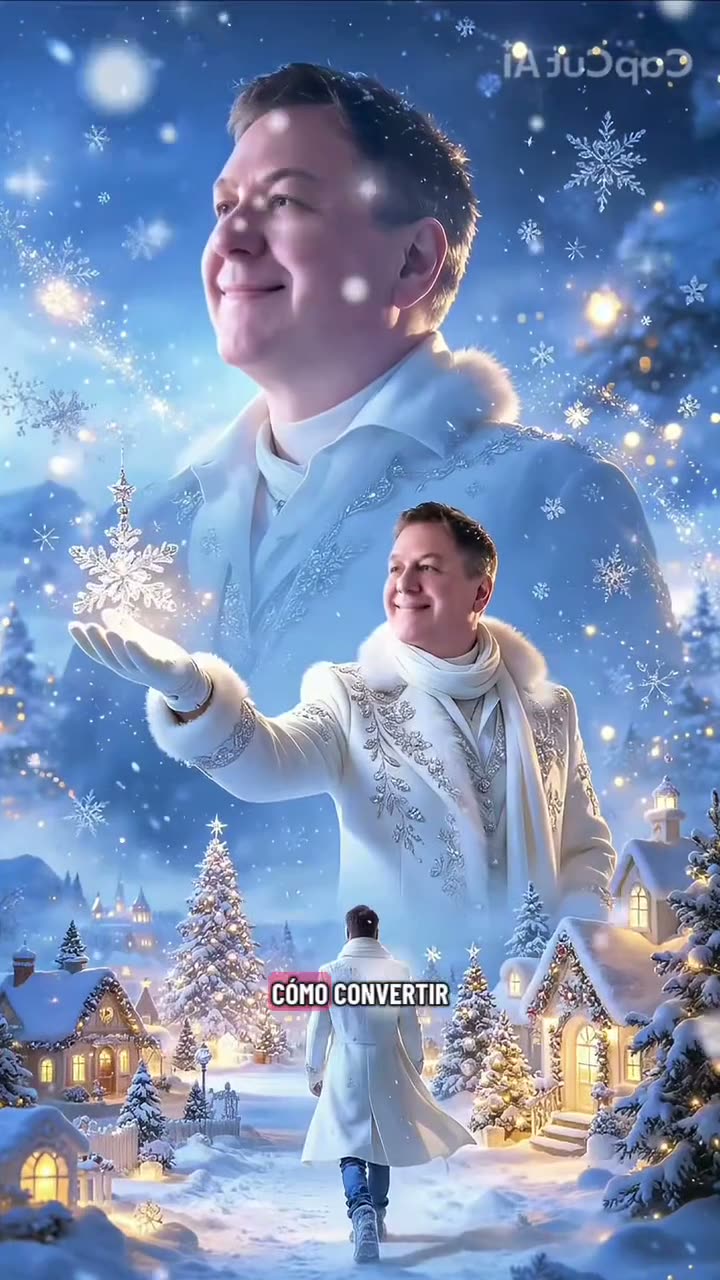
The Christmas Ice Queen composition uses a blue winter village as a backdrop. A large profile fills the upper part of the frame. A closer figure holds a bright snowflake, and a small figure walks away along a path. The same person connects the layers.
Watch the start of @isolde3292’s reference on the trend page. Look at what connects the three poses. The snow and the houses sit inside one continuous scene, while changes in scale guide your gaze from the face down to the path. The still-photo edit uses that arrangement as its starting point.
| Layer | Where it sits |
|---|---|
| Large profile | In the cool blue sky above the village. |
| Snowflake pose | In the middle, holding the lit snowflake. |
| Full-body figure | Farther down the snowy path among the houses. |
02Make the winter portrait from one photo
- Open the photo trend pagePlay the opening reference and note where the village path ends. Press Edit your photo to open the image editor with the scene prompt from this page.
- Add a clear portraitPick a well-lit photo with one face and the hairline visible. Choose the person you want in the large profile and the medium pose. Confirm that you have permission to use the photo.
- Read the scene instructionsThe prompt asks for a single village and the same identity at three different scales. Leave the description of the top, middle and bottom layers together when you adjust the prompt.
- Check the credit quoteThe image edit uses 5 credits at the current quote. Review the amount shown before submitting. This workflow produces one still image for you to inspect and download.
- Look at the result before savingCheck the upper face and the middle face side by side. They should look like the same person. Follow the line of the path to check that the small figure feels part of the scene.
03Choose a portrait with usable detail
Good input makes the identity easier to carry across the picture. The closest layer shows features in profile, while the snowflake pose gives you a more direct view. Start with enough detail for both to feel connected.
- Use an evenly lit adult portrait where both eyes and the face outline are clear.
- Keep the hair and hairline in view if they help identify the person.
- Pick a photo without heavy color filters across the face.
- Use a single person so the editor has one identity to follow.
- Choose a photo you have permission to edit and share.
04Prompt for the layered winter scene
The prompt is included in the image editor and available to review. The most useful part to preserve is the order of the three layers. Describe one person and one village, then give each view its position.
Create one vertical still image from the uploaded adult portrait. Show the same recognizable person in three layers of a connected snowy village at blue hour. Put a large side profile in the sky, a medium figure in a pale winter coat holding a glowing snowflake in the middle, and a small full-body figure on the snowy path below. Match facial features, skin tone and hair across the layers. Use softly lit houses, snowy trees and ordinary winter clothing. Leave the scene free of text and panel borders.05Keep the three views in the same picture
Look at the finished image first as a small preview, then at full size. In the small view, the large profile should carry the upper part of the picture. At full size, check facial features and hair across the layers, then inspect where the middle pose meets the village.
If the sides look like separate panels, describe one uninterrupted snowy village and name the position of each pose again. If the faces look like different people, start with a clearer portrait and keep the same-person instruction in the prompt. Check the result again before sharing.
06Check credits for the still image
You can open the reference and read the instructions free. The creation screen shows the price for one image edit. The current price is 5 credits and a new account gets 25 welcome credits. Check your balance and the quote displayed before starting the edit.
Compare the output with the portrait before deciding what to save. The large profile and the snowflake pose should both feel recognizable. If you change the prompt for another try, check the displayed credit quote again before submitting.
07Use the still as a seasonal portrait
The three layers come through when all of them have room. Keep the distant figure visible if you crop the photo for a card or post. The lower third is where the little traveler gives the portrait depth. Leave enough sky around the profile to keep the upper layer distinct.
If you share a take on the trend, credit @isolde3292 for the opening reference. A short caption can point to the path or the snowflake and let the viewer find the other layers.
- Three views of the same winter evening.
- Meet me down the snowy path.
- Start with the snowflake, then look up.
08Questions
- Do I need three reference photos?
- One well-lit adult portrait is enough. Use an image of the person you want in all three layers.
- Does this create a moving portrait?
- The image editor delivers one still photo. The video on the trend page is the creator reference.
- Who posted the reference?
- The opening composition is from @isolde3292’s TikTok. The source link on the trend page opens the full post.
- How much does one image edit cost?
- The current quote is 5 credits. Check the amount shown in the editor before submitting.