01What happens in the Elevator Outfit Change trend
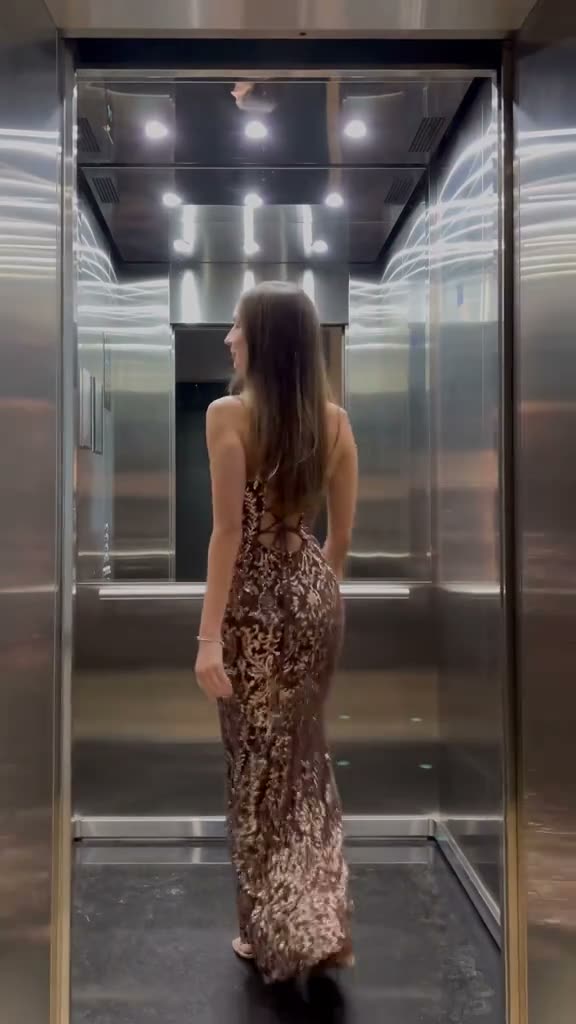
The Elevator Outfit Change trend keeps one person in a reflective metal elevator while four evening outfits appear in quick cuts. The camera holds a full-body view, so the location and standing position stay the same as the clothes change.
The original is a 14-second vertical clip with its sound. The remake uses one adult photo for the lead. This table follows the outfit sequence shown in the source.
| Time | Beat |
|---|---|
| Shot 1 | The creator stands full-body inside a reflective metal elevator. |
| Shot 2 | A hard cut changes the first evening outfit. |
| Shot 3 | The same elevator framing holds as two more looks appear. |
| Shot 4 | The creator finishes the four-look fit check in the same spot. |
02How to make the Elevator Outfit Change AI video from one photo
The trend page links the original clip and the creation flow. Everything runs in your browser, so you do not need to install an app. Use only a photo you have permission to use.
- Open the trend pageWatch the original and check the outfit sequence. The page is available to view without paying.
- Choose Create your ownThis opens the existing video creation flow for this trend. You do not need to write a prompt on AI Trend Club.
- Add one adult photoUse one photo for the person who stands in the elevator. Confirm that you have permission to use that image before continuing.
- Pick the resolutionChoose 480p for 623 credits or 720p for 934 credits. The exact amount is shown on the button before you spend.
- Make and download the videoTap Make my video and wait for the render. When it is ready, download it with the original trend sound or silently. The finished clip is vertical.
03The photo that works
Use a single adult photo for the full-body lead in the elevator. These checks follow the role and fixes listed for this trend.
- Add one adult photo for the lead.
- Use a full-body image, since the source shows the person standing from head to feet.
- Keep this as a one-person role. The creation flow asks for one photo, not a second partner image.
- If the lead does not fit the frame, switch to a full-body photo.
- If a render fails, credits come back automatically; try again with a clearer photo.
04The Elevator Outfit Change AI prompt
AI Trend Club already provides the source clip, so you do not need to write a prompt there. If you want to try the idea in another video model that accepts reference images, start with this prompt.
Start with the person in the reference photo standing full-body inside a reflective metal elevator. Keep the camera vertical and fixed on the doors and full standing position. Show a quick series of hard cuts, with the same person wearing four different evening outfits one after another. Keep the elevator, door frame, body position, and timing consistent across changes. End on the last look in the same place. Keep clothing generic with no readable brand marks. Do not add another person, a new location, captions, or a watermark.05CapCut template or AI video?
A CapCut template can stitch together clips that you record yourself. It cannot place your face inside the original elevator scene or carry the source creator’s four outfit cuts into your own footage.
An AI video uses your adult photo to put you in the source clip’s elevator framing. The fixed door view and outfit-change sequence remain the reference. Download the result, then use CapCut if you want to add captions or the trend sound to a separate edit.
The two options solve different jobs. A CapCut template arranges your own recordings. The AI video workflow starts from the linked original and changes the lead using the photo you add.
06Is the Elevator Outfit Change AI video free?
Watching the original and opening the trend page are free. Making the video spends credits. A new account gets 25 welcome credits, enough for a few images but not enough for this video. A failed video returns its credits automatically.
The lowest cash entry is the $6.99 Week pass. The 1,000-credit pack costs $9.90. This video costs 623 credits at 480p or 934 credits at 720p, so check the amount shown before you start.
| Option | Price | Credits |
|---|---|---|
| Week pass | $6.99 | 800 |
| 1,000 credits | $9.90 | 1,000 |
07Post your Elevator Outfit Change video
The original sound is included with this trend. When you post, keep that sound and credit the original creator, @karolvidaldiaz, in the caption. The idea is a quick fit check where people can compare the four looks.
- Four looks in one elevator. Which one would you keep?
- Same elevator, new evening look.
- Pick your favorite from the outfit changes.
08Questions
- Is there an Elevator Outfit Change AI template?
- Yes. The AI Trend Club trend page has the linked original and a Create your own flow for this outfit-change video.
- Which AI makes the Elevator Outfit Change video?
- It uses an AI video model guided by the original clip. The creation flow starts from the source video and your adult photo.
- Can I make it on my phone?
- Yes. The site runs in your browser, and the task does not require an app installation.
- Who made the original Elevator Outfit Change clip?
- The original was posted on TikTok by @karolvidaldiaz on August 12, 2025. The trend page links to that post.
- Is this video free to make?
- No. Viewing the original and the trend page is free, but a video uses 623 credits at 480p or 934 credits at 720p.