01What happens in the Pet DJ Arena trend
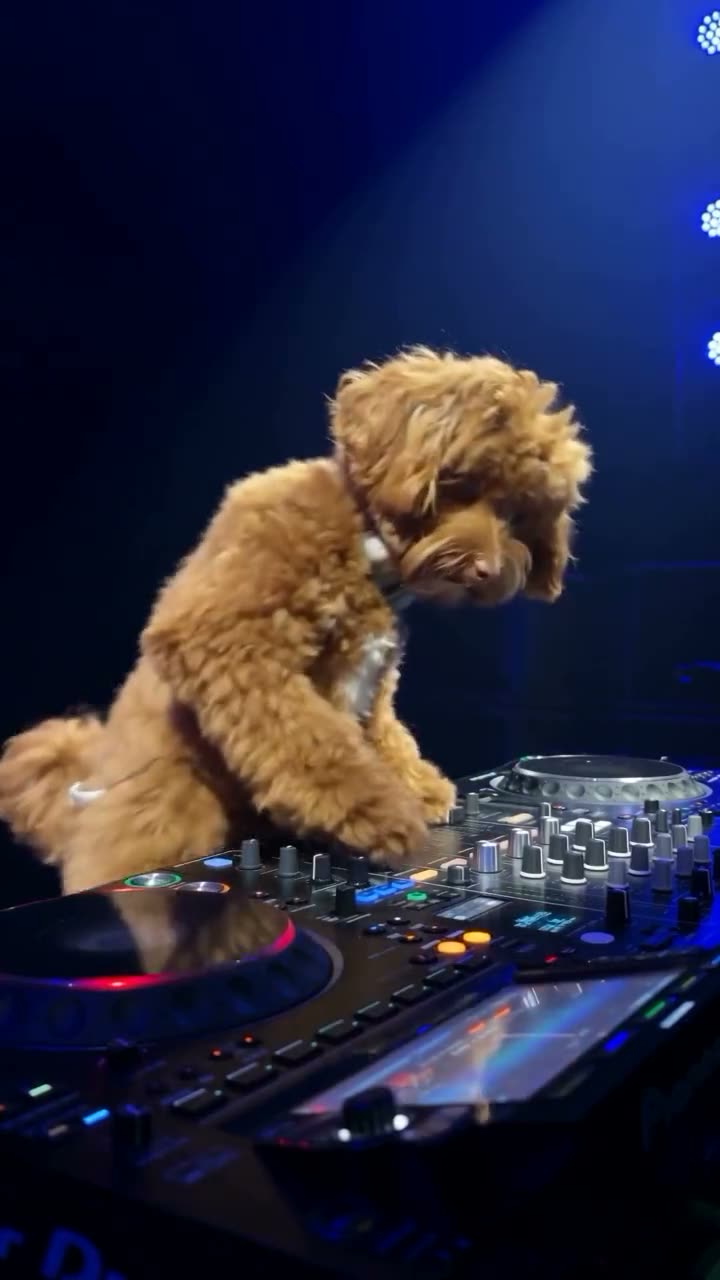
A curly dog leans over a set of turntables with a paw near the mixer. Blue lights pick out the stage while the camera changes angles. A close view keeps the dog and the controls together, then a wider view shows the crowd.
The arena makes the clip work as a miniature concert. The mixer gives the pet something to do in the foreground, and the crowd changes the scale when the shot opens up. You can see both ideas in the reference before you pick your photo.
Pay attention to the close view. The pet’s face is easy to see over the controls, so recognizable eyes and coat markings in your source photo matter as much as the wider silhouette.
| Time | Beat |
|---|---|
| Shot 1 | A paw reaches toward the mixer. |
| Shot 2 | A side angle shows the decks under blue light. |
| Shot 3 | The dog’s face and paws fill the view above the controls. |
| Shot 4 | A wider view shows the pet facing the crowd. |
02How to make the Pet DJ Arena AI video from one photo
The same photo supplies the lead in every shot. You do not need separate pictures of the pet facing the camera and looking to the side.
- Watch the referenceOpen Pet DJ Arena on AI Trend Club. Check how the clip moves between the controls, the lead pet and the audience so you know what the template keeps.
- Start the creatorPress Create your own. The video is set up for one pet behind the decks, with one photo field for the lead.
- Add a cat or dog photoChoose one image that shows the pet’s face and coat clearly. Confirm you have permission to use it and check that another animal is outside the crop.
- Choose the resolution and renderThe 480p option costs 692 credits. The 720p version costs 990 credits. Read the amount shown on the button before you tap Make my video.
- Download your videoPlay the full result and check the pet at both the close and wide angles. Download the silent vertical clip when you are ready to use it.
03The photo that works
Start with a clear image of one cat or dog. Look for even light and a face you can recognize at a glance. A close crop can help if a second animal is in the picture, as long as you keep the chosen pet’s face and coat visible.
Check the source before rendering. If you cannot see the eyes or the fur on a dark patch of the coat, a brighter, sharper photo gives you more to work with. This is especially helpful for the close shot over the mixer.
If the result picks out the wrong animal, try again with a crop containing only your intended lead. If the markings seem faint, return to the photo field with a sharper image in even light.
- Check that the pet’s eyes are in focus.
- Keep the face and coat inside the crop.
- Choose a photo with even light.
- Leave other pets outside the frame.
04The Pet DJ Arena AI prompt
The AI Trend Club template already has the camera angles and stage built in. Upload your pet photo and use the creator as it comes. For another video model that accepts image references and a text prompt, try describing the order of the shots and what stays in them.
Keep the same pet through all the angles. The close view should make the face easy to recognize, while the wider view shows why the audience is part of the joke.
Cast the pet in the reference photo as the only DJ on an arena stage. Start with the pet leaning over the turntables and reaching a paw toward the mixer under a blue spotlight. Cut to a side view, then to a close view with its face and paws visible above the controls. End on a wider view facing the audience. Keep the same pet species and coat markings through the cuts. Preserve the decks, stage and crowd, and render the video silently.05CapCut template or AI video?
Use CapCut if you have already filmed your pet and want to add titles or cut the footage to a beat. The Pet DJ Arena AI template puts the pet from a still photo into the stage scene and follows the changes in camera angle.
You can use both in order. Make the video first, then put the silent clip into CapCut to add a sound or title. Keep any title away from the pet’s face and the paws reaching for the mixer.
06Is the Pet DJ Arena AI video free?
You can watch the original reel excerpt and read the trend page for free. The 25 credits included with a new account cover a few images. The video uses a separate render charge.
The Week pass includes enough credits for a standard render. If you want HD, compare its charge with your remaining balance before starting. The creator shows the amount for the resolution you choose. Credits are returned automatically if rendering fails.
| Option | Price | Credits |
|---|---|---|
| Week pass | $6.99 | 800 |
| 1,000 credits | $9.90 | 1,000 |
07Post it
Credit @beachboymax for the Instagram reference. If you add sound in TikTok or CapCut, time the change in the music to the close shot at the decks or the wider crowd reveal. A short caption can give the pet the role of an arena headliner.
- My cat booked the main stage.
- My dog took over the set.
- Tiny paws, full house.
08Questions
- Can I make the pet DJ clip with a cat photo?
- Yes. The Pet DJ Arena template takes one cat or dog photo. Keep the face and coat markings in view.
- Do I need to film my pet at a mixer?
- One clear photo is enough to start. The reference supplies the mixer, spotlight and crowd.
- Does the download come with music?
- The video downloads silent. Choose a sound later in TikTok or CapCut.
- Who posted the reference clip?
- The dog reel on the page was posted by @beachboymax on Instagram. Follow the link beside the reference to see the post.