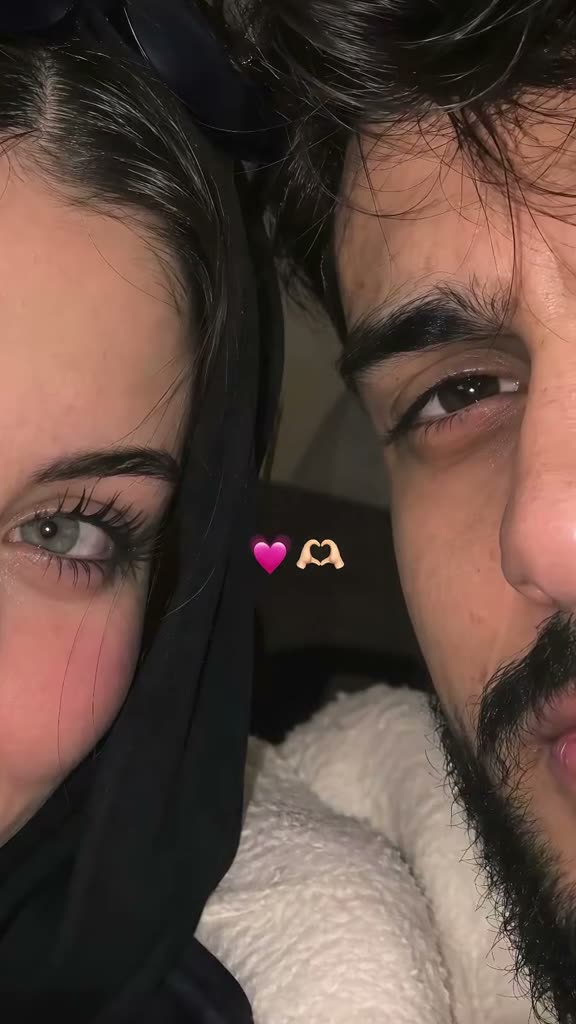
01What makes it a split close-up
The couple split closeup photo brings both faces near the center of a vertical portrait. The outside edges of the faces can fall beyond the crop, but one eye from each person stays fully in view. A thin shadow or a strand of hair gives the two faces a little room to read separately.
The short montage on AI Trend Club comes from the TikTok posted by @aheem94qw2. Watch how the angle and light change between looks. Even when one face sits a bit higher in a portrait, both eyes stay important to the composition. That is the detail to compare when you pick a photo for your own edit.
| Part of the portrait | What to look for |
|---|---|
| Eyes | One eye from each person is visible and sharp. |
| Center | A narrow shadow or hair separates the faces. |
| Outer edge | The frame can crop a cheek without cutting through a visible eye. |
02How to make it from one couple photo
Open the Couple Split Closeup Photo trend and choose Make your couple close-up. The AI Trend Club image editor opens with the close-up prompt ready to edit. The upload is one photo where both adults already appear together.
- Pick a photo of the two of youChoose a clear photo that keeps both faces in focus. If you have a wider photo and a tight selfie from the same moment, start with the one that leaves the editor space around each eye.
- Upload the photoAdd both people in the same file and confirm that you have permission from both adults. The prompt reads the person on the left and the person on the right in the order they appear.
- Choose Portrait and check the promptUse Portrait for the upright composition. Keep the instructions that ask for one clear eye from each person, a close crop and a narrow shadow between the faces. Leave both people's features intact when you edit the prompt.
- Create and inspect the stillCheck the credit quote before submitting. Once the photo is ready, look at both eyes and the line where the faces meet. Save the image when you can still recognize both people at a glance.
03Choose an input where both faces are clear
Look at the eyes in your starting photo before you think about the final crop. If one person's eye is covered by hair or the frame, the edit has less of that person's face to work with. Start wide enough to see the features you want to keep. The close crop comes in the output.
When both people are a similar distance from the camera, their eyes take up a similar amount of space. Compare the light on both faces too. Soft light helps the eyes stay readable, while a narrow shadow can give the finished portrait its separation.
- Use one image with both adults in it.
- Keep the eyes and brows clear in the source.
- Pick a photo with both faces in focus.
- Look for soft light on both faces.
- Skip heavy smoothing filters and tight crops that already cut through an eye.
04Split beauty close-up photo prompt
You can use the prefilled prompt as it is. If you want to adjust it, change the light or the crop while keeping the instructions about two distinct people. The directions for left and right follow the uploaded photo as you see it.
Edit the uploaded photo of two consenting adults into one vertical beauty close-up. Keep the same two distinct people and the left-to-right order in the upload. Put their temples close together and crop tightly through the outside of each face, keeping one eye from each person fully visible and sharp. Keep a narrow natural shadow, with dark hair where appropriate, between the two faces. Preserve each person's eye shape, brows, hair, skin texture and expression. Use soft side lighting and a simple dark background. Keep both faces distinct, with no collage divider, duplicated features, text or stickers.05Check the faces and the crop
Open the result at a size where you can see the brows. Check whether each visible eye still belongs to the person you recognize from the source. Then look at the center. The shadow should sit between the faces and leave the visible eyes clear.
If one eye disappears into the outer edge, start again with a wider photo and leave the instruction about keeping one eye from each person inside the crop. If both people have picked up the same expression or brow, return to a source photo where both faces are clear and keep the instruction to preserve their features separately.
If one face looks soft, compare it with the upload. A clearer source photo is a better starting point when one person was already out of focus. Check both sides again before saving.
06What the photo edit costs
One image edit uses 5 credits. New accounts start with 25 welcome credits. The editor shows the quote before you submit. You can watch the credited portrait montage and read the guide before you open the editor.
The output is one still image. The movement you see on the trend page comes from the original montage. If you want to use your portrait as part of a video, save the still and add it to your own edit.
07Share your portrait
Look at the finished image together before you share it. If you mention where the composition came from, credit @aheem94qw2 and link to the TikTok on the trend page. A short caption can leave the focus on the portrait.
- A close-up of us.
- Both of us in the details.
08Questions
- How many photos do I upload?
- Upload one clear photo that shows both adults together.
- What aspect ratio should I pick?
- Choose Portrait for an upright close-up. Check the final crop around both visible eyes.
- Can I keep each person on the same side?
- Yes. The prefilled instructions preserve the source photo's left-to-right order.
- Does it make the montage too?
- The editor returns a single still. The clip on the trend page shows the credited reference.