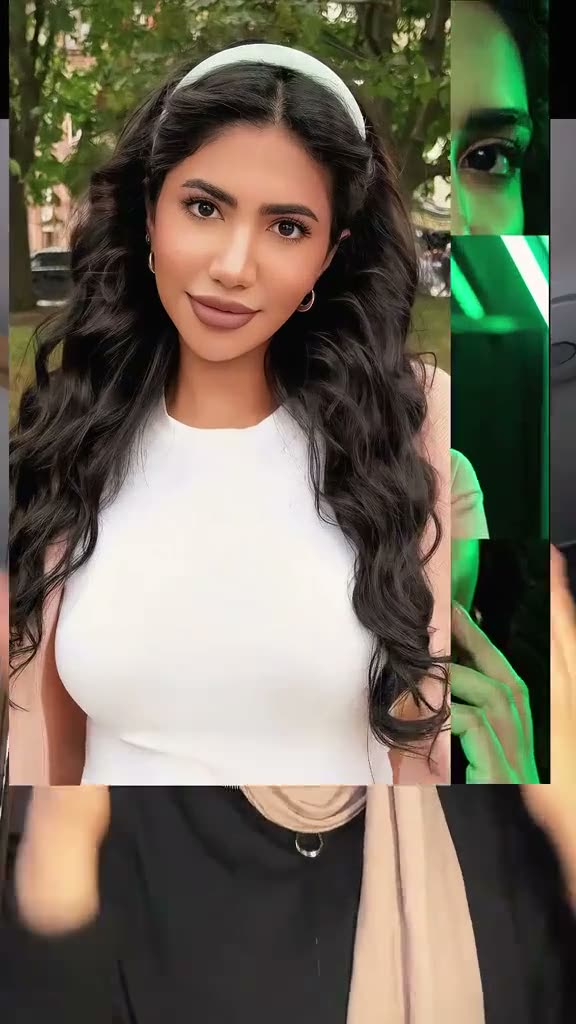
01What happens in the Green Beam Portrait photo trend
Green Beam Portrait turns one close face into a three-panel still image. A narrow green light crosses the eyes, face and lips while the rest of the image sits in a deep green shadow. The linked post by @aheem94qw2 shows the portrait treatment. It is a reference for the look, not a claim about who first made it.
The edit repeats the same person across three close views. The top focuses on the eyes, the middle shows the face, and the bottom brings attention to the lips. The repeated face makes the narrow beam read as a portrait style instead of a change to a larger scene. AI Trend Club returns one edited image, not a moving video.
| Panel | What it shows |
|---|---|
| Eyes | A close view of the eyes under the green beam. |
| Face | The same person in a dark green portrait. |
| Lips | A close view of the lips in the final panel. |
02How to make the Green Beam Portrait AI photo from one portrait
Open the trend page and choose its image editor. The page carries in the green-light prompt, so there is no need to write one before you start. Add one adult close portrait, read the prompt and confirm that you have permission to edit the photo. The editor creates one still image.
The current image edit uses 5 credits. The editor shows the amount before you submit. Review the result after it finishes, especially the face and the green light. The prompt describes a style, so use the finished image only if its details look acceptable to you.
- Open the trend pageReview the linked reference and the description of the three green-lit views.
- Open the image editorChoose the image button on the trend page to carry in its edit prompt.
- Add one portraitUse one clear close portrait of an adult with the eyes and face visible. Confirm that you have permission to edit it.
- Read the prompt and priceCheck the three-panel layout and the narrow green beam. The current image edit price is 5 credits, shown before submission.
- Create and inspectSubmit one image edit, then review the face, skin tone, hair and light before saving or sharing.
03Choose a close portrait with the face visible
The page describes a close adult portrait with the eyes and face visible. Use one photo of the person who should appear in all three panels. A group is not needed for this layout. The same input person should carry through the eyes, face and lips views.
Use a photo you own or have permission to edit. If the face is difficult to recognize in the result, the page’s fix is to choose a closer portrait with the eyes and face visible. Review the image before you share it. The prompt can guide the green beam and dark background, but the still image should be checked on its own.
- One clear close portrait of an adult
- Eyes and face visible in the input
- One person for all three panels
- A photo you have permission to edit
- A final check of the face and light before sharing
04Review the included Green Beam Portrait prompt
The trend page opens the image editor with a prompt already included. You can read it before you submit. It asks for one vertical triptych and keeps the same person in each panel, with the eyes at the top, face in the middle and lips below. It also describes a narrow green beam and a dark green atmosphere.
Use the prompt as a guide, not as a guarantee that every detail will look identical to the reference. The page’s suggested fix for uneven light is to keep the same narrow beam and dark background in the wording. If you use another image editor, this version follows the page’s visual description.
Use the uploaded close portrait of one adult as the identity reference. Create one vertical three-panel portrait of the same person, with a close view of the eyes in the top panel, the face in the middle panel, and the lips in the bottom panel. Use a narrow green neon beam across the visible facial features and a dark green atmosphere. Keep the person recognizable and keep the skin tone, hair, and facial structure consistent across all three panels. Make one still image, not a video. Add no extra faces, words, logos, or watermark.05An AI photo edit or a video template?
This page makes a still portrait, not a video. The linked TikTok demonstrates the green-light effect in a clip, but the AI Trend Club editor uses your portrait to create one image. It does not promise motion, multiple saved frames or a finished video from this page.
A video template arranges moving footage, while this image workflow applies a prompt to one photo. If your goal is the three-panel still, use the image editor from the trend page. After you save it, you can use the image as a profile picture or in a post about the green-lit portrait style.
06How much does a Green Beam Portrait edit cost?
Viewing the reference and reading the trend page do not use image credits. Submitting an edit does. One image edit currently uses 5 credits. A new account starts with 25 welcome credits, enough for five edits at that price if the full balance is still available. The editor shows the current price before you submit.
If you need credits, the current Week pass costs $6.99 and includes 800 credits. The 1,000 credits pack costs $9.90. These are site purchase options, not a promise that you need to buy either one for this edit. Check the live amount shown in the editor before creating the image.
| Option | Price | Credits |
|---|---|---|
| One image edit | Included in balance | 5 |
| Week pass | $6.99 | 800 |
| 1,000 credits | $9.90 | 1,000 |
07Share the three-panel portrait
The three close views keep attention on one face, while the green beam and shadow create the color treatment. The style can suit a profile image or a beauty-style post. It is an edited portrait, not a photograph of a separate lighting setup. If you refer to the source look, credit @aheem94qw2 and link to the TikTok post.
A short caption can describe the repeated close views or the green light. Keep it clear that your picture is an AI edit when that matters to your audience. The examples below stay with the portrait details shown on the page.
- One face, three green-lit views.
- A closer look under a green beam.
- Three panels, one portrait mood.
08Questions
- What is Green Beam Portrait AI?
- It is a still portrait edit with a narrow green light and three close views of the same person.
- How many photos do I need?
- Use one clear adult close portrait with the eyes and face visible.
- Does it create a video?
- No. The existing image editor returns one still image.
- Which AI makes the portrait?
- The trend page opens the AI Trend Club image editor with its green-light prompt. The current price metadata names GPT Image.
- Who posted the reference?
- The linked TikTok is by @aheem94qw2. The page credits and links to that post.