01What happens in the Golden Dance Clone trend
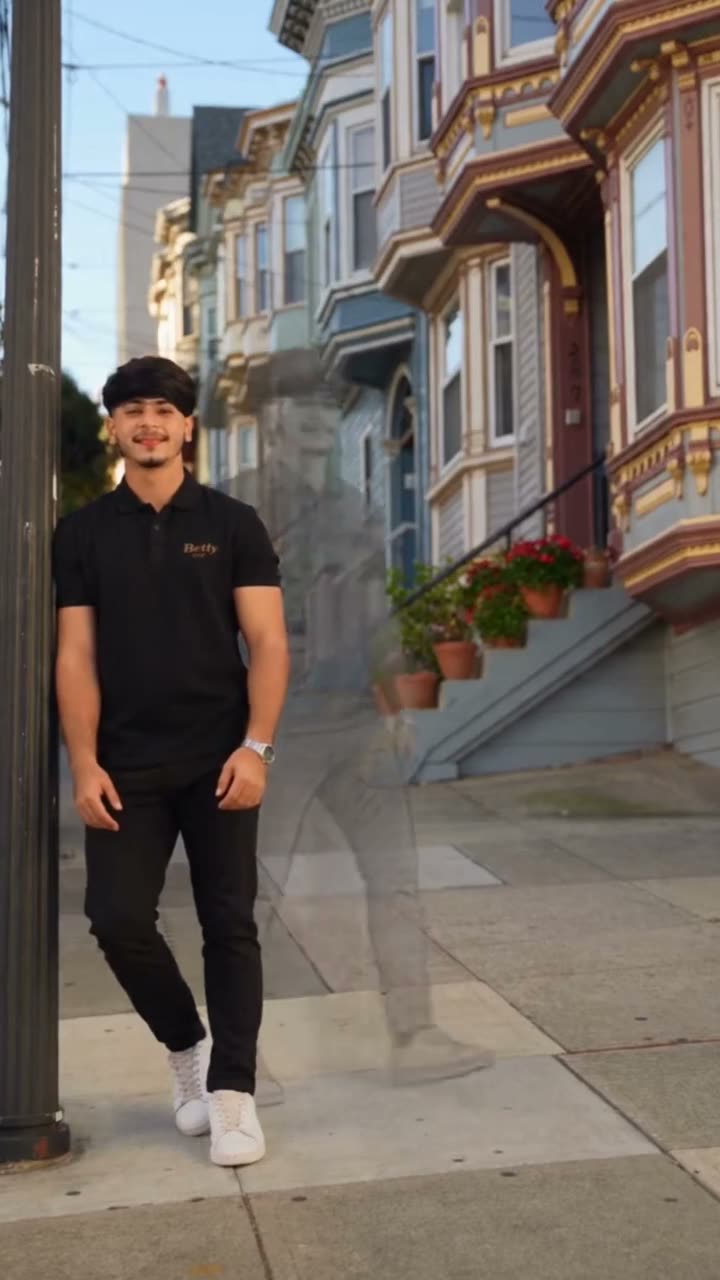
The Golden Dance Clone starts with a dancer standing by a street post. An outline appears beside the dancer, fills with gold light and turns into a double. After a high-five, the two versions do the same steps in one fixed shot.
The second figure is a copy of the lead. Your photo supplies the same identity to the dancer by the post and to the adult who forms to their right. Watch the gold reveal and the high-five in the reference to see when the second figure becomes fully visible.
| Beat | What you see |
|---|---|
| Shot 1 | One dancer waits by a post on the sidewalk. |
| Shot 2 | A translucent outline appears in the open space beside the dancer. |
| Shot 3 | Gold light fills the outline, then clears to reveal an identical partner. |
| Shot 4 | Both dancers high-five and move through the same steps. |
02How to make the Golden Dance Clone AI video from one photo
- Open the trendGo to the AI Trend Club page and watch the credited source video. It shows the camera angle and the part of the scene the generator follows. Open Create your own to start from that particular reference.
- Pick your photoUse a full-body photo of one adult for both copies in the scene. Use an image you have permission to use. Review the photo in the creation screen before sending it to the generator.
- Review the setupThe template supplies a reference and a prompt for the scene. This step is where you confirm who should play the lead and make sure the photo is the one you intended to use.
- Choose a resolutionThe guide quote is 507 credits for 480p and 761 credits for 720p. Check the exact quote on the create button and tap Make my video when you are ready.
- Review and downloadPause just after the high-five and compare the two faces and hairstyles. Watch the following steps for two separate bodies and enough space to see their feet. The gold outline should turn into a dancer before the duet starts. Download the vertical clip if you are happy with it. You can play it back without audio or add sound in your editing app afterward.
03The photo that works
A standing picture from head to shoes gives the model a readable face and a full figure for the sidewalk shot.
A group photo can leave the template with several faces to choose from. A close selfie can show the face well while leaving the body out of the image. If the copies look like two different people, try a sharper full-body picture with clearer hair and facial features, then compare them again in the frame after the reveal.
- Use a sharp photo of one adult.
- Show the face, arms and shoes in the same frame.
- Choose light that makes the face easy to see.
- Leave out dark glasses that cover the eyes.
- Use a solo picture with no other person near the lead.
04The Golden Dance Clone AI prompt
AI Trend Club fills in the prompt when you open the template. If you are building the scene in a tool that accepts both a photo and a reference video, this is a starting prompt. Pair it with the source movement so the sequence and point of view are clear to the model.
Use the adult in the reference photo for both copies of the same person. Start with one dancer standing beside a street post in a fixed vertical sidewalk shot. A translucent outline forms in the empty space on the right and fills with golden light. The glow clears to reveal the same adult with matching hair and facial features. The two dancers high-five, then move through the same short steps side by side. Keep their bodies separate and leave room for their feet. Preserve the camera position, street setting and timing. Render a silent clip.05CapCut template or AI video?
A video editor such as CapCut can cut and layer footage you already recorded. The reference-guided version starts from a still photo and handles the outline, gold flash and matching second adult in the sidewalk scene. You can use a separate editor for music, captions or a shorter cut after the video downloads.
For this workflow, open the create link beside the source clip so you start from the matching movement. The downloaded file is already vertical, so you can review the framing before you decide what to add during editing.
06Is the Golden Dance Clone AI video free?
It is free to open the trend and watch the reference. Making a video costs credits. A new account receives 25 welcome credits, enough for a few images. This video needs more credits than that welcome balance.
The Week pass and the 1,000 credits pack both cover one render at either listed resolution. Check the button for the current quote before you spend. If the video job fails, the credits for that job automatically return to your balance. You can open the trend again and review your photo before deciding whether to try again.
| Option | Price | Credits |
|---|---|---|
| Week pass | $6.99 | 800 |
| 1,000 credits pack | $9.90 | 1,000 |
07Post your version
Keep the opening wait, the reveal and the first shared move in the same cut. Viewers can see the joke land when the original dancer high-fives the copy. The video downloads silent, so add music you can use in your posting app if you want a beat underneath.
Credit @abdullahchaudhary814 as the account that posted the reference. The source link is on the trend page. You can use one of these lines as a caption or write your own in the voice you use for your posts.
- My duet partner is finally on time.
- Two dancers, one photo.
- When your backup dancer is also you.
08Questions
- Does the Golden Dance Clone need two photos?
- One adult photo supplies both copies. The shot starts with one person and adds a second version of that same adult beside them.
- Can I use this as a duet with a friend?
- The clip is built around the same adult on both sides. Choose one solo photo of the adult who should play both roles.
- What if the gold copy never looks like me?
- Check the face after the glow clears. If the faces differ, use a sharper picture of one person where the face and hair are easy to read.
- Can I make it from my phone?
- Yes. Open the create page in your browser and select the full-body photo from your device. You can download the finished clip from the same account.
- Who posted the reference clip?
- The linked post was shared on TikTok by @abdullahchaudhary814. Its source link is on the trend page.