01What happens in the NYC Alley Rats trend
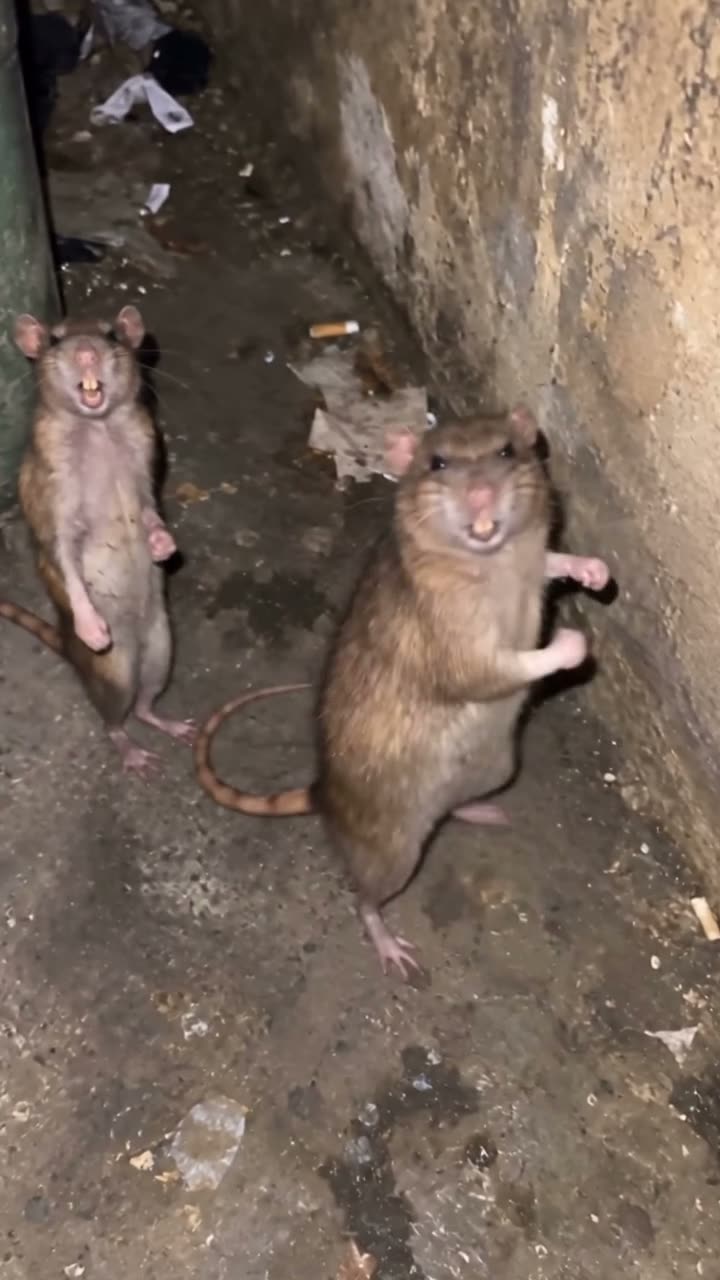
The original reel by @aliaboutine takes a camera into a narrow alley where a group of upright rats moves toward the lens. The animal in front grows bigger in the frame as it approaches and lifts its paws. The setup plays like a shortcut that turns into an encounter with a very confident welcoming committee.
In a personal version, your cat or dog takes the foreground role. The dark alley and the fictional rats behind it give the pet a place in the scene. Watch the source once and look for the moment the front animal takes up more of the frame. That change in scale is what makes its gesture read.
| Time | Beat |
|---|---|
| Opening | Upright rats appear by the rough alley walls and green bin. |
| Approach | The front animal moves toward the handheld camera. |
| Gesture | The closest animal brings its paws up and fills more of the shot. |
| End | The lead keeps moving as the group stays farther back. |
02How to make the NYC Alley Rats AI video from one photo
- Watch the reference on the trend pageOpen NYC Alley Rats on AI Trend Club and play the original. Watch the front animal separately from the ones behind it. The scene is easier to follow once you see which animal your pet will replace.
- Open the makerPress Create your own. The alley clip is already attached to the template, so you can go straight to selecting the lead photo. The rest of the group comes from the reference.
- Add your pet photoAdd one photo of your own cat or dog, or a photo you have permission to use. Pick a photo where the pet is easy to identify in a quick glance. The lead gets the closest view, so make that the animal you want viewers to recognize.
- Check the resolution and creditsThe 480p version uses 507 credits and the 720p version uses 761 credits. The button shows the credit cost before you spend. Pick the quality before starting the render so you can compare the charge with your balance.
- Render and check the downloadTap Make my video, wait for the render, and download the vertical clip. Play it from the start and look at the lead as it approaches. The finished video is silent, so you can add sound later if the post needs it.
03Choose a photo with recognizable markings
The alley is dark and the lead moves, so the pet's eyes, nose, and fur pattern need to read together when it comes close. Use the photo picker to check the face before starting.
- Use a solo photo of the cat or dog you want to see at the front. Other animals in the picture make it less clear which markings belong to the lead.
- Choose a sharp image with the eyes and nose visible. It should be possible to recognize the pet even when the image is small.
- Use a well-lit photo so the model can distinguish lighter and darker areas of the fur before placing the animal in the shadowy alley.
- Keep toys, hands, and props clear of the face. An unobstructed photo gives the foreground gesture room to work.
04An AI prompt for the alley scene
AI Trend Club loads the scene when you open the maker, so you can leave the prompting to the template. If you are building the scene yourself in a video model that accepts an image reference, describe which animal changes, where the camera sits, and when the lead moves forward.
Create a vertical video from a low handheld view into a narrow, dim alley. Start with several fictional upright rats beside rough walls and a green bin. Use the pet in the reference photo for the animal closest to the camera and preserve its recognizable fur markings. Have the lead shuffle closer and raise its paws as it grows larger in the frame. Keep the other rats separate and farther back. Hold the alley layout and subtle camera movement through the final step. Keep the output silent.05Using the clip in CapCut
A standard CapCut edit is useful when you already have footage to arrange. In this version of the alley joke, the input is a still photo and the AI video model places the pet into the reference scene. That gives you a moving foreground lead in the alley without filming your pet walking toward a camera.
Once the video is downloaded, you can open it in CapCut to trim the ending or add a caption. Leave enough of the first shot for the alley to register. The moment the front animal lifts its paws works better when the viewer has already noticed the others behind it. If you want sound, add it in TikTok or CapCut.
06Is the NYC Alley Rats video free?
You can watch the reference and read the trend page for free. New accounts receive 25 welcome credits, enough for a few images. The video takes more credits, and the quality setting changes the amount on the button. Failed video renders return their credits automatically.
If you are buying credits for this edit, the Week pass gives you 800 credits for $6.99. The pack of 1,000 credits costs $9.90. Check the video button and your balance before buying so you have enough for the quality you want.
07Post your alley clip
Play it once on your phone to see how the pet reads in the dim scene. Keep the caption short and credit @aliaboutine for the original. Add sound in the editor if you want it.
- Wrong turn. Right welcoming committee.
- My pet knows a shortcut.
08Questions
- What does my pet replace in the NYC Alley Rats trend?
- Your cat or dog plays the nearest animal. The other fictional rats stay farther back.
- Does the template need a video of my pet?
- A clear solo pet photo is the input. The alley clip supplies the motion and camera framing.
- Can I make the edit in a phone browser?
- Yes. Open Create your own on the trend page and upload the photo in your browser.
- Who posted the original alley reel?
- @aliaboutine posted the reference on Instagram. The trend page links to it.