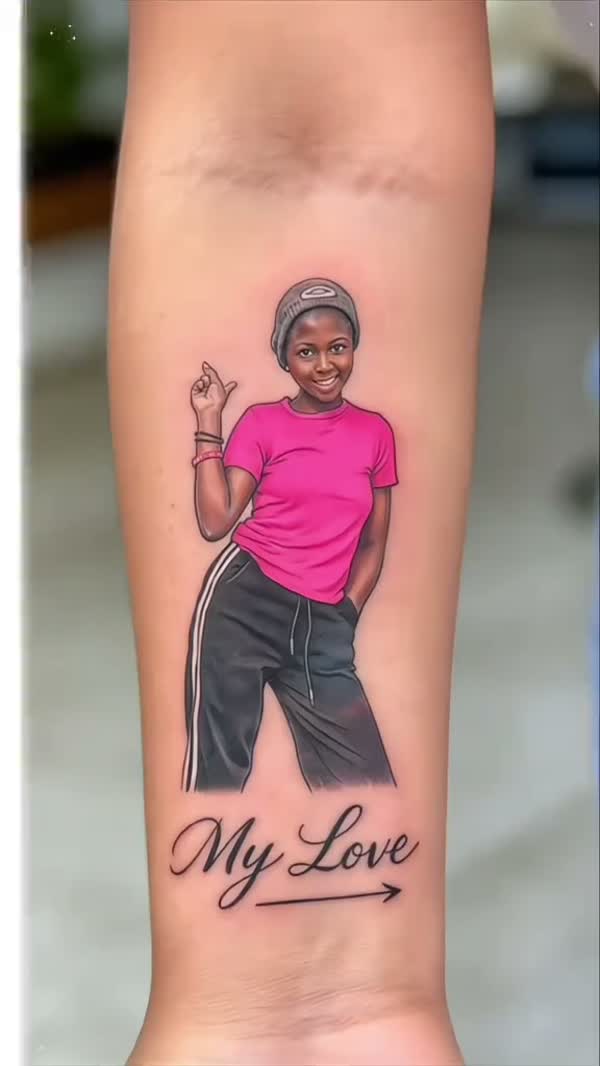
01What the Forearm Portrait Tattoo AI photo does
The Forearm Portrait Tattoo photo format places a portrait design along a forearm. The linked TikTok example by @user6146384046736 shows several portraits positioned on arms, with the design following the skin and wrist. This page uses the opening part of that post as a visual reference and links directly to the creator.
The AI Trend Club page creates one still digital mockup from one adult portrait. It is not a real tattoo, a medical image or a video. The image editor does not apply ink to anyone's skin. Review the result as artwork and do not present it as a photograph of permanent body art.
02Choose one portrait photo
Start with one adult portrait that you own or have permission to edit. Use a photo where the face is clear enough to identify the subject. The editor uses that image as the portrait reference and creates a new forearm scene around it. You do not need to upload a separate photo of an arm.
Think about whose image you are using. If it is a partner, family member or friend, ask before uploading it. If you will share the result, ask before posting it too. Do not use a stranger's photo or imply that another person has agreed to be permanently tattooed.
- One clear adult portrait
- A photo you own or have permission to edit
- One forearm design in the prompt
- A result described as a digital mockup
03Review the Forearm Portrait Tattoo prompt
The trend page opens the existing image editor with a prompt already filled in. It asks for a portrait tattoo mockup on one forearm, with fine linework, soft shading and skin texture. The wording also tells the model that the result is a temporary visual mockup, not a real tattoo.
Read the prompt before creating. It can be changed to fit the photo, but keep the request focused on one portrait and one forearm. Generated text is often inconsistent, so the page prompt leaves out lettering and logos. If you want words in a real tattoo, discuss the lettering separately with a qualified tattoo artist rather than relying on generated text.
Use the uploaded photo of one consenting adult as the portrait reference. Create one realistic digital mockup showing that person as a clean portrait tattoo design on a single forearm. Keep the person recognizable while translating the portrait into fine black linework with soft, natural shading. Wrap the design with the direction and curve of the forearm, keeping skin texture, wrist and arm proportions believable. Show one arm in a simple neutral setting. This is a temporary visual mockup, not a real tattoo. Do not add extra tattoos, words, logos, another person or a watermark.04Make the photo in the image editor
Open the editor from the Forearm Portrait Tattoo page. The button carries the prompt into the image tool, so you can review it before submitting. Add one adult portrait and confirm you have permission to use it. The page shows the current price before the image request starts.
One image edit uses 5 credits. Check the amount on the button before you submit. You can leave the editor without starting an edit if you decide not to spend credits. The page does not require a paid video workflow, and it does not create an animated result.
When the image is ready, compare the face, forearm angle, portrait size and wrist area with your photo. Small details can vary, so save it only if you are comfortable with the mockup.
- Open the image editorUse the button on the trend page to carry over the prompt.
- Add one portraitChoose an adult photo you own or have permission to edit.
- Review and createRead the prompt, check the 5-credit price and submit only when ready.
- Inspect the mockupCheck the face, forearm position and overall design before saving.
05A digital mockup is not real ink
The image editor creates a still picture. It does not make a real tattoo, apply pigment, estimate permanence or show how a tattoo will heal. Skin texture and lighting in the result are visual effects. Do not use the generated image as proof that the portrait is already tattooed on someone's body.
The original TikTok post is a reference for the photo format. It remains the creator's work. Your result is a new AI-edited image from the portrait you provided, and it should be labeled clearly if you share it.
06Fix common mockup issues
If the face is hard to recognize, try a clearer adult portrait and keep the prompt focused on the same person. The image model can interpret facial features differently, so do not promise an exact likeness. A single portrait reference gives the editor one person to follow.
If the design sits awkwardly on the forearm, ask for one arm and a portrait that follows its direction and curve. Keep the wrist and arm visible in the scene. If the output looks like permanent ink, describe it as a digital mockup when you share it.
| What you see | What to check |
|---|---|
| The portrait looks different | Compare the face with the uploaded adult portrait. |
| The design sits at an odd angle | Ask for one forearm and a portrait that follows its curve. |
| The result looks permanent | Label it as a digital mockup, not a real tattoo. |
07Share it as a design idea
Before sharing, check the portrait and arm placement, and make sure the person agreed to the edit. Credit the linked TikTok reference and describe your image as an AI mockup, not a real tattoo. Short caption ideas:
- Trying a digital portrait tattoo mockup.
- One portrait, imagined on a forearm.
- A tattoo design idea made from one photo.
08Questions
- Is the Forearm Portrait Tattoo AI photo a real tattoo?
- No. It is one still digital mockup made by an image editor. It does not apply ink to skin.
- How many photos do I need?
- Use one clear adult portrait that you own or have permission to edit.
- How much does one image edit cost?
- One image edit uses 5 credits. The editor shows the current price before you submit.
- Who posted the linked example?
- The linked TikTok post is by @user6146384046736. The trend page links to the creator's post.
- Does this make a video?
- No. The editor makes one still image, not an animation or video.