01What the polka dot picture trend looks like
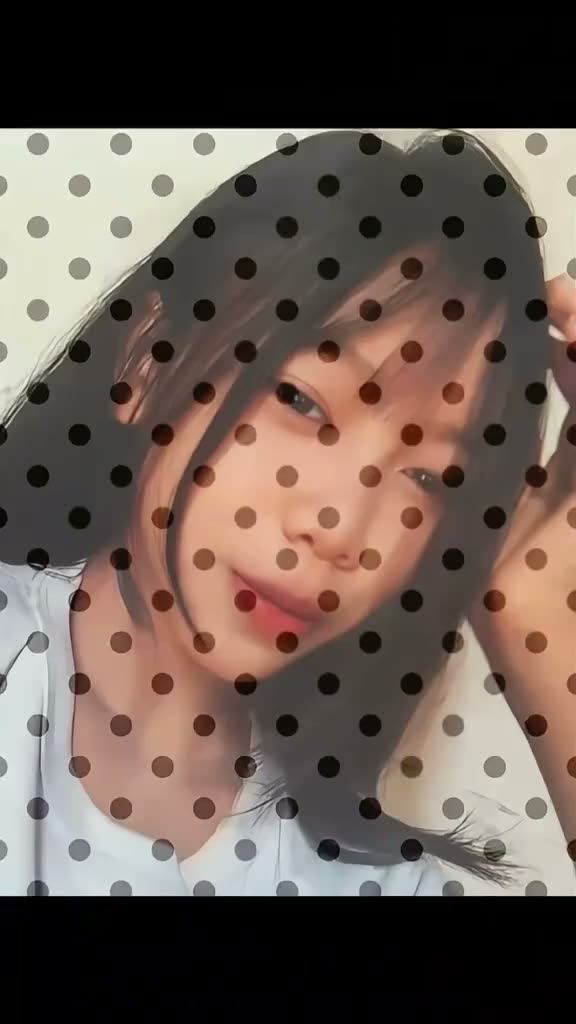
The effect puts a regular dot pattern between the camera and the subject. In the example you can still see the eyes, hair and background. The dots have the same spacing across all of them, which makes the pattern look like a transparent sheet over the shot.
The linked TikTok ends on a tilted close portrait with dark dots over a pale background and across the face. Use that last example to judge the effect. The editor here makes a still you can save as a portrait in its own right.
| Part of the photo | Detail to keep |
|---|---|
| Face | The expression and the shape of the eyes. |
| Hair and clothing | The original edges and textures. |
| Background | The same layer of dots continuing past the subject. |
02How to put a polka dot overlay on a photo
- Open the exampleGo to the Polka Dot Portrait page on AI Trend Club. Open the credited clip and notice how the dots cross the face and background at the same interval. A repeated pattern in the shirt alone would give a different effect.
- Add your photoPress Edit your photo. Add one portrait that you have permission to use. If you use a selfie, choose one where your eyes are already easy to see.
- Review the promptThe prompt is filled in. It covers the face, hair and background with a translucent grid and asks to preserve your pose, expression and framing. The words small and translucent help describe a light pattern that leaves the portrait readable.
- Check the image quoteThe editor shows the credit quote before submission. The current edit costs 5 credits for one still. If the prompt describes a mask on the face or dots on the clothes, change that wording before you create the image.
- Inspect the resultSave the image after you check the face at full size and at thumbnail size. Zoom in on the edge of the face to see whether the pattern continues into the background. Then zoom out and see whether the expression is clear at a glance.
03Choose a portrait where the expression is clear
A single clear portrait works well for this overlay. Natural light helps you see what the dots add, and the pattern has more room to read when there is less already covering the face. Pick the framing you would be happy using without the effect.
- Use a photo of one person.
- Choose a face with the eyes visible.
- Keep the light natural and even.
- Skip shadows that hide the eyes.
- Skip a heavy filter already covering facial details.
04Polka Dot Portrait AI edit prompt
Use the included wording as a starting point in the editor. For another image editor, the prompt should describe both the look of the dots and the parts of your photo you want to preserve.
Keep the person, facial features, skin tone, expression, hair, outfit, pose, framing, and background of the uploaded portrait. Put a regular grid of small translucent dots in front of the entire image. Continue the same pattern across the face, hair and background like a transparent sheet. Keep the eyes and expression visible through the pattern. Use gentle contrast and even spacing. Preserve a single still portrait, with no face paint, extra person, text, border or watermark.05When the dots look too heavy
If the dots cover facial details, ask for smaller dots and lower opacity. This keeps the spacing of the pattern while giving your face more room. If they show up just on your outfit, ask explicitly for the grid to sit in front of the whole image.
Check the rows across the edge of a shoulder or near the hairline. They should continue through the background. If the edit has moved the scene or turned the dots into face paint, ask it to keep the original crop and place the effect in a separate foreground layer.
- Too bold: lower the contrast.
- Too large: make the dots smaller.
- Confined to clothing: extend the pattern across the entire frame.
06How many credits does one still take?
You can view the reference for free. The image edit currently uses 5 credits for one still, and a new account starts with 25 welcome credits. The quote in the editor is the one to check when you submit.
If you want a lighter or bolder version, review the first image before making another. Changing the size and opacity together can make it hard to tell which change helped. Keep the same photo while you adjust the pattern so you can compare like for like.
07Check the image before using it as a profile photo
A close crop can make the overlay feel more noticeable because the dots take up more of the small frame. Preview the part of the image that will be visible in your profile circle. Make sure the eyes still read and the pattern can be seen on both sides of the face.
If you mention where the look came from, credit @rmraedkfo5 and link to the original from the trend page.
- A little pattern over the usual portrait.
- Same photo, through a layer of dots.
08Questions
- Can I use a selfie?
- Yes. Choose a selfie with one person, natural light and clear eyes.
- Will this turn my photo into a video?
- The editor makes one still image. The short clip on the trend page is the credited example.
- Can I make the dots less visible?
- Yes. Ask for lower opacity or smaller dots in the editable prompt.
- Who posted the reference?
- The linked TikTok was posted by @rmraedkfo5. Open the credit on the trend page for the full tutorial.