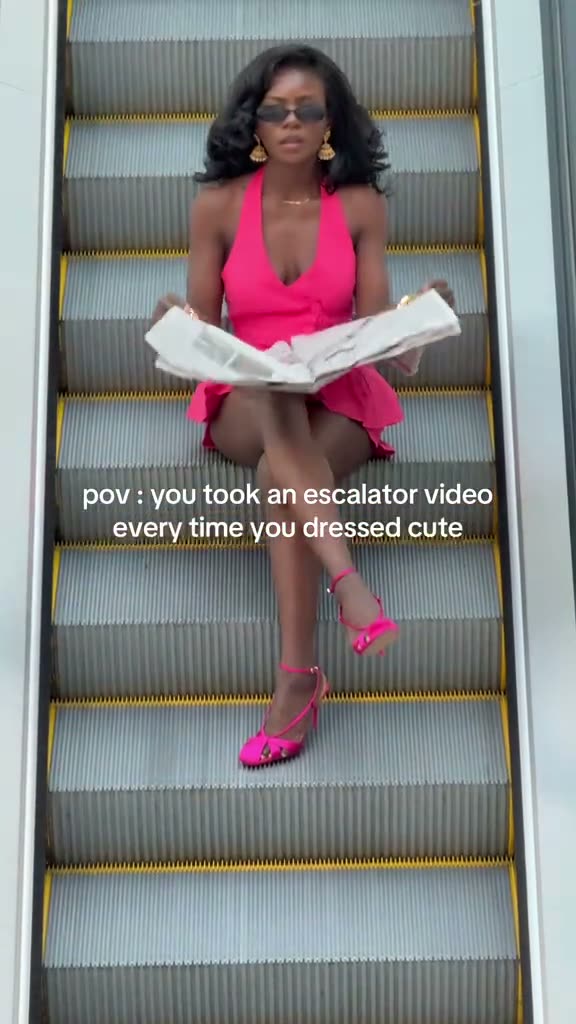
01What happens in the Escalator Outfit Change trend
The Escalator Outfit Change trend follows one adult seated on a moving escalator while a fixed overhead camera looks down. Quick cuts change the clothing and seated pose as the steps carry the person through the frame. The linked example credits its creator and shows the format in one short vertical clip.
| Time | Beat |
|---|---|
| Shot 1 | The creator sits on moving steps as the camera looks straight down. |
| Shot 2 | A hard cut changes the outfit and seated pose. |
| Shot 3 | Another look appears as the rider moves through the frame. |
| Shot 4 | The final cut returns to the overhead view with a changed outfit. |
02How to make the Escalator Outfit Change AI video from one photo
The page turns the linked scene into a one-photo remake. You choose the trend, add an adult photo, and start a video job from the existing recipe. There is no prompt to write on AI Trend Club, and the exact cost appears before you spend credits.
- Open the trend pageGo to the Escalator Outfit Change page on AI Trend Club and review the linked example.
- Start your remakePress Create your own to open the existing video flow for this trend.
- Add your photoUpload one full-body adult photo and confirm that you have permission to use it.
- Choose a resolutionSelect 480p for 507 credits or 720p for 761 credits. Check the button before spending.
- Make the videoPress Make my video. The page says the result is ready in a few minutes, then you can download the silent vertical clip.
03The photo that works
Use one adult photo for the rider role. The trend depends on seeing the seated pose and the clothing changes from the overhead angle, so choose an image that gives the scene enough of the person to work with. Keep the listed checks simple:
- Use a clear full-body adult photo with the face visible.
- Show the full pose and leave room around the person.
- Avoid a tight crop that hides the body.
- Do not use a group photo for the single lead role.
- Generated outfit details can vary, so review the result before sharing.
- If a render fails, its credits come back automatically; the page suggests trying a clearer photo.
04The Escalator Outfit Change AI prompt
AI Trend Club does not ask you to write a prompt. If you are trying the look in another video model that accepts a reference image, this short scene description can be a starting point. Keep the requested sequence centered on the overhead angle and repeated outfit cuts.
Show the person in the reference photo seated on a moving escalator in a clean indoor setting. Begin with a high fixed camera looking straight down at the full seated figure as the steps move beneath them. Cut to a new outfit and a changed seated pose while keeping the person in the same position in frame. Repeat the look change with quick, clear cuts. Return to the same overhead composition for the final outfit. Keep the escalator, camera angle, and solo subject consistent throughout.05CapCut template or AI video?
A CapCut template can arrange clips that you record yourself, such as several outfit looks filmed on an escalator. It does not put your face into the linked creator’s escalator scene. An AI video uses your uploaded photo to replace the lead in a recreation of the original setup, with the overhead angle and outfit sequence guiding the result.
This trend download is silent. Add the trending sound separately in TikTok or CapCut after you download the video. You can also use CapCut for captions or other edits after the AI video is ready. Review the final cut before posting so the clothing changes and framing look the way you expect.
06Is the Escalator Outfit Change AI video free?
You can watch the linked example and the trend page without paying. A new account receives 25 welcome credits, enough for a few images but not enough for this video. The standard option costs 507 credits at 480p, and the higher 720p option costs 761 credits. Failed videos return their credits automatically.
The listed entry choices are a Week pass with 800 credits or a 1,000 credits pack. The Week pass costs less upfront and includes enough credits for this video at either listed resolution. The pack gives more credits but costs more. Check the on-page button before you start because it displays the current cost for the selected resolution.
| Option | Price | Credits |
|---|---|---|
| Week pass | $6.99 | 800 |
| 1,000 credits | $9.90 | 1,000 |
07Post it
The remake is silent, so add the trend sound in TikTok or CapCut before posting if you want audio. Credit the linked example creator as @misstchillo in your caption. The idea works as a quick style showcase because the repeated escalator view makes each outfit easy to compare.
- One ride, a few new looks.
- Same overhead view, fresh outfit each cut.
- Which look would you keep?
08Questions
- Is there an Escalator Outfit Change AI template?
- The AI Trend Club trend page has a one-photo video flow based on the linked overhead escalator scene. Add one adult photo and start the preset recreation; there is no prompt to write.
- Which AI makes the Escalator Outfit Change video?
- It uses an AI video model guided by the original clip. The trend page provides the scene setup and video flow.
- Can I make it on my phone?
- Yes. AI Trend Club runs in the browser, so there is no app to install. Open the trend page and use the Create your own button.
- Who made the original?
- The linked example is credited to @misstchillo and the page lists it as posted on Oct 12, 2025. The page presents it as an example of the format.
- Does the download include the trend sound?
- No. The video is silent. Add the trend sound in TikTok or CapCut after downloading.