01What happens in the Subway to Times Square trend
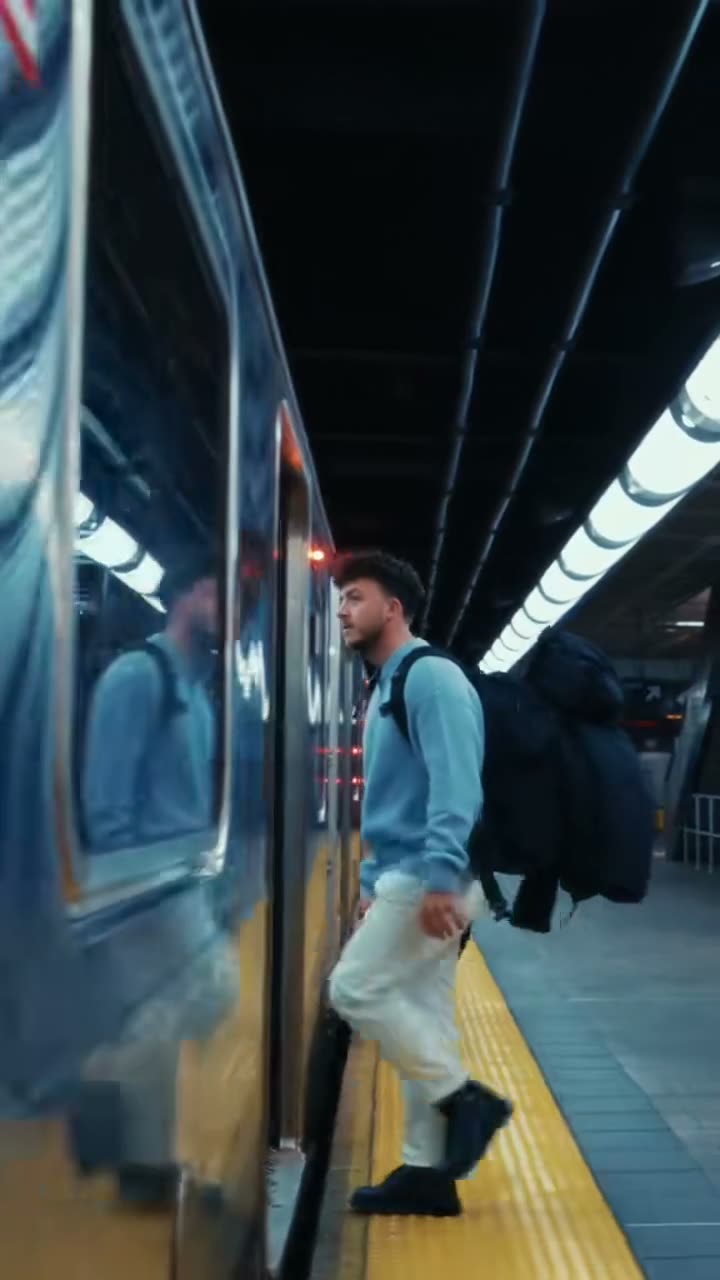
The reference starts on a New York subway platform. A walker in a light blue top stands next to a train, then a dark column passes in front of the camera. When the view clears, the same person is crossing the street in Times Square in a black jacket.
The column gives the camera a moment when it can cut between places without breaking the motion. The walker gives viewers a familiar point to follow after the change in clothes and setting. A passerby briefly crosses the lens in the street sequence, then the view opens back onto the crossing.
| Time | Beat |
|---|---|
| Platform | The walker appears beside the train in a light blue top. |
| Column wipe | A dark pillar covers the view and hides the cut. |
| Street reveal | The walker in a black jacket comes into view in Times Square. |
| Final crossing | The walker continues across the road as people and cars pass. |
02How to make the Subway to Times Square AI video from one photo
- Watch the cut on the trend pageOpen the reference and look for the point where the dark column covers the platform. The street reveal immediately after the wipe is the moment to look for when checking your own video.
- Start the templatePress Create your own. The template already includes the two settings and their timing. You can use the maker in your browser without installing an app or writing a separate motion prompt.
- Add one adult photoPick a well-lit solo photo of the adult you want to cast and confirm that you have permission to use it. The same photo guides the walker on the platform and in the crosswalk, even though the two outfits are different.
- Choose 480p or 720pThis video costs 369 credits at 480p or 553 credits at 720p. The maker shows that charge before starting. Review the button after choosing the setting so you know which resolution and cost you have selected.
- Generate and check the crossingTap Make my video, wait for the render, and download the vertical clip. Play it through the wipe and check that the walker still looks like the same person when the scene opens onto the street.
03Choose one photo for both locations
The subway and street shots use different clothes and lighting, so the face is the detail that ties them together. A clear solo portrait makes it easier to carry the same identity through the cut.
- Use one adult photo with a face you can recognize at a glance. The template applies this same person on both sides of the wipe.
- Choose an image with enough light to see the face clearly. Check the preview in your phone gallery if you have several photos to choose from.
- Keep hats, hands, and other objects out of the way of the face in your input. The template already supplies the station and street wardrobe.
- Avoid group pictures and heavy face filters. The maker needs one clear lead, with enough visible detail to keep the person recognizable when the location changes.
04An AI prompt for the column wipe
The template on AI Trend Club sets up the station and crosswalk for you. If you are recreating the movement in another reference-image video model, describe the obstruction, the visual match across the cut, and the walking motion that continues after it.
Make a vertical video with the person in the reference photo as the same adult throughout. Begin beside a train on a subway platform, with the adult in a light blue top and the camera moving past a dark station column. At the instant the column fills the frame, cut to an open Times Square crosswalk. Reveal the adult in a black jacket and jeans continuing the stride. Keep passing cars and pedestrians behind the walker, with background signs indistinct. Let one passerby briefly cover the view before it opens again. Keep the finished clip silent.05Cutting your own clips in CapCut
In an ordinary editing project, you can place two clips on a timeline and cut at the moment a column hides the first shot. That approach works when you already have the footage. The photo-based maker supplies the walker and both environments from the reference, so it starts with the portrait instead of two clips you filmed.
You can take the generated MP4 into CapCut to add a caption or a sound. Leave the column wipe and the first step in the crosswalk intact when trimming. Those two moments are what connect the subway and street views for the audience.
06Is the Subway to Times Square video free?
Watching the source and reading the trend page are free. A new account comes with 25 welcome credits, enough for a few images. Making this video requires 369 or 553 credits, depending on resolution. If a video render fails, the credits return automatically.
The Week pass supplies 800 credits for $6.99. A pack of 1,000 credits costs $9.90. Check your existing balance and the charge shown on the creation button before buying credits.
07Post the station-to-street reveal
Review the silent download on a phone before posting. If you add a sound in TikTok or CapCut, let the visual wipe stay readable and credit @farbfilms for the original reference.
- One column later, Times Square.
- The shortest subway exit in New York.
08Questions
- Do I need two photos for the subway transition?
- One clear adult photo supplies the same walker in both locations. The template keeps the change from the light blue top to the black street jacket.
- Is there a Subway to Times Square AI template?
- Yes. The maker attached to the trend page follows the column wipe and the crosswalk reveal from the linked source.
- Can I make it in my phone browser?
- Yes. Open the trend page, tap Create your own, and add a photo from your device.
- Who posted the original?
- @farbfilms posted the original transition on TikTok. The trend page credits the account and links to the clip.