01What happens in the Giant Bed Crawl trend
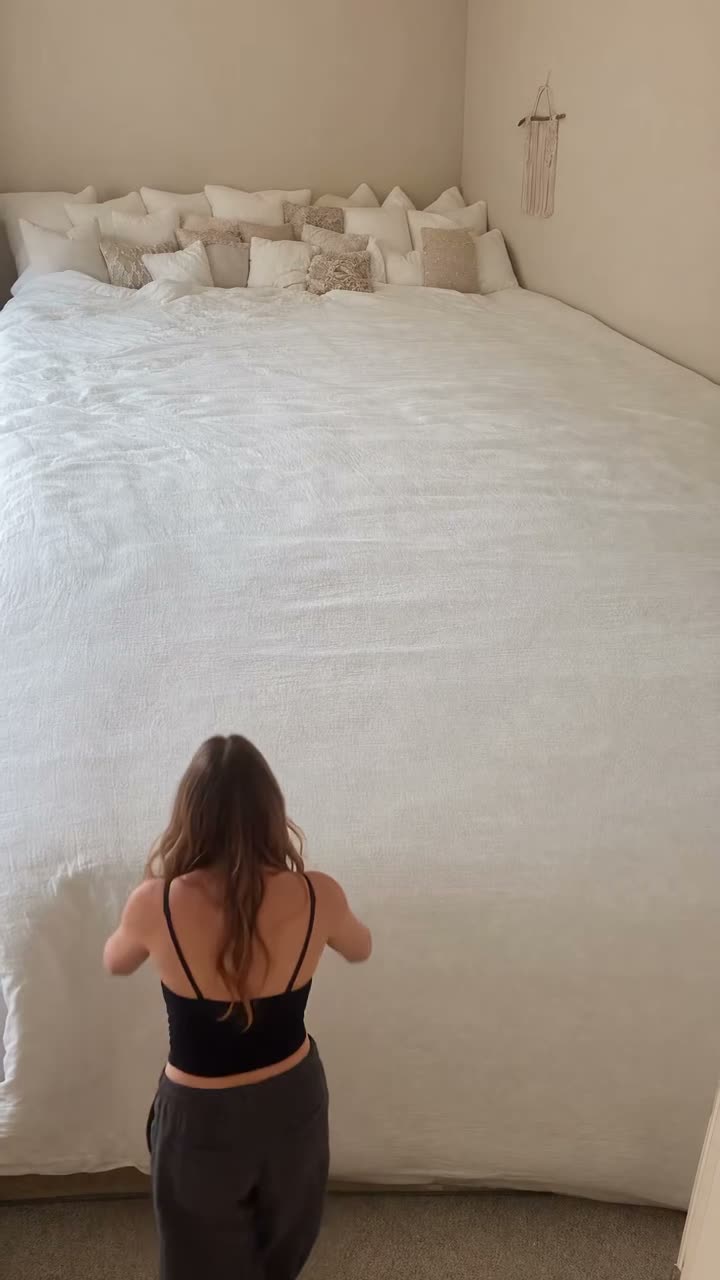
A person walks up to the foot of a white bed, climbs onto the duvet, and crawls until they reach a bank of pillows at the other end. The camera holds the same view throughout. By the time the person turns around, they look tiny against the stretch of bedding they just crossed.
The last beat sells the scale. The person who had to climb onto this enormous mattress settles in and pulls up the cover like it was a perfectly ordinary trip to bed. Watch the original to see how the crawl flows into that final turn.
| Time | Beat |
|---|---|
| Shot 1 | The person approaches the foot of the bed. |
| Shot 2 | They brace against the duvet and climb up from the near edge. |
| Shot 3 | They crawl away from the camera toward the pillows. |
| Shot 4 | They turn at the head of the bed and pull the cover up. |
02How to make the Giant Bed Crawl AI video from one photo
Open the trend page to watch the original and check the vertical framing. Your photo supplies the person who climbs onto the bed. The reference clip supplies the bedroom, the route across the duvet, and the timing of the last movement.
- Open the trend pageFind Giant Bed Crawl on AI Trend Club. Watch the person move from the near edge of the bed to the pillows at the back of the room.
- Press Create your ownThe button opens the setup for this scene. You'll see the photo slot for the bed climber.
- Add one adult portraitChoose a photo with one face clearly visible. Confirm that you have permission to use it before continuing.
- Choose a resolutionThe 480p video uses 646 credits and the 720p video uses 968 credits. Check the credit amount on the button before you tap Make my video.
- Download the clipReview the climb, the middle of the crawl, and the moment your lead turns among the pillows. Download the vertical video and add sound in your editing app if you want it.
03The photo that works
Pick a sharp, well-lit adult portrait. The person faces away for much of the crawl and turns from far across the room, so a clear input gives the model the facial detail it needs for the moments when the face is visible.
A selfie works if the face is easy to see. When you check the finished clip, look at the adult by the pillows as well as the much larger figure in the foreground. Both views should depict the same person.
- Use a solo adult portrait.
- Keep the whole face in view.
- Choose clear, even light across the face.
- Skip group photos and faces hidden by objects.
- Use a sharper image if the face looks blurry.
04The Giant Bed Crawl AI prompt
AI Trend Club takes the photo and uses the original clip to guide the motion. The setup requires no written prompt.
If you're trying another model that accepts reference images, start with the instructions below. Give the climb and the turn their own moments so the crossing feels long enough for the size of the room.
Hold a fixed vertical view from the foot of an oversized white bed. The person in the reference photo approaches the near edge, plants their hands on the duvet, and climbs onto the mattress. They crawl steadily away from the camera toward the row of pillows, becoming smaller in the frame with distance. At the far end, they turn, sit among the pillows, and draw the duvet up. Keep the same person, white bedding, fixed framing, and continuous motion through the final pose.05CapCut template or AI video?
A CapCut template can help you cut together footage you've already shot. Use the AI video workflow when you have a portrait and want the original bedroom scene to guide a new clip with that person in it. You'll still see the crawl from the foot of the bed to the pillows in the vertical frame.
The AI Trend Club download is silent. You can bring it into CapCut afterward to add a caption, a sound available in your app, or both. Check how those edits look during the final turn, when the person is smallest in the frame.
06Is the Giant Bed Crawl AI video free?
You can open the trend page and watch the original for free. A new account receives 25 welcome credits, enough for a few images. Making the trend video requires the credit amount shown for the resolution you choose.
Starting with an empty balance, the Week pass has enough credits for a 480p video. The 1,000-credit pack covers 720p if you want to make it at that resolution. If your render fails, the credits used for that video return to your balance automatically.
| Option | Price | Credits |
|---|---|---|
| Week pass | $6.99 | 800 |
| Credit pack | $9.90 | 1,000 |
07Post your Giant Bed Crawl video
If you want to use the trend sound, look for an available version in TikTok or your editor after downloading. Credit @valentinloiseau.ai in your caption. Let the viewer see the whole crossing first so the quiet moment at the pillows lands.
- Taking the long way to bed.
- I wanted a little more room to stretch.
- That was the last task of the day.
08Questions
- Is there a Giant Bed Crawl AI template?
- Open the Giant Bed Crawl trend page and press Create your own to get to the photo slot and resolution options.
- Which AI makes the video?
- AI Trend Club uses an AI video model guided by the original clip. It uses the uploaded portrait for the person in the scene.
- Can I make it on my phone?
- Yes. Open the trend page in your browser, choose a photo, and pick a resolution. The site runs in your browser.
- Who posted the Giant Bed Crawl original?
- @valentinloiseau.ai posted the reference on TikTok. The trend page links to the original post.
- Does the download include the original sound?
- The generated clip is silent. Add your preferred sound in TikTok or an editor after downloading.