01What happens in the Giant Cat Bath trend
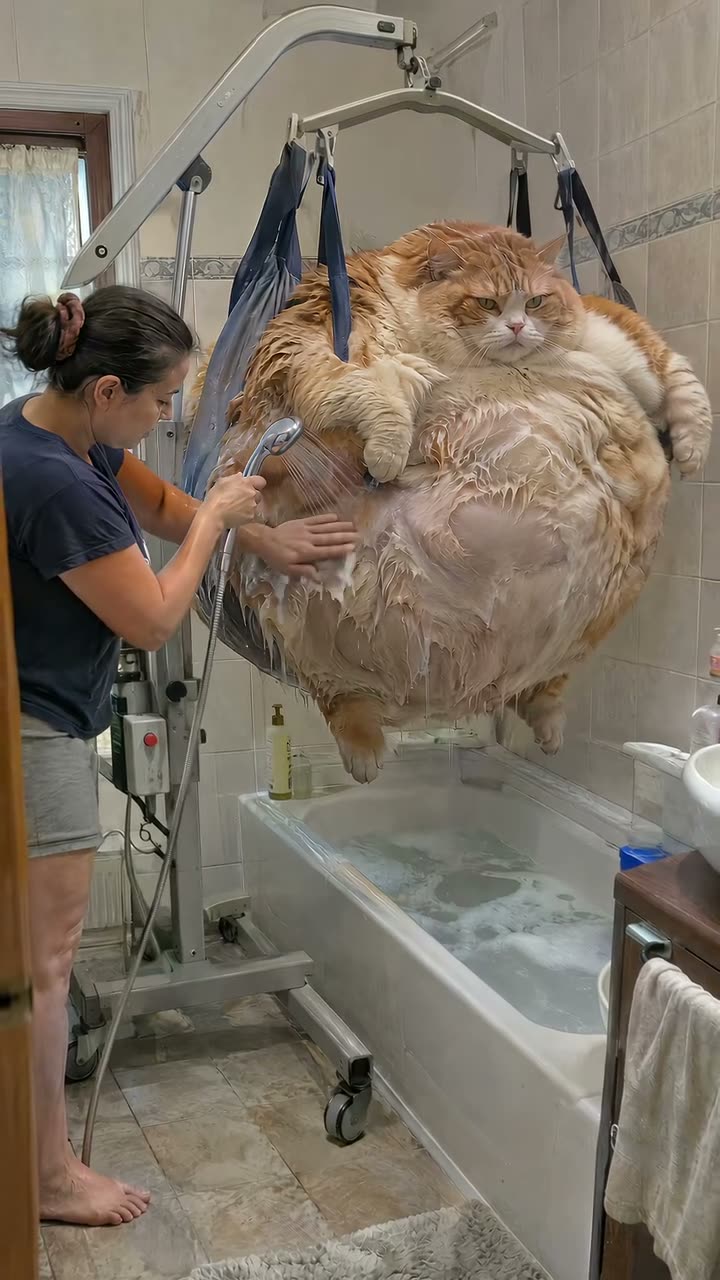
A giant tabby sits in a blue sling above a bath. An adult beside the tub rinses its fur with a handheld sprayer. In the Giant Cat Bath AI video, your cat plays the tabby and the room stays in view for the whole shot.
The scale is easiest to read where the cat nearly fills the frame beside the handler. Look for the coat, the blue straps and the falling water when you watch the reference. Those details distinguish the wash scene from clips that place a giant cat in a city.
| Beat | What you see |
|---|---|
| Shot 1 | An oversized tabby fills a blue sling above the tub. |
| Shot 2 | A handler lifts the sprayer and rinses the cat’s coat. |
| Shot 3 | The water falls into the tub as the cat turns its head. |
| Shot 4 | The camera holds on the cat and the sling. |
02How to make the Giant Cat Bath AI video from one photo
- Open the trendGo to the AI Trend Club page and watch the credited source video. It shows the camera angle and the part of the scene the generator follows. Open Create your own to start from that particular reference.
- Pick your photoChoose one photo of the cat you want in the sling. Use an image you have permission to use. Review the photo in the creation screen before sending it to the generator.
- Review the setupThe template supplies a reference and a prompt for the scene. This step is where you confirm who should play the lead and make sure the photo is the one you intended to use.
- Choose a resolutionThe guide quote is 461 credits for 480p and 692 credits for 720p. Check the exact quote on the create button and tap Make my video when you are ready.
- Review and downloadWatch the cat’s head turn and the spray fall into the tub. Check the face and markings while the cat looks to the side. The handler should remain a separate person beside the tub. Download the vertical clip if you are happy with it. You can play it back without audio or add sound in your editing app afterward.
03The photo that works
Choose a picture that shows how your cat looks in ordinary light. The generator needs enough of the coat to carry its markings into a much larger body.
If the result could be any tabby, compare your upload to the result frame where the groomer holds the sprayer close to the coat. Can you see the same stripes or patches? If the upload only shows a tiny face or has the body cropped out, start with a picture that shows both the face and the markings you want to keep.
- Use a photo of one cat so the lead is clear.
- Keep the eyes, ears and muzzle visible.
- Pick a photo with the head and body in focus.
- Use light that shows the coat pattern clearly.
- Skip heavy filters that change fur color or hide markings.
04The Giant Cat Bath AI prompt
AI Trend Club fills in the prompt when you open the template. If you are building the scene in a tool that accepts both a photo and a reference video, this is a starting prompt. Pair it with the source movement so the sequence and point of view are clear to the model.
Use the cat in the reference photo as the oversized lead in a fixed vertical grooming clip. Keep its original face, ears, fur color and coat pattern. Place it comfortably in a blue fabric sling above an indoor tub, with the overhead support and handler in view. The handler directs a gentle stream of water across the cat’s coat. Let the water fall into the tub as the cat turns its head slightly. Keep the same framing and natural feline posture through the last beat. Render a silent clip.05CapCut template or AI video?
Start with the reference-guided generator if you want your cat in the sling. It supplies the bathing room, handler and sprayer from the source. If you already filmed a pet clip and only want to trim it or add a caption, use an editor such as CapCut on the footage you have. The two steps can happen in that order when you are making a post.
For this workflow, open the create link beside the source clip so you start from the matching movement. The downloaded file is already vertical, so you can review the framing before you decide what to add during editing.
06Is the Giant Cat Bath AI video free?
It is free to open the trend and watch the reference. Making a video costs credits. A new account receives 25 welcome credits, enough for a few images. This video needs more credits than that welcome balance.
The Week pass and the 1,000 credits pack both cover one render at either listed resolution. Check the button for the current quote before you spend. If the video job fails, the credits for that job automatically return to your balance. You can open the trend again and review your photo before deciding whether to try again.
| Option | Price | Credits |
|---|---|---|
| Week pass | $6.99 | 800 |
| 1,000 credits pack | $9.90 | 1,000 |
07Post your version
Let the opening show the cat and the sling together. A line about bath day can set up the scene before the water starts running. The clip downloads silent. If you want sound, add a track you can use in your posting app after download.
Credit @valentinloiseau.ai as the account that posted the reference. The source link is on the trend page. You can use one of these lines as a caption or write your own in the voice you use for your posts.
- Bath day needed a bigger tub.
- The cat booked the full wash.
- When the bath has a lifting crew.
08Questions
- How is Giant Cat Bath different from the Giant Cat AI video?
- This effect is set above a bathing tub with a fabric sling and sprayer. The giant-cat scale is part of both ideas, but the clip here follows the small head turn and wash in one room.
- Which coat details should I check?
- Start with the muzzle, forehead and the visible markings on the body. The color and pattern in those areas help you tell whether the clip looks like your cat.
- Can I make the video on a phone?
- Yes. Open the trend in your browser and add a cat photo from your device. The create page shows the resolution and credit quote before you start the video.
- Can the video use both cats from one picture?
- This template has one cat role. Use a picture that contains the cat you picked, with its face and coat in view.
- Who posted the reference clip?
- The linked post was shared on TikTok by @valentinloiseau.ai. Its source link is on the trend page.