01What happens in the Plane Over Head Flyover trend
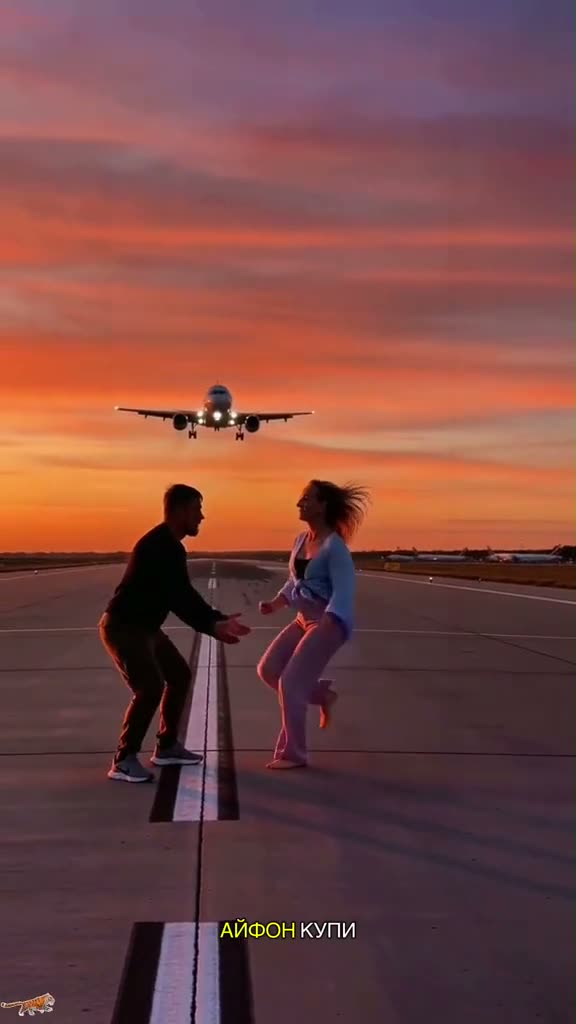
The Plane Over Head Flyover trend opens on two people standing on a runway at sunset. One supports their partner in an overhead lift while a plane passes above them. The full original is a 15-second vertical video, but this recipe uses the continuous 5.1-second opening.
Two separate adult photos replace the pair in that selected section. The camera stays far back, so the runway, sunset, lift, and plane are all part of the scene. The table follows the full source in order.
| Time | Beat |
|---|---|
| Shot 1 | Two people stand far down a runway at sunset. |
| Shot 2 | The person below supports their partner in an overhead lift. |
| Shot 3 | A plane passes above the pair while the camera stays wide. |
| Shot 4 | The full original then cuts to other scenes beyond the selected opening. |
02How to make the Plane Over Head AI video from two photos
Open the trend page to see the linked original and the creation flow. The site runs in your browser, so there is no app to install. Have two different adult photos ready, one for each person in the lift.
- Open the trend pageWatch the original and note the sunset runway, the overhead lift, and the passing plane. The public trend page can be viewed without paying.
- Choose Create your ownContinue to the existing video creation flow for this trend. You do not need to write an AI prompt on AI Trend Club.
- Add two adult photosUse a different photo for each role. Add one adult for the supporter below and another adult for the lifted partner above. Confirm that you have permission to use both photos.
- Pick the resolutionChoose 480p for 236 credits or 720p for 353 credits. The exact amount appears on the button before you spend.
- Make and download the videoTap Make my video and wait for the render. Download the result with the original trend sound or silently. This recipe uses the selected 5.1-second vertical opening.
03The photos that work
Use two different adult photos, with one person assigned to each side of the lift. The role labels and troubleshooting notes for this trend call for separate images.
- Add two separate photos, one for each adult.
- Use the first image for the supporter below.
- Use a different second image for the partner who is lifted on the right.
- Keep the two people in their own roles; the pair should not become one blended identity.
- If only one person appears, check that both photo roles have their own image.
- If a render fails, credits come back automatically; try again with clearer photos.
04The Plane Over Head Flyover AI prompt
AI Trend Club supplies the clip, so there is no prompt to write in its creation flow. If you want to test the scene in another video model that accepts reference images, start with this prompt.
Start with a wide view of two adults on a runway at sunset. Keep the person in the reference photo as the supporter below and the person in the second reference photo as the lifted partner above. Show the supporter holding the partner overhead in one continuous opening shot. Let a plane pass above them in the distance. Keep the camera far back, preserve the runway and the sunset, and hold the couple’s positions until the cut. Keep both adult identities distinct and the lift supported. Do not add another scene, text, or logos.05CapCut template or AI video?
A CapCut template can arrange clips you record yourself, but it cannot put your face into the original runway scene. It also cannot reproduce the source’s passing plane and partner lift from your own footage just by applying a layout.
An AI video starts from the original clip and uses the two adult photos to replace the pair in the selected opening. The left photo plays the supporting role, and the other photo plays the lifted partner. The recipe follows the continuous sunset section rather than the later scenes in the full original.
After downloading, you can open the result in CapCut to add captions or the trend sound to your edit. Keep any new captions separate from the generation prompt; the site flow does not ask you to write one.
06Is the Plane Over Head AI video free?
You can watch the original and browse the trend page for free. Making the video uses credits. A new account receives 25 welcome credits, enough for a few images but not this video. If a video fails, its credits are returned automatically.
The lowest cash entry is the $6.99 Week pass, with 800 credits. The 1,000-credit pack costs $9.90. This selected clip uses 236 credits at 480p or 353 credits at 720p. Review the button before spending, since it shows the charge for the option you choose.
| Option | Price | Credits |
|---|---|---|
| Week pass | $6.99 | 800 |
| 1,000 credits | $9.90 | 1,000 |
07Post your Plane Over Head Flyover video
The original sound is included in the trend download. Keep the sound when you post, and credit @bao789055 in your caption. The meaning comes from the wide sunset runway and the partner lift beneath the passing plane.
- A lift beneath a passing plane.
- One runway, one sunset moment.
- The plane made this couple pose feel cinematic.
08Questions
- Is there a Plane Over Head AI template?
- Yes. The AI Trend Club trend page includes the original clip and a Create your own flow for the selected opening.
- Which AI makes the Plane Over Head video?
- It uses an AI video model guided by the original clip. Add two adult photos, one for each role.
- Can I make it on my phone?
- Yes. The site runs in a browser, so you can use it without installing an app.
- Who made the original Plane Over Head clip?
- The original was posted on TikTok by @bao789055 on October 10, 2026. The trend page links to the post.
- Is this video free to make?
- No. Viewing the original and page is free, but the selected clip uses 236 credits at 480p or 353 credits at 720p.