01What happens in the Club Balcony Spotlight trend
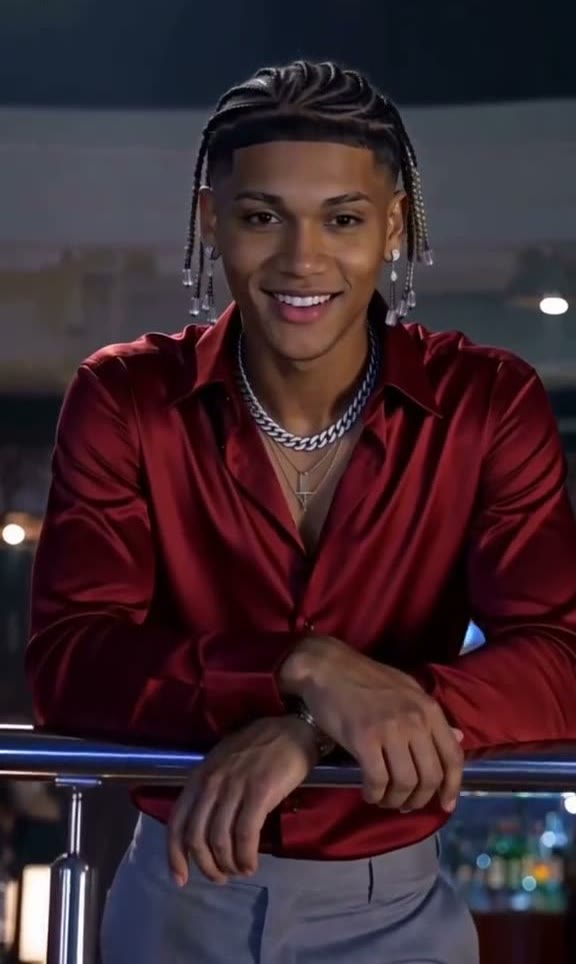
The clip starts with an adult leaning over a rail above a busy club floor. The camera then turns down to a separate dancer in the spotlight. The change in viewpoint is the part that makes the scene read: one person watches from above, and another takes the floor below.
The AI Trend Club page uses two adult photos for those two roles. The club layout, balcony, crowd and camera turn remain part of the scene. The source clip is vertical and runs about eleven seconds. The page links to the original post so you can compare the reference before you start.
| Time | Beat |
|---|---|
| Shot 1 | An adult leans over a rail above the club floor. |
| Shot 2 | The camera turns away from the balcony and looks down into the room. |
| Shot 3 | A separate dancer moves under a bright spotlight among the crowd. |
| Shot 4 | The camera closes in on the dancer while the club remains around them. |
02How to make the Club Balcony Spotlight AI video from two photos
The page carries the scene and role order into the creation flow. You do not need to write a prompt there. Review the selected photos and resolution before you submit, because the credit amount depends on the size you choose.
- Open the trend pageRead the source description and watch the linked original so you know which person is the balcony observer and which is the floor dancer.
- Choose Create your ownStart from this trend page so the two-photo roles are loaded in the right order.
- Add two adult photosUse one consenting adult photo for each role, and confirm you have permission to use both. Keep the balcony role and dancer role separate.
- Choose a resolutionA 480p video uses 300 credits. A 720p video uses 450 credits. Check the button for the current amount before you spend.
- Make the videoTap Make my video and wait for the result. The page prepares a silent video; download it and add a sound later in your social app if you want one.
03The photos that work
The roles are different, so use two different people in the inputs. You can check the free still preview before making the full video; it shows one frame, not the camera movement or the complete dance. Use people who have agreed to appear in an edited video.
- Add two separate adult photos.
- Use one adult as the balcony observer.
- Use a different adult as the spotlight dancer.
- Keep the two identities separate in their assigned roles.
- Confirm you have permission to use both photos.
04The Club Balcony Spotlight AI prompt
On AI Trend Club, there is no prompt to write. If you want to try the idea in another video model that accepts a reference clip, use the prompt below as a starting point and check the result before sharing.
Create a vertical club video in one continuous moving shot. Start above a busy two-level dance floor, with the person in the reference photo leaning over the upper balcony rail. Turn the camera down toward the bright spotlight below. Place the person in the second reference photo as the separate dancer in that light. Keep the two faces distinct and tied to their starting roles. Preserve the rail, club floor, crowd, lighting, and smooth camera turn. Do not add another lead, readable logos, or a new scene. Keep the video silent.05CapCut template or AI video?
A CapCut template can arrange clips you record yourself. It does not put your photo into the original club scene. The AI video flow on this page uses the linked source clip as a visual guide and places two photo roles into that scene.
Choose the template route if you already have footage and want to assemble it. Choose the AI video route if you want the two adult photos to play the balcony and spotlight roles in the reference scene. You can add captions or a sound after downloading, but keep the original creator credit when you refer to the source.
06Is the Club Balcony Spotlight AI video free?
Watching the original clip and reading this page is free. Making the full video uses credits. A new account receives 25 welcome credits, enough for a few images but not this trend video. A failed video returns its credits automatically. Check the amount shown on the creation button before you submit.
The Week pass is the least expensive listed way to get enough credits for a 480p version. The 1,000-credit pack also covers one 720p version. A 480p Club Balcony Spotlight video uses 300 credits; a 720p version uses 450.
| Option | Price | Credits |
|---|---|---|
| Week pass | $6.99 | 800 |
| 1,000-credit pack | $9.90 | 1,000 |
07Post your Club Balcony Spotlight remake
The remake is silent, so add a sound in TikTok or another social app if you want one. Credit @battos13 when you refer to the original clip. Keep the caption clear that your version uses AI, and do not imply that you filmed the source scene.
- From the balcony to the spotlight.
- Two roles, one club scene.
08Questions
- How many photos do I need for Club Balcony Spotlight?
- Use two separate adult photos. One plays the balcony observer, and the other plays the dancer below.
- Do I need to write an AI prompt?
- No. The page carries the scene into its creation flow. You can review the setup before you submit.
- Which AI makes this video?
- An AI video model guided by the original clip. The creation page shows the current price before you start.
- How many credits does it use?
- The 480p version uses 300 credits, and the 720p version uses 450 credits. Failed videos return credits automatically.
- Who made the original Club Balcony Spotlight clip?
- The original was posted by @battos13 on TikTok. We link to it above.