01What happens in the Burgundy Hair Dye trend
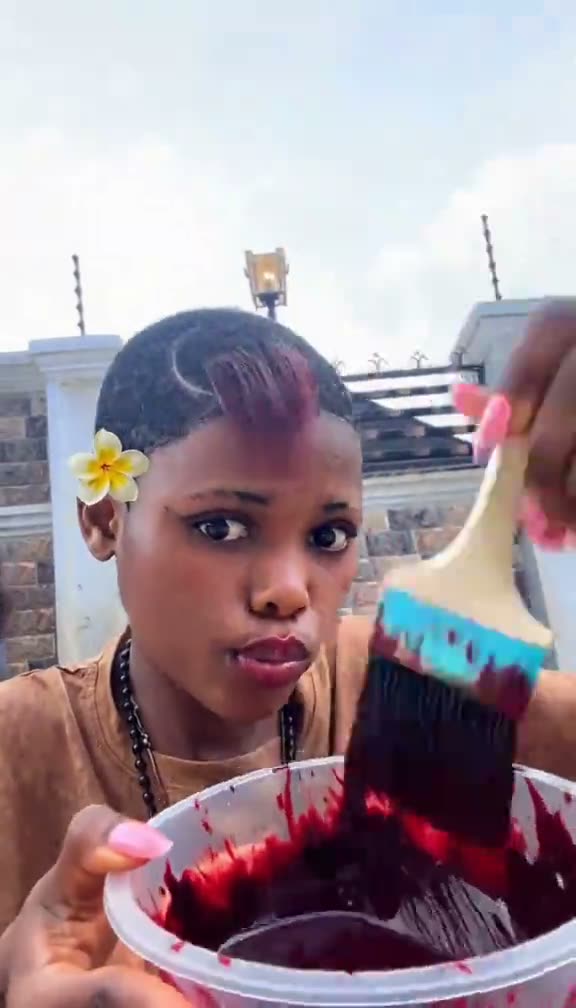
The Burgundy Hair Dye trend is a short color reveal filmed on a rooftop patio. The creator starts with a bowl and brush, applies color near the hairline, smooths the new length, then faces the camera to show burgundy waves. AI Trend Club uses the original clip as the motion reference and gives the lead role to the adult in your portrait.
The remake is a video, not a hair-color preview tool. It follows the source scene and actions, while the uploaded photo guides the lead's recognizable appearance. You can download with the original sound or choose the silent version. The table breaks the clip into its visible beats so you know what the reference asks the model to follow.
| Time | Beat |
|---|---|
| Shot 1 | The creator holds a bowl and brush at a rooftop patio. |
| Shot 2 | She brushes dye along the side of her hair. |
| Shot 3 | The new burgundy length is smoothed with a styling tool. |
| Shot 4 | She faces the camera to show the finished waves. |
02How to make the Burgundy Hair Dye AI video from one photo
Start from the trend page if you want the reference clip, creator credit and edit button together. The prompt is already part of the workflow, so you do not need to write a shot description or upload a separate video. Review the selected portrait and the displayed credit amount before you submit.
- Open the trend pageChoose Create your own to open the video setup for this clip.
- Add one portraitUpload one clear adult photo and confirm that you have permission to use it.
- Check the previewMake sure the selected photo is the person you want in the lead role.
- Choose a sizeSelect 480p for 553 credits or 720p for 830 credits. The button shows the amount before you spend.
- Create and downloadTap Make my video, then choose a download with the original sound or a silent version.
03The portrait that works
The workflow uses one adult portrait as the lead identity. The reference supplies the rooftop setting and the brush-and-reveal action, so the photo does not need to show a bowl, brush or burgundy hair. Pick an image where the face and hairstyle can be read clearly.
- Use one adult portrait, not a group photo.
- Keep the face visible and in focus.
- Show enough hair for the color change to read.
- Avoid a photo where a hat or other object hides most of the hairstyle.
- Use a photo you have permission to edit.
04The Burgundy Hair Dye AI prompt
AI Trend Club supplies the instructions, so there is no prompt to write on the trend page. If you want to test the idea in another video model that accepts a reference clip, this example describes the same simple sequence. Keep the result centered on one person and a visible color reveal.
Recreate the rooftop hair-color reveal from the reference clip with the person in the reference photo as the same lead throughout. Begin with the lead holding a bowl and brush, then show a careful brush pass along the side of the hair. Follow with a short styling motion that smooths the new length. End with the lead facing the camera so the burgundy waves are easy to see. Keep the rooftop framing and action order. Add no extra people, text, logos or watermark. Keep the video silent.05CapCut template or AI video
A CapCut template arranges clips or photos that you provide. It can add timing, transitions and captions, but it does not place your face into this creator's rooftop footage. The AI video flow uses the source clip as a reference and uses your photo for the lead, so the result follows the color-reveal scene instead of simply cutting together your own phone recordings.
You can still use CapCut after you download the result. Add a caption or adjust the final edit there if you like. Keep the creator credit when you refer to the original post, and do not present the remake as footage of a real hair-color appointment.
06Is the Burgundy Hair Dye AI video free
Watching the original and reading the trend page do not spend credits. Making a new video does. New accounts receive 25 welcome credits, which is enough for a few images but not this trend video. The current video price is 553 credits at 480p or 830 credits at 720p, and the editor shows the exact amount before you submit. Failed videos return their credits automatically.
The lowest listed purchase options are the Week pass and the 1,000-credit pack. The Week pass costs $6.99 and includes 800 credits. The pack costs $9.90 and includes 1,000 credits. Compare the credit amount for the size you choose before paying; a Week pass covers the standard 480p option, while the 720p option costs more than its included credits.
| Option | Price | Credits |
|---|---|---|
| Week pass | $6.99 | 800 |
| 1,000 credits | $9.90 | 1,000 |
07Post the hair-color reveal
The download includes the original sound. Before sharing, check that the color reveal is visible and that the edited lead still looks like the person in your photo. Credit @beauty.presh232 when you discuss or repost the reference, and link to the original TikTok rather than implying that you made it.
Keep a caption short and describe the edit as an AI remake. These ideas stay close to the trend's simple color-change format.
- A rooftop color reveal in burgundy waves.
- From brush pass to finished hair.
- Trying the burgundy hair transition with my photo.
08Questions
- Can I make this AI video with one photo?
- Yes. Add one clear adult portrait so the photo can guide the lead's appearance.
- Which AI makes the Burgundy Hair Dye video?
- AI Trend Club uses an AI video model guided by the original clip. The exact credit price appears before you submit.
- Can I make it on my phone?
- Yes. The video setup runs in the browser, so you can open the trend page on a phone without installing an app.
- Can I include the original sound?
- Yes. The trend page lets you download with the original sound or choose a silent clip.
- Who made the original?
- The selected TikTok is by @beauty.presh232. The page links to the original post and credits the creator.