01What happens in the Crochet Doll trend
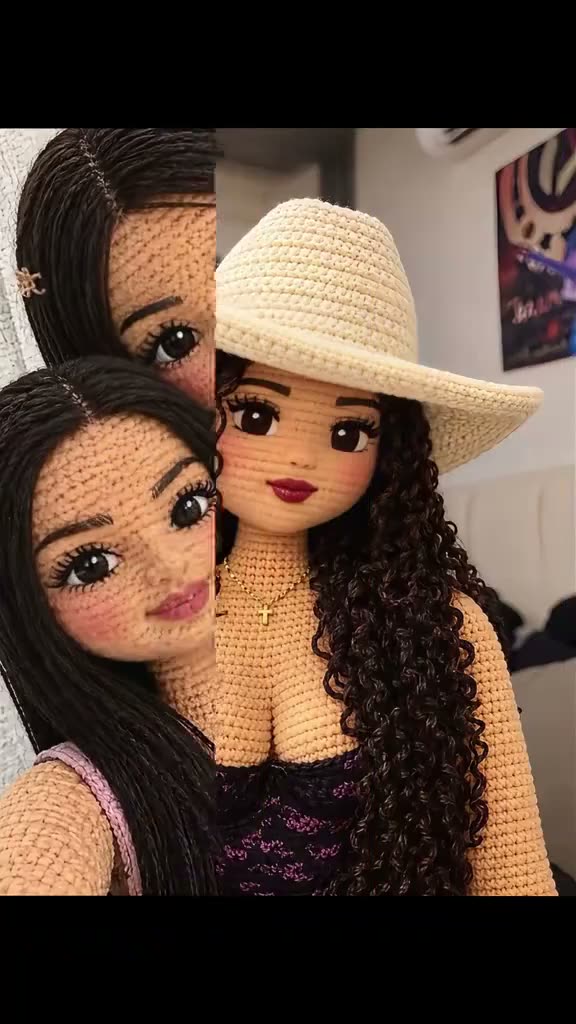
The Crochet Doll trend starts with a portrait and gives it the look of a small handmade figure. Soft yarn loops cover the visible surfaces, and the hair takes on a stitched, yarn-like texture. The goal is to keep the person recognizable while the materials change around their face, hairstyle, clothes and pose.
The linked TikTok by @rmraedkfo5 shows crochet-style dolls and a creator demonstrating a photo effect on a phone. AI Trend Club adapts that idea as a still-image edit. The editor does not animate the post or turn your portrait into a moving video. Use the table to see how the reference moves from examples to a phone demonstration.
| Beat | What the reference shows |
|---|---|
| Opening | Crochet-style dolls appear in a close portrait view. |
| Next | More yarn dolls are shown together. |
| Then | The creator holds a phone to demonstrate the photo effect. |
| Ending | The phone screen shows more crochet-style portraits. |
02How to make the Crochet Doll AI photo from one portrait
Open the trend page to see the source and the photo-edit button together. The prompt is included, so you can review the instructions before starting instead of writing them from scratch. Upload a portrait that you have permission to edit, and check the displayed price in the image editor before you send the request.
- Open the photo trendChoose Edit your photo to carry the included crochet prompt into the image editor.
- Add a portraitUpload one clear adult portrait with the face and hairstyle visible.
- Review the editRead the included prompt and confirm the photo is the one you want to change.
- Check the priceOne image edit uses 5 credits. The editor shows the price before you submit.
- Create and inspectMake one still image, then review the face, yarn texture and framing before you save or share it.
03The portrait that works
Use a single adult portrait where the face and hairstyle can be seen. The editor restyles the visible person in that image, so a clear input gives it a readable face, pose and clothing to preserve. You do not need a photo of a doll or yarn. The image prompt describes the crochet material and lets your portrait provide the person.
The page is designed for an individual portrait. A group photo can make it unclear which person should become the crochet figure. Pick an image you own or have permission to edit. Before creating, check that the prompt still describes a portrait and that the displayed output is a still image.
- One adult portrait with a visible face.
- Hair that can be seen in the source image.
- A person in focus so the main features remain readable.
- A single person rather than a group.
- A photo you have permission to edit.
04The Crochet Doll AI photo prompt
AI Trend Club fills in the edit prompt for this page. You can read it in the image editor before you submit. If you use another image editor, this sample describes the same treatment while keeping the person's identity and composition tied to the portrait you provide.
Restyle the uploaded adult portrait as a handcrafted crochet doll. Preserve the same person's recognizable face, hairstyle, skin tone, expression, pose, clothing, colours and composition. Render the visible surfaces as soft yarn loops and stitched fabric, including yarn-textured hair. Keep the person recognizable and retain the original framing. Make one complete still image, not a video or a collage. Add no text, logo or watermark.05CapCut template or AI photo
A CapCut template arranges video clips or photos that you bring into a timeline. It can add cuts, transitions and captions, but this page's editor changes the visual style of one portrait. It creates a still crochet-style image, not a video sequence. Start here when you want a yarn-doll portrait; choose a video template when you want moving clips assembled into a timeline.
You can use CapCut after you download the still if you want to place it in a separate video or add a caption elsewhere. That additional editing does not change what the image editor returns. Check that the downloaded file is a single image before you share it as a photo.
06Does the Crochet Doll AI photo cost credits
The linked reference and the trend page can be viewed without making an image request. Creating the edited portrait uses credits. One image edit currently costs 5 credits, and the editor shows the price before you submit. New accounts receive 25 welcome credits. Check the balance and the price shown in your account before you start another edit.
The result is one still image per request. A failed edit can be reviewed and retried with a clearer portrait or a prompt adjustment, but the model may change small details in a face or clothing. Inspect the result before you decide whether it is ready to save or share.
| Action | Credits |
|---|---|
| One image edit | 5 |
| Welcome credits for a new account | 25 |
07Share the crochet-style portrait
Look at the face, hairstyle, clothes and overall framing before publishing. The goal is a recognizable portrait with a soft stitched surface, so check that the yarn loops have not hidden the details you want to keep. Describe it as an AI-edited image if that context will help viewers understand the result.
When discussing the reference post, credit @rmraedkfo5 and link to the creator's TikTok. The captions below describe the photo edit without claiming that the source creator made your image.
- My portrait, restyled as yarn art.
- A crochet-inspired look from one photo.
- Soft stitches, familiar face.
08Questions
- Does the Crochet Doll filter make a video?
- No. The existing photo editor creates one still image, not an animation or video.
- What photo should I add?
- Use one clear adult portrait with the face and hairstyle visible.
- Do I have to write a prompt?
- No. The trend page carries an included edit prompt into the image editor, where you can review it.
- How many credits does one edit use?
- One image edit currently uses 5 credits. The editor shows the price before you submit.
- Who posted the reference?
- The selected TikTok is by @rmraedkfo5. AI Trend Club links to and credits that post.