01What happens in the Dog Electric Shock Prank trend
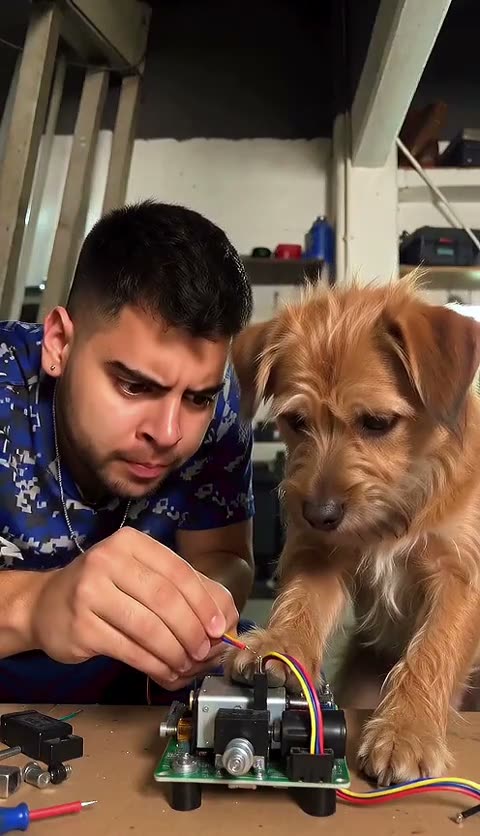
The Dog Electric Shock Prank trend is a staged reaction gag with an adult and a dog at a table. A brief digital flash interrupts the scene, both subjects react, and the view returns to the pair. This page adapts the beat as a fictional visual effect. It does not call for electricity, a physical device or contact with an animal.
The remake uses two separate photos so the adult and dog stay in their own roles. The source clip guides the table scene and the timing, while the model treats the flash as a screen effect. You can choose a download with the original sound or a silent version. Review the shot order before you start.
| Time | Beat |
|---|---|
| Shot 1 | An adult and dog sit across from each other at a table. |
| Shot 2 | A brief visual flash interrupts the same tabletop scene. |
| Shot 3 | The adult and dog show exaggerated surprised expressions. |
| Shot 4 | The shot returns to the pair looking toward each other. |
02How to make the Dog Electric Shock Prank AI video from two photos
Open the trend page to see the original creator credit and the two-photo setup in one place. Use a separate adult photo and dog photo. The prompt and reference are already supplied by the workflow, so you do not need to write a new effect or stage a real reaction. Check the credit amount before submission.
- Open the trend pageChoose Create your own to enter the video setup.
- Add the adult photoSelect one clear adult photo and confirm that you have permission to use it.
- Add a separate dog photoUse a different image that clearly shows the dog. Keep the adult and pet in their own upload slots.
- Choose a sizeSelect 480p for 600 credits or 720p for 899 credits. The button shows the amount before you spend.
- Create and inspectSubmit the edit, then check both identities and confirm the flash stays a fictional visual effect. Choose a sound or silent download when it is ready.
03The two photos that work
The setup needs one adult photo and one dog photo. The first image supplies the adult identity, and the second supplies the dog's face, species and coat. Keep the roles separate so the edit does not blend the person and pet into one subject.
- Use one clear adult photo for the adult role.
- Use a separate photo that shows the dog's face and coat.
- Do not upload one combined picture for both roles.
- Keep the dog's species and markings natural in the result.
- Use photos you have permission to edit.
04The Dog Electric Shock Prank AI prompt
AI Trend Club supplies the reference and instructions, so there is no prompt to write on the trend page. If you want to test the idea in another video model that accepts a reference clip, keep the adult and dog identities distinct and describe the flash as a harmless screen effect only.
Recreate the tabletop reaction scene from the reference clip as a fictional, non-contact visual gag. The adult in the first reference photo plays the seated adult, and the dog in the second reference photo stays a separate natural dog with the same species and coat markings. Show a brief digital flash on screen, followed by surprised expressions and a return to the same pair. Keep the table framing and simple action order. Show no real shock, wires, electrical devices, contact, distress or injury. Add no text or watermark.05CapCut template or AI video
A CapCut template can arrange your own clips with cuts, effects and captions. It does not put your adult and dog into the original creator's scene. The AI video flow uses the reference clip for the tabletop framing and uses the two uploaded photos for separate identities, so the result follows the same short reaction format.
The flash should read as an edited screen effect. Never use electricity, wiring or a device to frighten or hurt a real animal. After you download the video, you can use CapCut to add a caption or prepare a separate social edit. Keep the creator credit when you discuss the source clip.
06Is the Dog Electric Shock Prank AI video free
Watching the source and reading the page do not spend credits. Making the video does. New accounts receive 25 welcome credits, which is enough for a few images but not this trend video. The current price is 600 credits at 480p or 899 credits at 720p. The editor shows the amount before you submit, and failed videos return their credits automatically.
The lowest listed purchase options are the Week pass and the 1,000-credit pack. The Week pass costs $6.99 and includes 800 credits, which covers the standard 480p option. The pack costs $9.90 and includes 1,000 credits. Check the selected size and credit amount before paying.
| Option | Price | Credits |
|---|---|---|
| Week pass | $6.99 | 800 |
| 1,000 credits | $9.90 | 1,000 |
07Share the fictional reaction
Check the finished edit before sharing. Make sure the dog remains a dog, both photo roles stay distinct and the flash does not look like a real device or contact. Describe it as a fictional digital effect, not a real event. Credit @jarolcamil0 when you refer to the selected TikTok, and link to the source post.
The gag is the sudden flash followed by two surprised looks. A short caption can state that the effect is edited and keep the attention on the reaction.
- A digital flash and a double take.
- A fictional reaction edit with my dog.
- The surprise is in the cut, not a real shock.
08Questions
- Is the effect real?
- No. This recipe uses a fictional digital flash only. It does not require electricity, wires, a device or contact with an animal.
- How many photos do I need?
- Use one adult photo and a separate dog photo so each upload guides its own role.
- Which AI makes this video?
- AI Trend Club uses an AI video model guided by the original clip and the two selected photos.
- Can I make it on my phone?
- Yes. Open the trend page in your mobile browser. The video setup runs in the browser without an app install.
- Who made the original?
- The selected TikTok is by @jarolcamil0. The page links to the source and credits the creator.