01What happens in the dinosaur dance
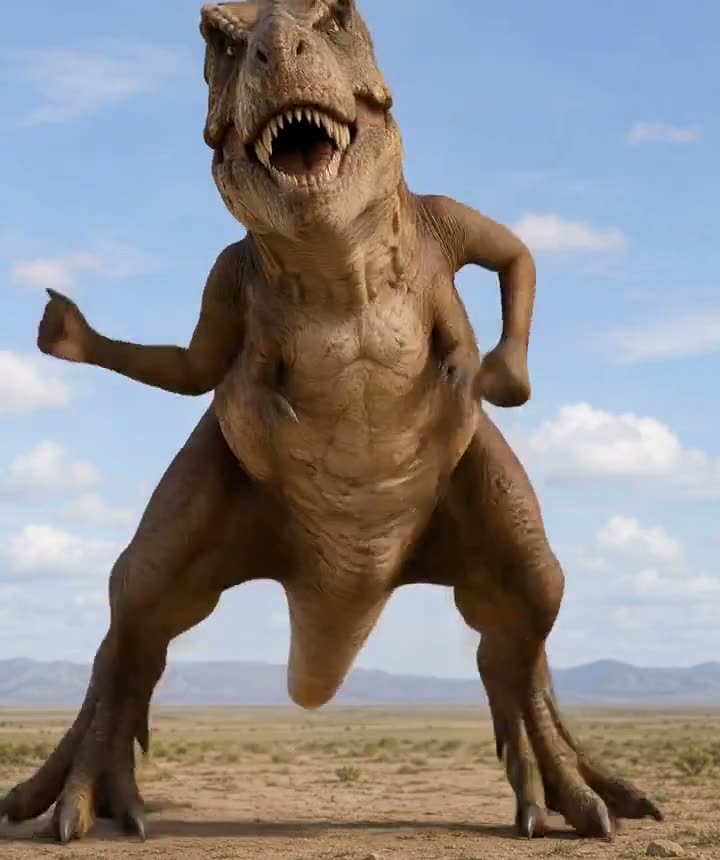
A brown dinosaur stands close to the camera on a broad plain. It shifts its weight, dips toward the ground and swings an arm sideways before reaching overhead. The shot holds on one dancer, so you can follow the full sequence without cutting to another angle.
Watch the source on the trend page before you upload your photo. Look at the knee bend and the big reach separately. They are the two poses that give the dance its shape. The open sky and low horizon make the movement readable even on a small screen.
| Time | Beat |
|---|---|
| 0:01 | The dinosaur faces the low camera and starts moving its arms. |
| 0:04 | It bends, shifts its weight and begins to stand back up. |
| 0:07 | One arm swings across the body as the dancer keeps stepping. |
| 0:11 | The dancer reaches up and opens out near the end. |
02Make the AI dance from one pet photo
- Open the source and creation pageOpen the Anone Daisuki Dinosaur Dance on AI Trend Club and play the source once. Pick Create your own when you are ready. The short excerpt supplies the setting and timing for the dance.
- Add your cat or dogChoose one photo of the animal you want to cast. Check the upload before going on. You want a single face and enough of the body to see the coat and markings that distinguish the animal.
- Check the shot you are makingThe site uses the uploaded photo as the reference for the lead. The framing stays portrait like the source. The landscape and dance sequence come from the clip, so leave the composition work to the template.
- Choose a resolution and check the quoteThe 480p version uses 646 credits and the 720p version uses 968 credits. Read the credit quote shown before you spend. The lower resolution uses fewer credits for the same scene.
- Render and check the clipTap Make my video. Review how the pet looks at the dip and the reach before downloading. The exported clip is silent. Keep it silent or add audio you have permission to use in your editor.
03Pick a clear photo of one pet
Choose for recognition. If your cat has a stripe on its forehead or your dog has a pale patch on its chest, include that feature. A photo that hides the feature gives the model less of that animal to keep through the turn.
- Use a single cat or dog in the photo so the lead is easy to identify.
- Show the face clearly enough to see its outline and markings.
- Include the body when you have a portrait that shows it clearly.
- Choose an image where the coat is visible through the light and shadows.
- Use a photo you have permission to edit.
04Prompt for a reference-image video model
AI Trend Club already includes the dance instructions. For a model that accepts a reference image, describe who moves, what the camera does and how the poses follow each other. A short sequence with distinct actions gives you an easier first result to evaluate.
Cast the cat or dog from the reference photo as the only dancer on an open plain under a blue sky. Keep the pet’s face, coat and markings recognizable. Hold the camera low and fixed. Start with a sideways step and a small arm or paw lift, then bend low and rise. Sweep one arm across the body, reach overhead, and open outward to finish. Keep the ground and horizon steady. Use a playful movement style and deliver the clip in silence.05Where CapCut fits
A filmed dance edit usually starts with a clip you record and then trim around the beat. Here, the pet photo supplies the subject and the reference video supplies the movement. Once the clip is ready, a video editor is useful for adding a caption or audio you have permission to use.
Check the center of the frame before adding a caption. The reach takes up space near the top and the crouch draws attention down to the ground. A short caption outside those areas leaves both poses easy to see.
06What the dance costs in credits
You can watch the source and read the trend page free. A new account gets 25 welcome credits, which cover some image work. A dance render uses the quote shown in the creation flow. If a video render fails, the credits come back automatically.
The Week pass covers one 480p render at the listed quote. The 1,000-credit pack covers either listed resolution. Use the current quote on the creation screen to check what your balance covers.
| Option | Price | Credits |
|---|---|---|
| Week pass | $6.99 | 800 |
| 1,000 credits | $9.90 | 1,000 |
07Check the last pose before sharing
Play the download through the sideways swing and the final open pose. Look for a consistent face and the same coat across both moments. Credit @terano_saurusu for the visual reference when sharing your take.
- The smallest dancer on the plain.
- A very serious pet dance rehearsal.
- Wait for the overhead pose.
08Questions
- Can I make this on my phone?
- Yes. The upload, creation and download steps run in the browser.
- Can I use a dog photo?
- Yes. This version is set up for a cat or dog. Use one photo of the animal you want to cast.
- Who posted the dinosaur reference?
- The visual take shown on the trend page is from @terano_saurusu on TikTok. The source link opens that post.
- Does the download have a soundtrack?
- The video comes out silent. You can keep it that way or add licensed audio in your own editor.