01What happens in the Birthday Car trend
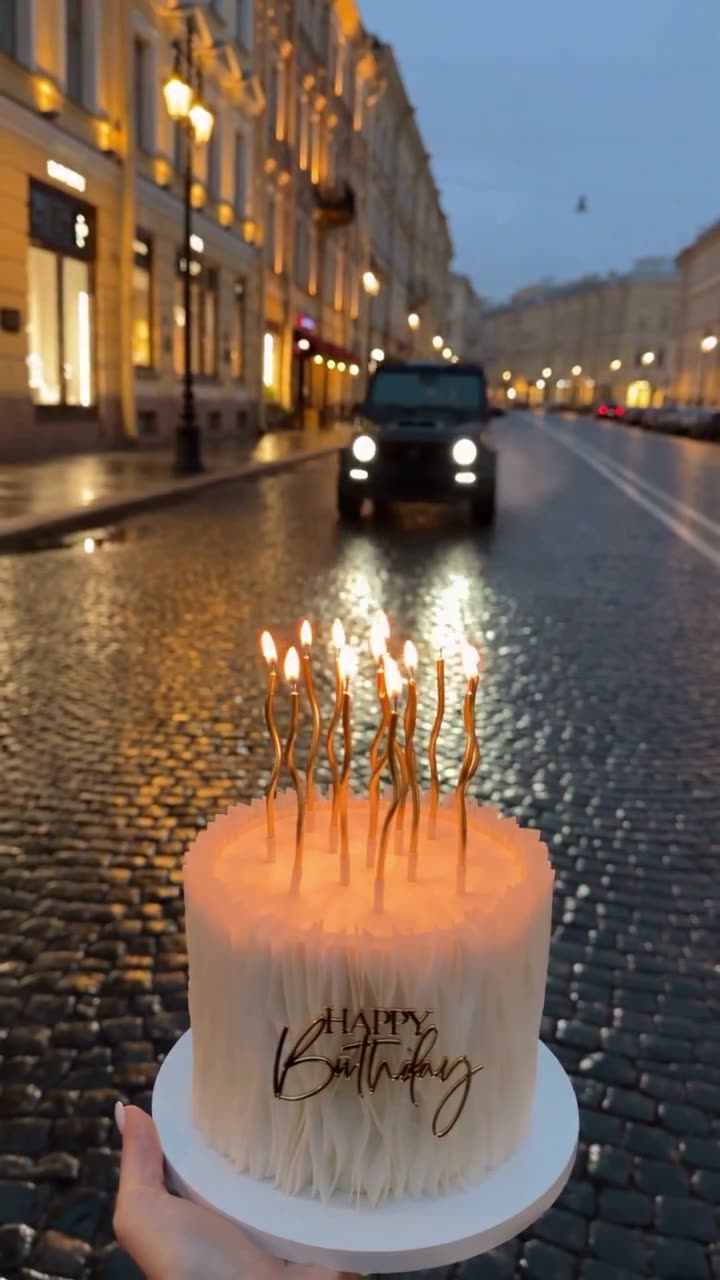
The Birthday Car trend turns a birthday wish into a short street scene. A candlelit cake sits on a wet city street as a dark SUV pulls up beside it. An adult leans from the window to blow out the candles, and the clip ends in black and white with a birthday title over the scene. One adult photo supplies the person at the window while the cake and street remain in view.
The effect moves from the cake in the foreground to the vehicle arriving at dusk, then to the person blowing out the candles. The final change to black and white makes the closing birthday frame easy to recognize. The page describes the clip as a vertical video and includes the original sound. It is a stylized AI scene, not a recording of a real birthday surprise.
| Time | Beat |
|---|---|
| Shot 1 | A candlelit cake fills the foreground on a wet city street. |
| Shot 2 | A dark SUV pulls up beside the cake at dusk. |
| Shot 3 | An adult leans from the window and blows out the candles. |
| Shot 4 | The clip ends on a black-and-white birthday frame. |
02How to make the Birthday Car AI video from one photo
The AI Trend Club page already includes the scene description, so you do not need to write a prompt there. Add one adult photo, select a video size and confirm the price shown on the button before you submit. The page flow includes the source sound. Review the clip after it renders, especially the person at the window and the transition to the closing birthday frame.
- Open the trend pageRead the page description and watch the linked original to understand the cake, vehicle and candle sequence.
- Choose Create your ownOpen the video editor from the trend page. The scene setup is ready to use.
- Add one adult photoConfirm you have permission to use the photo. The person in the image takes the role at the vehicle window.
- Choose a video sizeThe current price is 369 credits at 480p or 553 credits at 720p. Read the amount on the button before spending.
- Make and review the clipSubmit the edit and check the face, candle moment and black-and-white ending. The page says failed video credits come back automatically.
03The photo that works
Use a clear adult portrait with the face visible. The person in the image becomes the adult leaning from the vehicle window, so the face should be easy to see in the source photo. If the person is difficult to place in the result, the page suggests trying a sharper portrait with the face unobstructed. Use a photo you have permission to edit.
- One clear portrait of an adult
- The face visible in the photo
- A sharper image if the person is difficult to place
- An unobstructed face if the result does not look right
- Permission from the person shown before creating or sharing
04The Birthday Car AI prompt
On AI Trend Club, you do not need to write a prompt. The page supplies the cake, street, vehicle and candle sequence. If you want to try a similar scene in another video model that accepts a reference image, you can start with the prompt below and review the result after it renders.
Use the person in the reference photo as the adult leaning from the window of a dark SUV in a vertical birthday scene. Begin with a candlelit cake in the foreground on a wet city street at dusk. Have the vehicle pull up beside the cake, then show the person leaning from the window to blow out the candles. Keep the cake and street visible as the action unfolds. End with a black-and-white birthday frame and a simple birthday title.05CapCut template or AI video?
A CapCut template can arrange footage you record, such as a cake, a car and a birthday greeting. It cannot place your face into the original scene or make the vehicle and cake sequence from a single portrait. The AI video flow on this page uses your adult photo as the person at the window and follows the scene shown by the reference.
After downloading, you can use CapCut to add captions or a different sound. The page includes the original sound in its flow, so check the audio selection before export. If you share the result as a birthday car trend, keep the caption focused on the cake, candles and window reveal rather than suggesting the scene was filmed as a real event.
06Is the Birthday Car AI video free?
You can watch the source and read the trend page without using video credits. Creating a clip uses credits. A new account starts with 25 welcome credits, enough for a few images but not for this trend video. The Week pass costs $6.99 and includes 800 credits, which covers one standard video at the current listed price. A failed video returns its credits automatically. The editor shows the exact cost for your selected size before submission.
The 1,000-credit pack is another listed option. You do not need to purchase either option to view the page. At the current listed price, the 480p version uses 369 credits and the 720p version uses 553 credits. Check the button in case the live amount changes before you create.
| Option | Price | Credits |
|---|---|---|
| Week pass | $6.99 | 800 |
| 1,000 credits | $9.90 | 1,000 |
07Post the Birthday Car video
The cake and candles establish the birthday, while the vehicle arriving at dusk leads into the candle blowout and monochrome ending. The original sound is included in the page flow. If you refer to the source version, credit @mira__98kr and link to the original post. Describe your result as an AI scene when that helps viewers understand what they are seeing.
- A birthday cake waiting beside the street.
- Candles, a car window and a birthday wish.
- A dusk scene that ends in black and white.
08Questions
- What is the Birthday Car trend?
- It is a birthday scene with a cake on a wet street, a dark vehicle at the window and an adult blowing out the candles.
- How do I make the Birthday Car video?
- Open the trend page, add one adult photo, choose a size and submit. The scene setup is already on the page.
- How much does it cost?
- The page lists 369 credits at 480p and 553 credits at 720p. The Week pass costs $6.99 for 800 credits. Check the button before submitting.
- Which AI makes the Birthday Car video?
- The page uses an AI video model guided by the original clip. It carries the cake, vehicle and candle scene into the video flow.
- Who posted the original?
- The selected original is by @mira__98kr. The trend page links to the post and credits the creator.