01What happens in the Hand of God Golden Lift trend
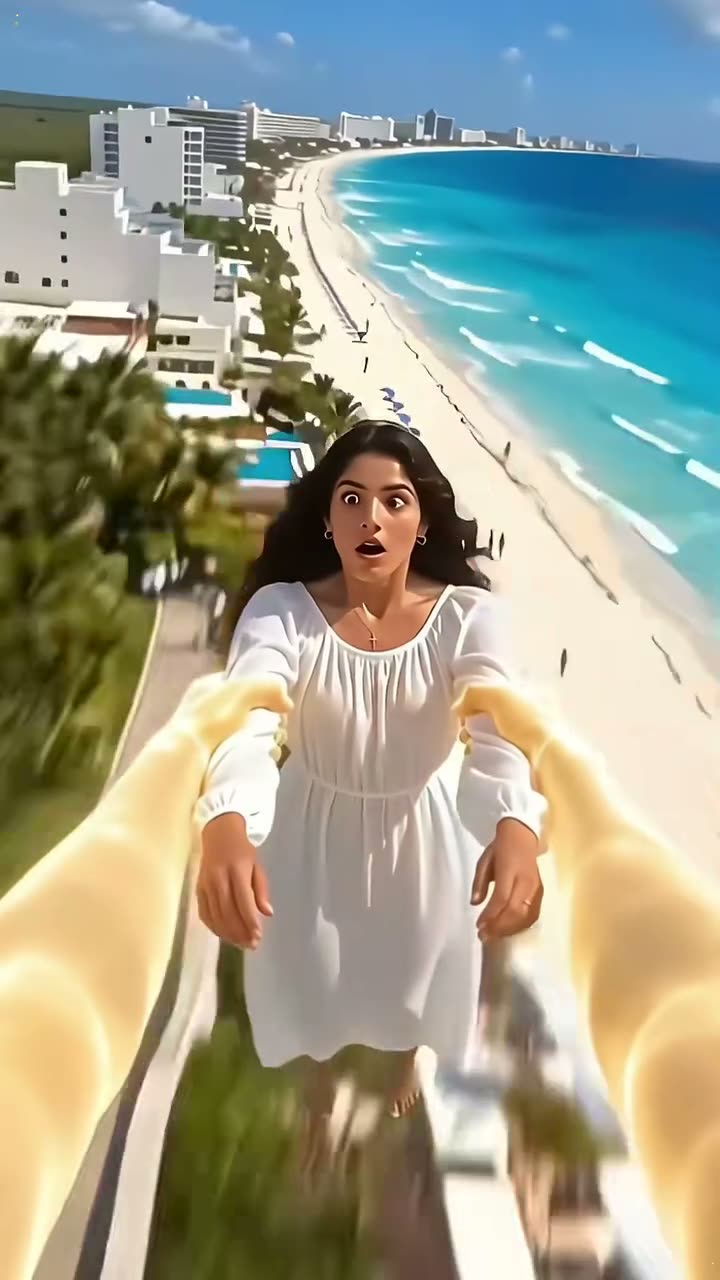
Two golden hands hold a person in white high above a coast. The camera rises with the person and the buildings drop away in the background. By the last beat, the adult looks up with the blue water below.
This Hand of God Golden Lift template follows the solo coastal rise from the linked creator post. The complete TikTok also shows other scenes and a phone walkthrough. The short excerpt on the trend page shows the sequence used to guide your video.
| Beat | What you see |
|---|---|
| Shot 1 | An adult in white rises with one glowing hand to either side. |
| Shot 2 | The buildings and shore fall lower in the frame as the camera rises. |
| Shot 3 | The blue sea opens beneath the adult, who looks up. |
02How to make the Hand of God Golden Lift AI video from one photo
- Open the trendGo to the AI Trend Club page and watch the credited source video. It shows the camera angle and the part of the scene the generator follows. Open Create your own to start from that particular reference.
- Pick your photoChoose a portrait of one adult to play the person between the glowing hands. Use an image you have permission to use. Review the photo in the creation screen before sending it to the generator.
- Review the setupThe template supplies a reference and a prompt for the scene. This step is where you confirm who should play the lead and make sure the photo is the one you intended to use.
- Choose a resolutionThe guide quote is 185 credits for 480p and 277 credits for 720p. Check the exact quote on the create button and tap Make my video when you are ready.
- Review and downloadWatch the clothing, the two golden hands and the height change. When the shot opens out over the water, look for the same face and hair from the beginning. The person is the only role your photo changes. Download the vertical clip if you are happy with it. You can play it back without audio or add sound in your editing app afterward.
03The photo that works
Use a picture with a clear adult face and visible shoulders. The figure takes up less of the frame as the coast opens out, so recognizable features matter.
If the face starts clear and becomes hard to recognize during the rise, review the photo at a small size. The hair and facial features should still be easy to pick out. Try an evenly lit portrait with a larger face area if the details disappear. The reference supplies the white clothing and the coast, so choose the upload for the person’s likeness.
- Pick one adult in the photo.
- Keep the face and shoulders in view.
- Choose even light across the face.
- Avoid sunglasses that cover the eyes.
- Use a sharp portrait in place of a distant figure.
04The Hand of God Golden Lift AI prompt
AI Trend Club fills in the prompt when you open the template. If you are building the scene in a tool that accepts both a photo and a reference video, this is a starting prompt. Pair it with the source movement so the sequence and point of view are clear to the model.
Place the adult in the reference photo in a short vertical coastal lift. Two separate glowing golden hands carry the adult upward, with the person safely supported between them. The person wears flowing white clothing and keeps the same recognizable face, hair and skin tone throughout. Follow the upward camera motion as the coastline and buildings drop lower and blue water fills the view beneath the figure. Let the adult look up as the camera rises. Use one continuous solo lift with the same daylight and framing. Render the video silent.05CapCut template or AI video?
If you already have a clip of the lift, you can use an editor such as CapCut to cut it or add a caption. The AI video template serves a different purpose: you start with one portrait and use the short coastal rise as the visual reference for your own clip. Finish the video there, then add any text or sound you want in your editor.
For this workflow, open the create link beside the source clip so you start from the matching movement. The downloaded file is already vertical, so you can review the framing before you decide what to add during editing.
06Is the Hand of God Golden Lift AI video free?
It is free to open the trend and watch the reference. Making a video costs credits. A new account receives 25 welcome credits, enough for a few images. This video needs more credits than that welcome balance.
The Week pass and the 1,000 credits pack both cover one render at either listed resolution. Check the button for the current quote before you spend. If the video job fails, the credits for that job automatically return to your balance. You can open the trend again and review your photo before deciding whether to try again.
| Option | Price | Credits |
|---|---|---|
| Week pass | $6.99 | 800 |
| 1,000 credits pack | $9.90 | 1,000 |
07Post your version
The water opening underneath gives the shot its sense of height. Start with the golden hands visible and leave enough of the rise for viewers to see the shoreline recede. The file downloads silent. Add a sound you have permission to use if you want one for your post.
Credit @lunita35787 as the account that posted the reference. The source link is on the trend page. You can use one of these lines as a caption or write your own in the voice you use for your posts.
- The coast looked smaller from here.
- A lift straight over the water.
- Wait for the shoreline to drop away.
08Questions
- Is this the God Picked Me Up effect?
- God Picked Me Up is another name people use for the golden hands lift. This version follows the brief solo rise above the coast.
- Does it include the later scenes from TikTok?
- The creation reference is the solo coastal excerpt above the guide. The link beside the clip opens the full post, which continues past that moment.
- Why is the source clip shorter than four seconds?
- The featured source excerpt is about 3.2 seconds. The create screen quotes the template at a four-second render length.
- Does my photo need a beach background?
- Choose the portrait for the face and shoulders. The coastal view, white clothing and golden hands come from the reference scene.
- Who posted the reference clip?
- The linked post was shared on TikTok by @lunita35787. Its source link is on the trend page.