01What happens in the Airbag Prank trend
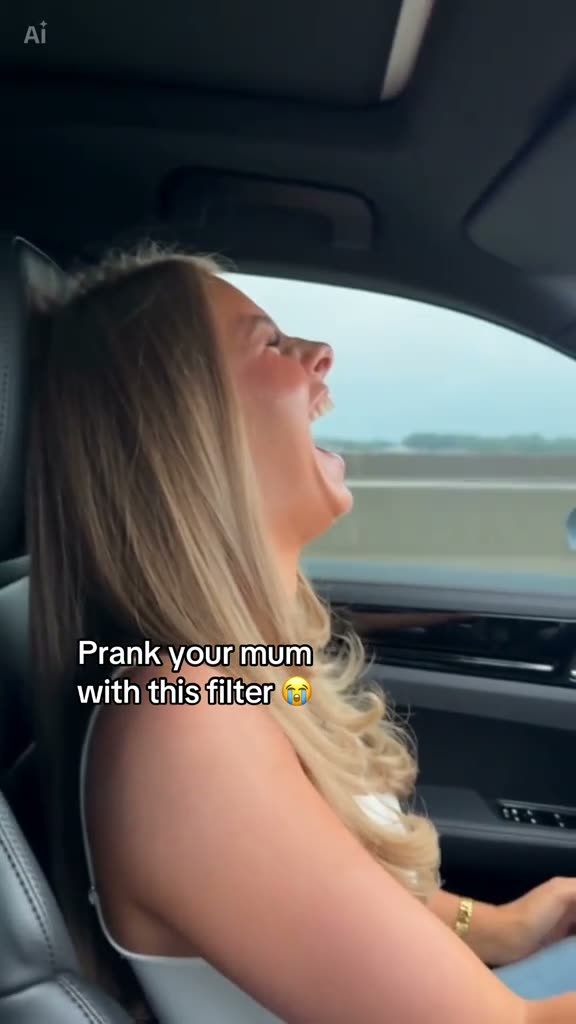
The Airbag Prank is a short fictional car scene. An adult laughs in the driver’s seat, an airbag opens into the foreground, and the driver reacts with surprise. The effect uses one adult photo to place a person in the driver role while the car interior and passenger-side camera view remain part of the scene. It is an AI effect, not footage of a real crash or a real airbag deployment.
The sequence has a clear setup and payoff. The first view shows the driver laughing in profile. The airbag then opens while the cabin stays visible. The driver turns toward it, and the clip ends on a surprised expression. That change from laughter to surprise is the core of the prank. Keep that context with the result so viewers understand it is staged.
| Time | Beat |
|---|---|
| Shot 1 | An adult laughs in profile from the passenger-side camera view. |
| Shot 2 | A white airbag opens into the foreground while the cabin stays in view. |
| Shot 3 | The driver turns toward the deployed airbag. |
| Shot 4 | The clip ends on the driver’s surprised reaction. |
02How to make the Airbag Prank AI video from one photo
The trend page carries the scene setup into the video editor, so there is no prompt to write on AI Trend Club. Add one adult photo, review the selected size and credit amount on the button, then submit only when the details look right. The page describes a vertical clip with the original sound included. Watch the finished result before saving or sharing, and label the airbag scene as fictional when the context might be unclear.
- Open the trend pageRead the description and watch the linked original to understand the fictional airbag reaction.
- Choose Create your ownOpen the video flow from the trend page. The page supplies the effect setup, so you do not need to write a prompt.
- Add one adult photoConfirm you have permission to use the photo. The person takes the driver role in the same car scene.
- Choose a video sizeThe current price is 507 credits at 480p or 761 credits at 720p. Read the amount on the button before spending.
- Make and review the clipSubmit the edit, then check the face and the airbag reaction. The page says a failed video returns its credits automatically.
03The photo that works
Use a clear adult portrait with the face visible. The person in the photo becomes the driver in the scene, so choose an image that lets the face read clearly after the effect. Use a photo that belongs to you or that you have permission to edit. The page is built around an adult person in the driver role.
- One clear photo of an adult
- The face is visible in the photo
- A sharper image if the driver’s face looks different in the result
- An unobstructed face if the first result does not resemble the person
- Permission from the person shown before you submit or share
04The Airbag Prank AI prompt
On AI Trend Club, you do not need to write a prompt. The page already sets up the driver, car interior and airbag reaction. If you want to try a similar idea in another video model that accepts a reference image, you can start with the prompt below and review the result carefully.
Use the person in the reference photo as the adult driver in a fictional car scene, viewed from the passenger side. Begin with the driver laughing in profile inside the car. Open a white airbag into the foreground while keeping the cabin visible. Have the driver turn toward the airbag with a surprised reaction, then end on that expression. Keep the camera angle and car interior consistent through the sequence. Present the moment as a staged AI effect, not a real crash or injury.05CapCut template or AI video?
A CapCut template can arrange footage that you record yourself. It does not place your face inside the original car scene or recreate the airbag moment from a photo. The AI video flow on this page uses your photo as the driver and follows the scene shown by the reference. Choose the method based on whether you want to edit your own footage or create this fictional scene around a photo.
After you download the finished clip, you can use CapCut to add captions or the sound you want. This page includes the original sound in its video flow, so check the audio choice before exporting. Keep any caption clear about the scene being an AI effect if a viewer could mistake the airbag for a real event.
06Is the Airbag Prank AI video free?
Watching the original and reading the trend page do not use video credits. Creating a clip does. A new account starts with 25 welcome credits, which is enough for a few images but not enough for this trend video. The current Week pass is $6.99 for 800 credits and covers one standard video at the listed price. A failed video returns its credits automatically. Check the button for the exact amount before you submit because the editor displays the cost for the size you choose.
The 1,000-credit pack is another listed purchase option. You do not have to buy either option just to view the reference or page. The page currently lists the same credit amount for this video whether you select the standard 480p output or the 720p output shown in the editor.
| Option | Price | Credits |
|---|---|---|
| Week pass | $6.99 | 800 |
| 1,000 credits | $9.90 | 1,000 |
07Post the Airbag Prank video
The clip works as a quick surprise because the driver begins by laughing and ends by reacting to the airbag. The original sound is included in the page flow. If you refer to the source look in a caption, credit @capcutaifilters1 and link to the original post. Describe your result as fictional AI content so the scene is not presented as a real crash or safety incident.
- A laugh, an airbag, and a surprised turn.
- A fictional car scene built around one reaction.
- The airbag surprise, clearly labeled as an AI effect.
08Questions
- What is the Airbag Prank trend?
- It is a fictional AI car scene where an airbag opens beside the driver and the person reacts. It is not real crash footage.
- How do I make the Airbag Prank video?
- Open the trend page, add one adult photo, choose a video size and submit the edit. There is no prompt to write on AI Trend Club.
- How much does the video cost?
- The page lists 507 credits at 480p and 761 credits at 720p. The Week pass is $6.99 for 800 credits. Check the button before submitting.
- Which AI makes the Airbag Prank video?
- The page uses an AI video model guided by the original clip. It carries in the scene setup, so you do not need to write a prompt.
- Who posted the original?
- The selected original is by @capcutaifilters1. The trend page links to that post and credits the creator.