01What happens in the Cardo Dinner trend
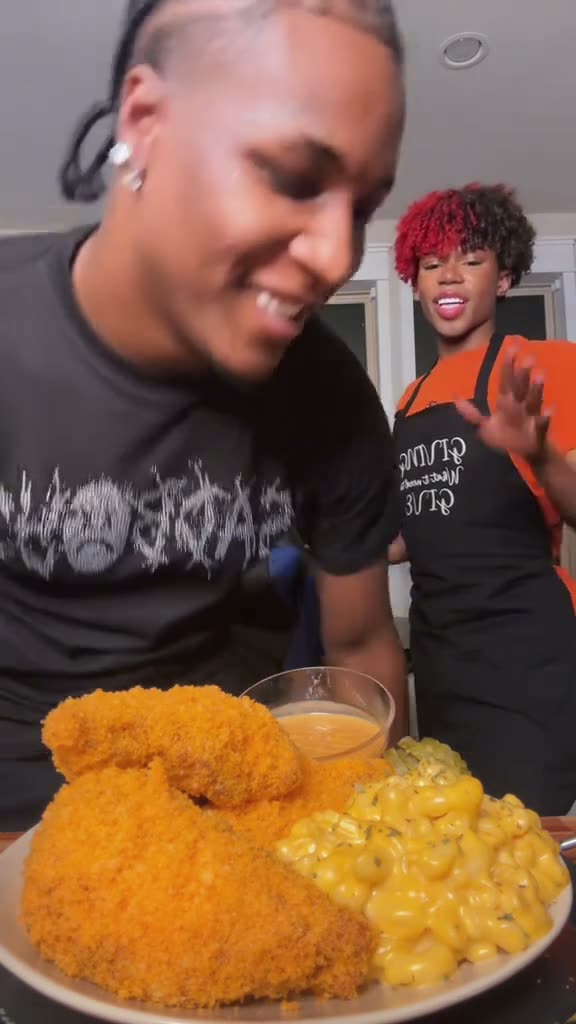
The Cardo Dinner clip is a short two-person scene around a meal. One adult sits at the table while another stands behind it and gestures toward the plated food. The camera stays close to the table, so the exchange and the meal share the frame. The linked example is the opening dinner scene from a TikTok post by @realjayllnn.
The page lets you make a new AI video with two adult photos, one for each role. The diner and standing person remain separate people. The generated video is silent and does not include the original sound.
| Time | Beat |
|---|---|
| Shot 1 | A diner sits beside a large plate in the foreground. |
| Shot 2 | A second adult stands behind the table and gestures toward the meal. |
| Shot 3 | The two people continue their short exchange across the table. |
| Shot 4 | The dinner setup remains in view through the end of the clip. |
02How to make the Cardo Dinner AI video from two photos
Start on the Cardo Dinner page so the correct two-person workflow opens. Your first photo plays the seated diner, and your second photo plays the person standing behind the table. Use separate photos of adults who agreed to appear. There is no prompt to write.
The page shows the current credit price before you submit. At the standard 480p setting, this video uses 692 credits. At 720p, it uses 990 credits. Check the button after choosing a resolution because it displays the exact amount before you spend.
- Open the trend pageGo to the Cardo Dinner page and watch the linked reference scene before you begin.
- Start your versionPress Create your own to open the existing two-photo video flow.
- Add both adult photosUpload the diner first and the standing cook second. Confirm you have permission to use both photos.
- Choose a resolutionThe 480p video uses 692 credits. The 720p video uses 990 credits. Review the button price before continuing.
- Make and review the videoTap Make my video. When it is ready, check both identities, the roles and the table scene before saving.
03Choose the two photos
Use one photo for each adult role so the editor can assign them separately. Choose photos you have permission to use, and ask the other adult before uploading their picture.
The page uses two adults, one per role. A clear portrait helps keep their identities distinct. Review the video because generated facial details can vary.
- Use two separate photos, one per adult role.
- Put the seated diner in the first photo.
- Put the standing cook in the second photo.
- Use photos only when both adults agree to the edit.
- Check that the final video keeps the two identities separate.
04The Cardo Dinner AI prompt
AI Trend Club fills in the prompt for you, so there is no prompt box to complete before you make the video. If you want to try the visual idea in another video model that accepts a reference clip and two photos, you can start with the description below.
The prompt assigns each uploaded adult to one role and keeps the table scene in place. It describes the action without naming the people in the original post. Generated motion can vary, so compare the final roles and table layout with your intended version before you share it.
Use the reference video as a short vertical dinner scene. The adult in photo one replaces only the seated diner. The adult in photo two replaces only the standing person presenting the meal. Keep both people distinct and preserve each uploaded identity. Retain the dinner table, plated food, drink, positions, hand gestures, camera framing and timing. Keep readable branding out of view. Change only the two adult identities. Do not add another person, dialogue, captions, logos, a watermark or a soundtrack.05CapCut template or AI video?
A CapCut template is an editing layout. It can arrange clips that you record yourself, add cuts, and place text or sound over them. It does not put your two photos into the dinner scene from the linked reference.
An AI video uses the original clip as a visual guide and builds a new version with your photos playing the two adult roles. The scene and the people are newly generated from the inputs. The Cardo Dinner workflow on this site exports a silent video and does not attach the source soundtrack.
If you download the silent result and want audio, choose a sound available for your account. You can add permitted audio or captions later in TikTok or CapCut.
06Is the Cardo Dinner AI video free?
Watching the linked reference and opening the trend page are free. Creating the video uses credits. A new account starts with 25 welcome credits, which can cover a few images but not a trend video. The editor shows the current amount before you submit, and a failed video returns its credits automatically.
The Week pass costs $6.99 and includes 800 credits. That is enough for one standard 480p Cardo Dinner video at 692 credits, with credits left for another image task. It does not cover the 720p version, which uses 990 credits. The 1,000-credit pack costs $9.90 and covers one 720p version. Check your balance and the button before you start.
| Option | Price | Credits |
|---|---|---|
| Week pass | $6.99 | 800 |
| 1,000 credits | $9.90 | 1,000 |
07Post it with clear credit
The recreated video is silent. If you add audio, use a sound your account is allowed to post. Credit the reference creator and say your version is an AI edit made with your own photos.
Check both roles and make sure the adults agreed to appear. Do not imply the original creator took part in your version. Short caption ideas:
- Two roles, one dinner table, my version.
- A quiet dinner scene with a familiar setup.
- Made this table moment with two consenting adults.
08Questions
- Is there a Cardo Dinner AI template?
- The trend page is a ready-made workflow for this scene. It accepts two separate adult photos and assigns one to each role.
- Which AI makes the Cardo Dinner video?
- An AI video model follows the linked dinner clip as a visual guide. The site handles the prompt and role assignment for you.
- Can I make it with a friend on my phone?
- Yes. The website runs in a browser, and you can add two separate adult photos. Get permission from both people first.
- Who posted the original example?
- The linked TikTok post is by @realjayllnn and was posted on May 20, 2025. The page links back to the source.
- Does the remake include the source sound?
- No. The exported video is silent. Add a sound separately only if you are allowed to use it.