01What happens in the Tweenslop trend
Tweenslop is an edit style, not a dance. One still photo is cut out like a sticker and thrown around on every beat of a fast Brazilian funk track. It bounces, squashes, tilts, zooms and flies, while the background flashes through new colors. The name joins tweening, where software fills in the frames between two poses, and slop, internet slang for cheap, mass-made content. Animators first used it as a joke about lazy motion. In 2026 people started making it on purpose, and the joke turned into a look.
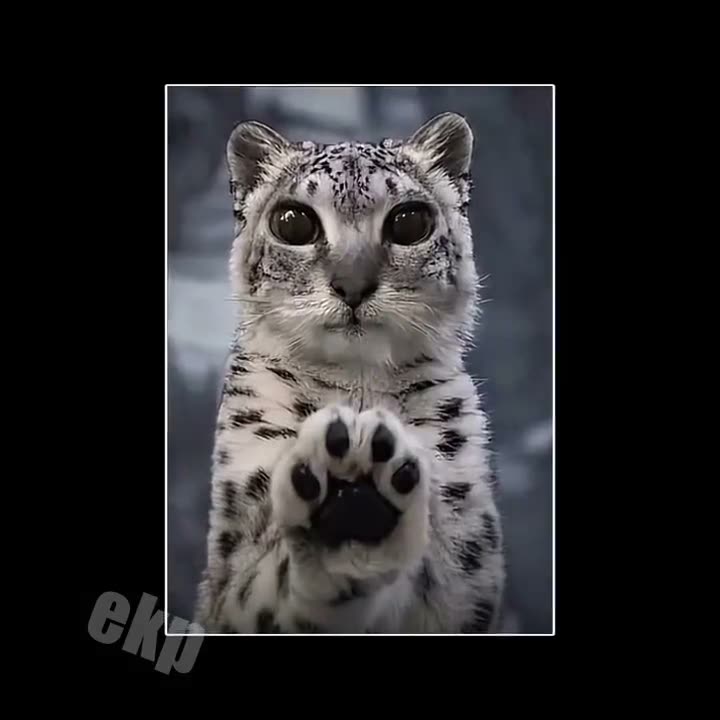
The version on our trend page is the snow leopard edit by @ekppp, posted Nov 1, 2026. It is 15 seconds long and square. Here is what happens in it, shot by shot.
| Time | Beat |
|---|---|
| Shot 1 | The photo pops out of its frame as a cut-out, paw raised, while the background flashes from gray to sky and grass. |
| Shot 2 | The cut-out squashes, tilts and flies across the frame. |
| Shot 3 | Copies of it race past in rows, each with a rainbow trail over pixel stars. |
| Shot 4 | More color flashes, then the rows of copies fly again on the last beats. |
02How to make the Tweenslop AI video from one photo
You do not need an animation app or a timeline. The tweenslop maker on AI Trend Club follows the original edit for you, and your photo becomes the cut-out.
- Open the trend pageGo to the Tweenslop page on AI Trend Club and watch the original edit so you know what the cut-out will do.
- Press Create your ownThis opens the maker for this trend. There is no prompt to write.
- Add one photoAdd a photo of yourself or of your dog or cat, and confirm you have permission to use it. A free preview still shows how your cut-out will look before you pay.
- Pick the quality480p costs 692 credits and 720p costs 990 credits. The exact number shows on the button before you spend anything.
- Make and downloadTap Make my video. It is ready in a few minutes. Download it with the trend sound or silent, square like the original.
03The photo that works
The whole edit is one flat cut-out spinning and zooming, so the outline of your subject carries the video. A clear subject on a calm background keeps it readable at full speed.
- One subject only: you, chest up, or one pet with the whole head in view.
- A plain background, so the cut-out has a clean edge.
- Good light, so the outline stays crisp when it spins.
- The subject filling most of the photo, not a tiny face far away.
- Skip busy backgrounds and group photos: two faces in one cut-out look messy.
- Use your own photo, your own pet or a friend who said yes.
04The Tweenslop AI prompt
On AI Trend Club there is no prompt to write: the trend page sends its own instructions with your photo. If you want to try a tweenslop edit in another video model that accepts a reference image, you can start from the prompt below and change it to suit your photo.
Square 15-second animation in the tweenslop style. The person in the reference photo is cut out like a flat paper sticker with a thin drop shadow, shown from the chest up with one hand raised. Shot 1: the photo sits in a thin white frame on black, then pops out as a cut-out. Shot 2: the cut-out bounces and pulses on every beat while flat backgrounds flash gray, sky blue and grass green. Shot 3: it squashes, tilts and flies across the frame. Shot 4: rows of copies race across a flat blue background with small white pixel stars, each copy trailing a rainbow. Shot 5: fast color flashes, a big zoom, and the rows fly again to end. Hard cuts on the beat, no camera shake, no text.05Tweenslop maker, animation app or AI video?
The hand-made edits in this trend are built in animation apps, keyframe by keyframe. That gives you total control over every squash and spin, but a 15-second edit can take hours, and you need to cut your photo out first.
A video template in an editing app can only rearrange clips and photos you supply. It can place a cut-out of you over a background, but each move is still set by hand. The AI video here starts from the original edit and puts your photo into it, so the motion, flashes and rows of copies come with it. The tradeoff: the AI follows the edit closely, but the exact beat hits, colors and number of copies can differ from run to run.
After you download, you can still open the clip in any editor to add a caption, trim it or change the sound.
06Is the Tweenslop AI video free?
Watching the original edit and the trend page is free, and so is the preview still that shows your cut-out. Making the video costs credits. A new account gets 25 welcome credits, which is enough for a few images but not for this video.
The 480p version is 692 credits and the 720p version is 990 credits. The cheapest way in is the Week pass or the 1,000 credits pack. If a video fails, the credits come back automatically.
| Option | Price | Credits |
|---|---|---|
| Week pass | $6.99 | 800 |
| 1,000 credits | $9.90 | 1,000 |
07Post it
Post the clip with the trend sound on, since the edit is cut to it. Credit the original edit by @ekppp in your caption; tweenslop is a creator-made style and people like to see where a version came from.
Caption ideas: Cheap animation, expensive energy. My cat has never moved this fast in real life. Tweenslop, but it is me.
08Questions
- What does tweenslop mean?
- It joins tweening, the animation shortcut where software fills in the frames between two poses, and slop, slang for cheap, mass-made content. It started as a joke about lazy motion and became a style people make on purpose.
- Is there a Tweenslop maker that works from one photo?
- Yes. On AI Trend Club you add one photo of yourself or your pet and the video follows the original edit for you. There is no prompt to write and no app to install.
- Which AI makes the Tweenslop video?
- An AI video model guided by the original clip. Your photo takes the snow leopard's place while the motion, flashes and rows of copies follow the edit.
- Does the video come with the tweenslop audio?
- Yes. You can download it with the trend sound from the original clip, or silent if you want to add your own.
- Who made the original?
- The snow leopard edit is by @ekppp on TikTok, posted Nov 1, 2026. The style goes back to the animator CheezeDibbles, whose cut-out edit of Aug 11, 2026 had 20.9M views.