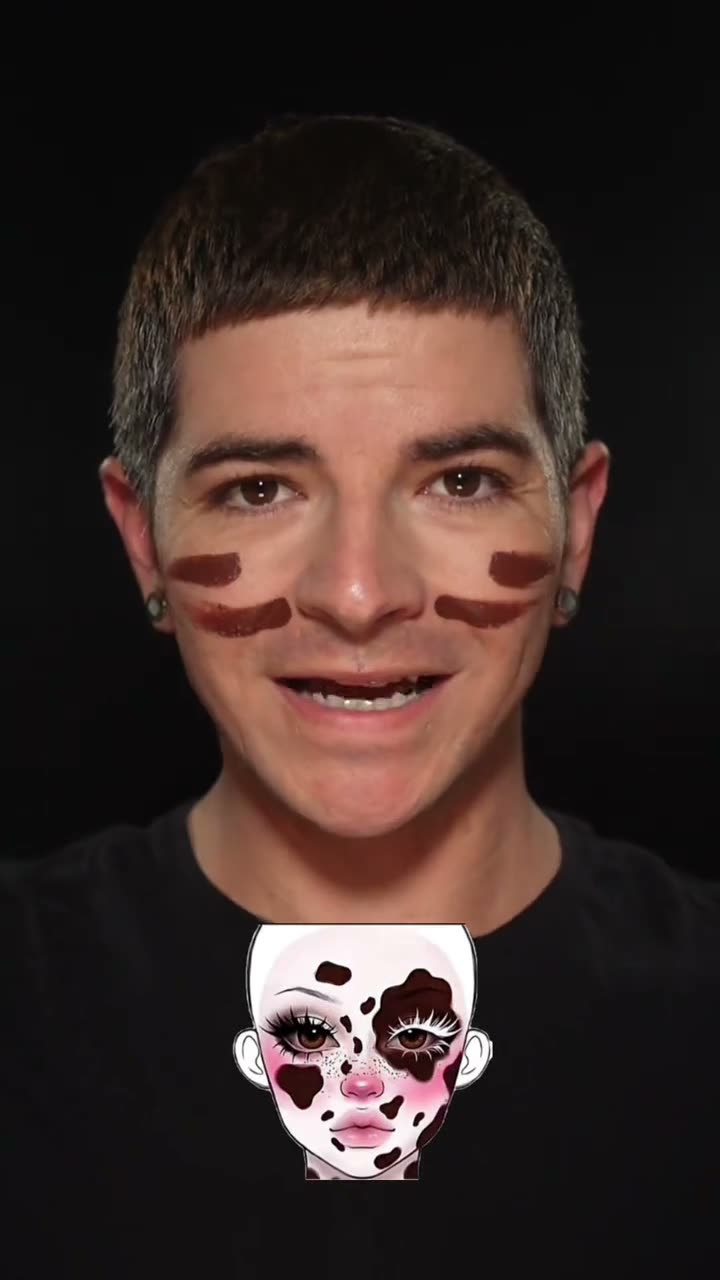
01What happens in the Cow Makeup Transition trend
The Cow Makeup Transition is a short makeup reveal. Brown marks appear on an adult’s face, then a cut shows a finished cow-inspired look with ears, horns, and a bell. One adult photo can take the lead’s place in the same scene.
The linked example is a 15-second vertical TikTok clip. The source post is by @kevinrupard. The page credits and links to that post so viewers can find the original creator.
| Time | Beat |
|---|---|
| Shot 1 | Brown makeup dots appear across the face. |
| Shot 2 | A cut reveals the cow-inspired makeup. |
| Shot 3 | Cow ears and horns frame the close-up. |
| Shot 4 | A bell completes the final look. |
02How to make the Cow Makeup Transition AI video from one photo
AI Trend Club turns the credited reference scene into a video with your photo in the lead role. You do not need to write a prompt on the site. The main choice is resolution, and the button shows the exact credit total before you spend.
- Open the trend pageGo to the Cow Makeup Transition page on AI Trend Club and look at the original clip and its creator credit.
- Start your versionPress Create your own to open the existing video flow.
- Add one photoUpload one adult photo that you have permission to use. Confirm that permission when asked.
- Choose a resolutionThe 15-second 480p version uses 692 credits. The 720p version uses 990 credits. Check the button for the final amount before starting.
- Make and review the videoTap Make my video. It is ready in a few minutes. Review the makeup and face before saving or sharing.
03The photo that works
The page is set up for one adult to play the makeup lead. Pick a photo you are allowed to edit and keep expectations realistic: generated makeup details can vary from the reference.
- Use one adult photo you have permission to edit.
- Choose a picture where the face is visible.
- Use a single person as the cow makeup lead.
- Avoid group photos for this one-person scene.
- Check the result because small makeup marks may change.
04The Cow Makeup Transition AI prompt
There is no prompt box to fill in on AI Trend Club. If you want to try the idea in another video model that accepts a reference clip and a photo, you can start with the prompt below. It describes the visual sequence without naming the original creator.
Use the person in the reference photo as the only lead in a short, vertical makeup-transition video. Begin with a close view as brown makeup marks appear across the cheeks and face. Make a clean cut to the same person in a finished cow-inspired look with brown-and-white patches, ears, horns, and a bell at the neck. Keep the camera framing and the person’s identity consistent through the reveal. Keep the makeup playful and clearly fictional. Preserve the simple dark background. Do not add another lead, captions, logos, music, dialogue, or a watermark.05CapCut template or AI video?
A CapCut template is an editing layout. It can arrange clips that you record yourself, add cuts, and place text or sound over them. It does not put your photo into the cow makeup creator’s original scene.
An AI video uses the reference scene to build a new version with your photo playing the lead. That is why the same makeup sequence, cow ears, horns, and bell can be part of the result. AI output can vary, so look at the finished frames before posting.
On AI Trend Club, the workflow runs in a browser and needs no prompt or app installation. Your generated videos are private to your account. If you want to edit a downloaded copy, a video editor can add captions or make a separate cut. Keep the creator credit with the source idea.
06Is the Cow Makeup Transition AI video free?
Viewing the original and opening the trend page is free. Creating the video uses credits. A new account’s 25 welcome credits are enough for a few images, not for this video. A failed video returns its credits automatically.
The lower-cost paid route for the 480p version is the $6.99 Week pass with 800 credits. The 1,000-credit pack costs $9.90. A 720p Cow Makeup Transition takes 990 credits, so check your balance and the exact button amount before you start.
| Option | Price | Credits |
|---|---|---|
| Week pass | $6.99 | 800 |
| 1,000 credits | $9.90 | 1,000 |
07Post it
If you share your version, identify it as an AI edit and credit @kevinrupard for the linked TikTok reference. The source has its own audio; the site lets you choose the trend sound or a silent download. Do not imply that the original creator made your generated version.
- Brown spots to a cow-inspired reveal.
- One portrait, then ears, horns, and a bell.
- A playful SFX makeup idea with credit to @kevinrupard.
08Questions
- How many credits does the Cow Makeup Transition take?
- The 480p version uses 692 credits and 720p uses 990 credits. The button shows the exact amount before you spend.
- Can I make this video without writing a prompt?
- Yes. The AI Trend Club flow uses the original clip and its built-in recipe, so there is no prompt to write.
- Which AI makes the Cow Makeup Transition video?
- It uses an AI video model guided by the original clip.
- Can I make the video on my phone?
- The site runs in a browser and does not require an app installation.
- Who made the reference clip?
- The linked TikTok post is by @kevinrupard. Credit the creator when sharing the trend idea.