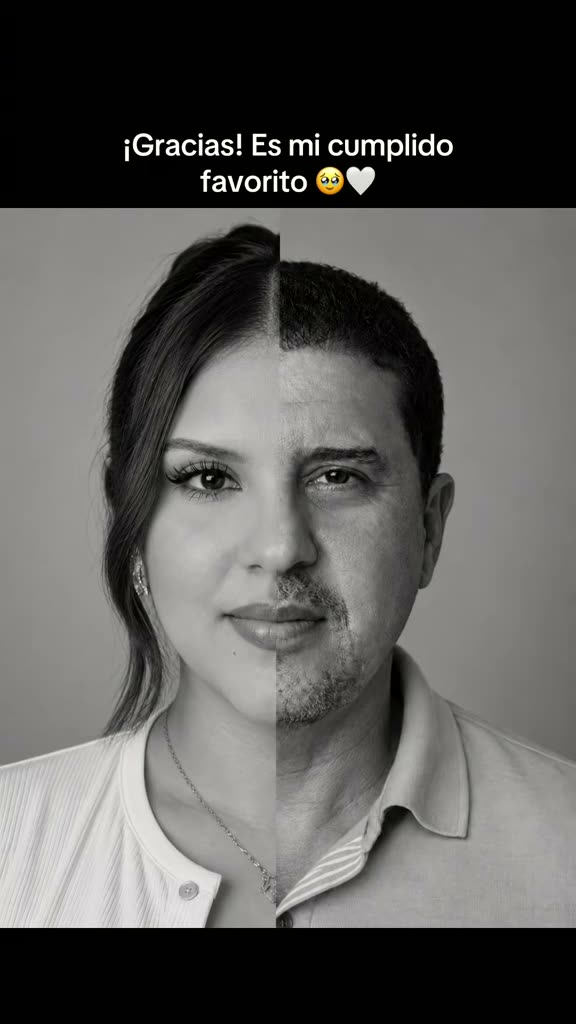
01What the split portrait shows
The split face parent portrait puts half of an adult child's face beside half of their parent's in a single grayscale image. A line down the center of the nose divides the halves. When the pupils and the mouth sit close to the same level, your eye reads one face first and then picks out the features that belong to each person.
The original TikTok from @jazminesparza.00 starts with a color selfie and cuts to the finished portrait. The clip on the AI Trend Club page holds on that final image. Look at the eye line and how the mouth crosses the join before you pick photos for your own version.
| Part of the portrait | What to look for |
|---|---|
| Eyes | Both pupils sit on a similar line. |
| Nose | The join follows the middle of the nose. |
| Mouth | The two halves meet without a large jump in height. |
02Make the portrait from two photos
Open the Split Face Parent Portrait trend and choose Make your split portrait. The image editor opens with the prompt filled in. The order of the photos tells the editor which half to use for each person.
- Add your portraitUse a front-facing adult portrait for the first upload. The default prompt puts this person on the left as the viewer sees it. Check that you picked the intended file before you add the second.
- Add your parent's portraitTap Add another photo and select the second portrait with their permission. This person supplies the viewer's right half. Check the order of the thumbnails before continuing.
- Review the crop and promptChoose Square for a centered headshot. In the prompt, keep the instructions about the centered join, matched light and distinct features. The prompt is editable, so you can change the side order if you prefer.
- Create and check one stillConfirm you have permission to edit both photos. Check the price shown beside the edit button, then submit. Open the result and compare the eyes, nose and mouth to your input portraits before saving it.
03Choose portraits at a similar angle
Start with two photos that already look as though they could have been taken at the same camera height. A head turned to the side puts one eye closer to the camera and changes the apparent width of the cheek. Pairing it with a straight-on photo gives the editor more to reconcile across the middle of the image.
Compare the lighting before you upload. A bright window on one side and overhead light on the other can give the halves very different shadows, even after the color is removed. Choose similar light if you have several photos. The resemblance comes through in the shape of the eyes and mouth, so keep both easy to see.
- Choose one consenting adult in each photo.
- Pick front-facing photos with a similar crop and camera height.
- Keep both eyes and the corners of the mouth visible.
- Choose similar lighting on both faces.
- Avoid heavy filters that smooth out the features you want to compare.
04Split face parent portrait prompt
The prompt below is already filled in when you open the image editor from the trend page. Its left and right directions are from the viewer's point of view. If the result blends the two people into one likeness, keep the instructions that assign each photo to its own half.
Make one black-and-white family resemblance portrait from both uploaded adult headshots. Use the first photo for the viewer's left half and the second photo for the viewer's right half. Keep each person's individual eye shape, brow, skin texture, cheek, and mouth on their side. Scale and align the pupils, nose bridge and corners of the mouth so a straight vertical seam follows the middle of the nose and lips. Use matched grayscale lighting, a plain gray background, and a direct gaze. The image shows one aligned split face with two recognizable halves. Add no captions, overlays, extra faces or borders.05Check that both people still look like themselves
Zoom in on the eyes first. Each half should keep the brow and eye shape of its own input. Move down to the nose bridge and lips. Check for a straight join through the nose and look for a large step where the two sides of the lips meet. Compare the output against the source photos if one half looks unfamiliar.
If the eye line jumps, try a pair of photos taken from a closer camera height. If one half is much darker, start with portraits lit in a similar way. If both halves look like the same person, make sure each upload shows a different person and that the prompt still assigns those photos to separate sides.
06What the image edit costs
The photo edit uses 5 credits. A new account starts with 25 welcome credits. You can watch the credited excerpt and compare its composition before you open the editor. The editing screen shows the quote before you submit.
The result is one still you can save. The motion on the trend page comes from the original TikTok excerpt. You can use the finished still as a standalone portrait or add it to a video in your own editor.
07Share the resemblance
Show the two people in the portrait the finished image before sharing it widely. If you mention where the idea came from, credit @jazminesparza.00 and link to the original TikTok. A short caption leaves room for the resemblance to speak for itself.
- My favorite family resemblance.
- I see it in the eyes.
08Questions
- How many photos do I need?
- Use two clear adult portraits. Put yours first and your parent's second with their permission.
- Can I change which face goes on each side?
- Yes. Switch the order of the photos or edit the side assignments in the prompt before creating the image.
- What if the join looks crooked?
- Try photos taken from a similar height and angle. Compare the pupils and the corners of the mouth after the edit.
- Does this make a video?
- The editor makes one still image. The clip shown on the trend page is the credited reference from @jazminesparza.00.