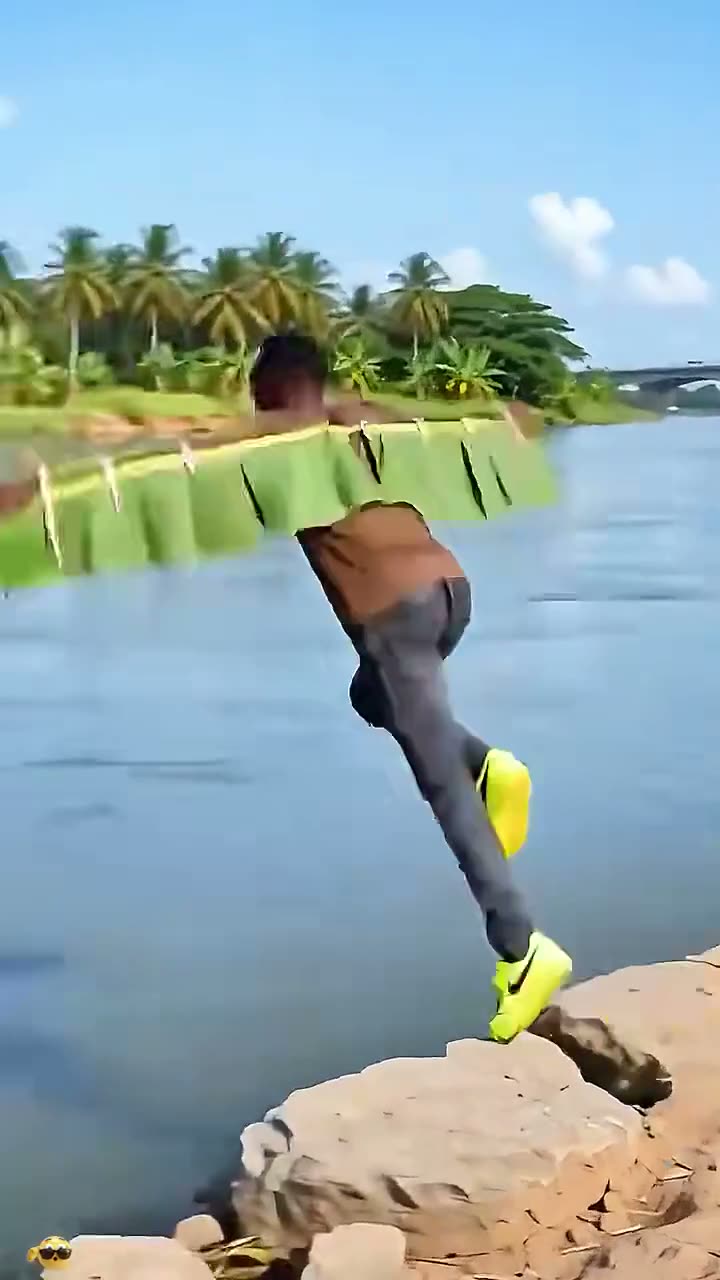
01What happens in the Banana Leaf Glider trend
The Banana Leaf Glider AI video turns a riverside scene into a fantasy flight. An adult stretches broad green leaves along both arms, rises above the water and glides forward while the camera follows. Crocodiles appear in the river below. The effect is generated video, not a real stunt. The linked TikTok post by @user4947097136093 shows the visual idea and is the source we credit on the trend page.
The AI Trend Club version uses one full-body photo to put you in the lead role. It keeps the river, leaves, camera movement and crocodiles in the scene. The generated clip is vertical and lasts 15 seconds. You can review the source before making anything, then decide whether this playful, scenic effect fits your photo.
| Time | Beat |
|---|---|
| Shot 1 | An adult spreads broad green leaves along both arms beside the river. |
| Shot 2 | The adult lifts above the water and glides forward. |
| Shot 3 | The camera follows as crocodiles rise in the water below. |
| Shot 4 | The view returns to the riverside palms and leaf-wing scene. |
02How to make the Banana Leaf Glider AI video from one photo
The page follows the original clip as a visual reference, so there is no prompt to write. Add one photo of the adult who should appear in the scene. The creation flow runs in a browser, and the credit amount appears before you spend. Check the lead and resolution before you start.
- Open the trend pageGo to the Banana Leaf Glider trend page and review the linked original clip.
- Start your versionPress Create your own to open the video flow.
- Add one photoChoose one clear full-body photo of an adult you have permission to use. Keep the face and both arms visible.
- Choose a resolutionA 480p video uses 692 credits. A 720p video uses 990 credits. Read the amount shown on the button before you submit.
- Make and downloadTap Make my video. When it is ready, review the result and download it with the original sound or silent.
03The photo that works
The lead in this effect is a person gliding with both arms extended. A clear full-body photo gives the edit a person and arm position to work from. Use a photo you own or have permission to use. This trend page is for an adult in the lead role; do not choose a pet photo for it.
- Use one full-body photo of an adult.
- Keep the face visible and well lit.
- Show both arms so the leaf-wing pose is easy to place.
- Avoid a group photo, since the page has one lead role.
- Check that you have permission to use the photo.
04A Banana Leaf Glider AI prompt to try elsewhere
You do not need to write a prompt on AI Trend Club. The page uses the linked clip to guide the movement. If you want to try the idea in another video model that accepts reference images and clips, use this description as a starting point. It follows the visible sequence and keeps the crocodiles in the water.
Use the reference clip as the scene and timing guide. The person in the reference photo takes the place of the adult wearing broad green leaves along both arms. Begin beside the tropical river as the adult spreads the leaves and lifts into a forward glide. Follow the person with the camera above the water. Keep the riverbank, palms, crocodiles below, leaf wings, and original sequence. Keep crocodiles in the water and away from the person. Use the same adult throughout. Do not show contact, impact, injury, text, logos, or a watermark.05A video template or an AI video?
A regular editing template arranges footage you record or provide. It does not put your photo into the reference river scene by itself. The AI video workflow uses the linked clip as a visual guide and places the person from your photo into the lead role. The result can vary, so compare it with both your photo and the reference before sharing.
The page handles the scene instructions for you. You only add one adult photo, choose the resolution and begin the render. You can download the finished clip with the source sound included or choose a silent file. If you want to add a caption or adjust the sound for a post, you can do that after downloading in an editor you already use.
06Is the Banana Leaf Glider AI video free?
Watching the original and reading the trend page do not use video credits. Making the video does. A new account starts with 25 welcome credits, enough for a few images but not enough for this video. The 480p version uses 692 credits, and the 720p version uses 990 credits. A failed video returns its credits automatically.
The current Week pass costs $6.99 and includes 800 credits, enough for one standard 480p version. A 1,000 credits pack costs $9.90 and covers one 720p version. The creation button shows the current credit amount before you submit, so check it there before spending. The table lists the current purchase options used by this guide.
| Option | Price | Credits |
|---|---|---|
| Week pass | $6.99 per week | 800 |
| 1,000 credits pack | $9.90 | 1,000 |
07Post the result with the original credited
The original sound is included in the download. When you share your version, credit the reference by @user4947097136093 and link to the creator’s post when the platform lets you. Make clear that your clip is an AI edit. It is a visual fantasy, not evidence of a real flight above the river or the crocodiles.
The idea reads as a playful escape because ordinary green leaves become wings and the water turns into a dramatic setting. Keep your caption close to that meaning. For example: “A leaf-wing daydream over the river” or “A little riverbank, a lot of imagination.” These describe a scenic AI edit without claiming that the flight happened.
08Questions
- What is the Banana Leaf Glider AI video?
- It is a vertical AI video effect showing an adult glide over a river with broad green leaves along both arms. The crocodiles stay below in the water.
- Which AI makes the Banana Leaf Glider video?
- AI Trend Club uses an AI video model guided by the original clip. You add one full-body photo and do not need to write a prompt on the trend page.
- Can I make it in a browser?
- Yes. The creation flow runs in a browser, and there is no app to install.
- How many credits does it use?
- One 480p version uses 692 credits. One 720p version uses 990 credits. The page shows the amount before you submit.
- Who made the original?
- The linked TikTok post is by @user4947097136093 and was posted on Nov 22, 2026. The first creator of the wider effect has not been confirmed.