01What happens in the Mermaid Splash Transformation trend
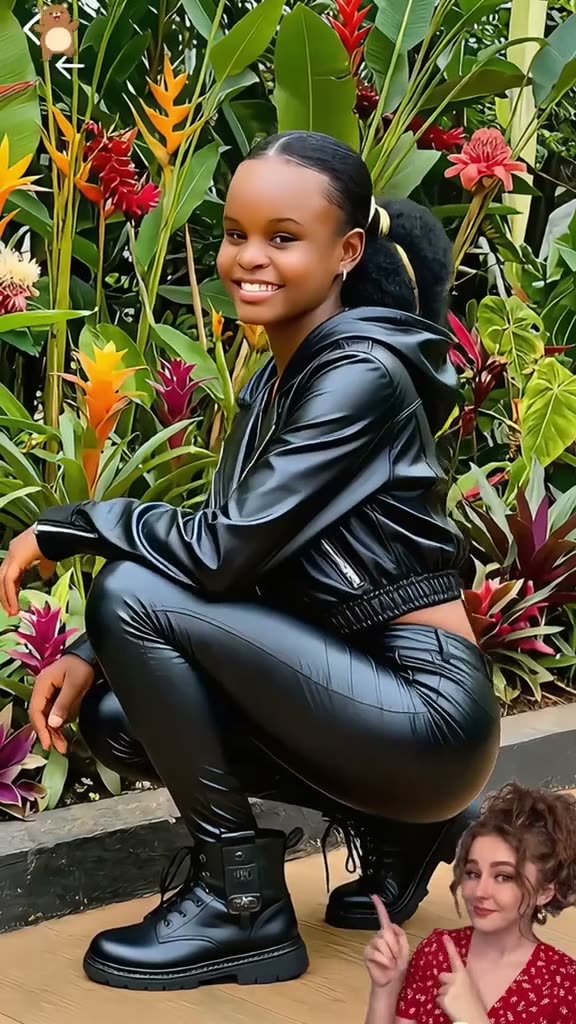
The Mermaid Splash Transformation uses a full-frame splash to change an outdoor pose into an underwater mermaid-style scene. A scaled tail appears after the water transition. A small presenter inset stays in the lower-right corner throughout the selected opening.
The selected vertical clip is 3 seconds long. It is the opening of a TikTok tutorial by @phan.van.khai6. The page links to the creator’s post, and the transformation described here is generic rather than a named movie character.
| Time | Beat |
|---|---|
| Shot 1 | The main adult poses in a leafy outdoor setting. |
| Shot 2 | A bright splash covers the full frame. |
| Shot 3 | An underwater mermaid-style scene reveals a scaled tail. |
| Shot 4 | The presenter inset stays at the lower right. |
02How to make the Mermaid Splash Transformation AI video from one photo
The existing trend recipe uses one adult photo for the main scene lead. It aims to keep the small presenter inset separate. The site has no prompt box, and the preview shown on the trend page is a still image test, not a completed video. The generated video costs depend on the resolution you choose.
- Open the trend pageVisit the Mermaid Splash Transformation page and review the opening reference segment.
- Start your versionPress Create your own to enter the one-photo video flow.
- Add one adult photoUpload a photo you have permission to use. Confirm that permission when asked.
- Choose resolutionA 3-second 480p video uses 139 credits. The 720p version uses 208 credits. Check the amount on the button before starting.
- Make and reviewTap Make my video. Check that the photo leads the main mermaid scene and that the inset remains separate.
03The photo that works
The reference uses one main adult lead and a separate small presenter inset. Add one adult photo for the central lead. The source scene is a fantasy effect, and generated water, splash, and tail details may vary.
- Use one adult photo you have permission to edit.
- Choose one person to play the central lead.
- Keep the face visible in the photo.
- Avoid a group photo for this one-person scene.
- Review the small inset and the main lead separately in the finished result.
04The Mermaid Splash Transformation AI prompt
AI Trend Club uses the original clip and a built-in recipe, so you do not have to write a prompt. If you test this idea in a different model that accepts a reference clip, the prompt below names the lead and keeps the presenter inset as a separate part of the layout.
Make a short, vertical fantasy transformation using the person in the reference photo as the main lead. Begin with the person posing in a leafy outdoor setting. Use a bright full-frame splash to cover the transition, then reveal the same person in an underwater mermaid-style scene with a scaled tail and soft water light. Keep the small presenter inset at the lower right as a separate, unchanged person. Do not replace the inset with the main lead or merge the two faces. Keep the video silent and add no new text, logos, or watermark.05CapCut template or AI video?
A CapCut template helps you arrange footage you record yourself. It can add cuts, music, or text, but it does not use the original scene to make your photo the person in the mermaid transformation.
An AI video uses the reference clip to guide a new version. Here the one uploaded adult photo is meant to lead the main scene, while the small lower-right presenter inset remains a separate part of the composition. The video result can vary, so check both people and the splash before sharing. The first preview on the page is a still image, not proof that a full video render passed.
AI Trend Club runs in your browser and does not require an app installation. There is no prompt to write. The creator’s original post contains audio, and the page lets you download with the trend sound or silent. The task recipe targets a silent render; choose carefully if you add audio for a social post.
06Is the Mermaid Splash Transformation AI video free?
Viewing the original post and opening the trend page is free. Creating the video uses credits. A new account receives 25 welcome credits, enough for a few images but not this video. The 480p version costs 139 credits and 720p costs 208 credits. A failed video returns its credits.
The $6.99 Week pass includes 800 credits, and the $9.90 pack includes 1,000 credits. Since the 480p and 720p versions use fewer credits than either option, check your account’s available balance and the exact amount shown on the button before you start.
| Option | Price | Credits |
|---|---|---|
| Week pass | $6.99 | 800 |
| 1,000 credits | $9.90 | 1,000 |
07Post it
If you share the result, credit @phan.van.khai6 and link to the original TikTok tutorial. The selected opening uses a generic mermaid-style effect, and its presenter inset belongs to the source layout. Do not suggest that the creator made your generated version. The site can include the trend sound or a silent export.
- A splash between the leafy pose and underwater scene.
- A scaled tail revealed by the water cut.
- A mermaid-style edit with credit to @phan.van.khai6.
08Questions
- How many credits does the Mermaid Splash Transformation take?
- The 480p version uses 139 credits. The 720p version uses 208 credits.
- Does my photo replace the small presenter inset?
- The recipe is designed to change the main scene lead and keep the lower-right inset separate. Review the result before sharing.
- Which AI makes this mermaid video?
- It uses an AI video model guided by the original clip.
- Can I make the video on my phone?
- The site runs in a browser and does not require an app installation.
- Who made the original tutorial?
- The linked TikTok post is by @phan.van.khai6. Credit the creator when sharing the idea.