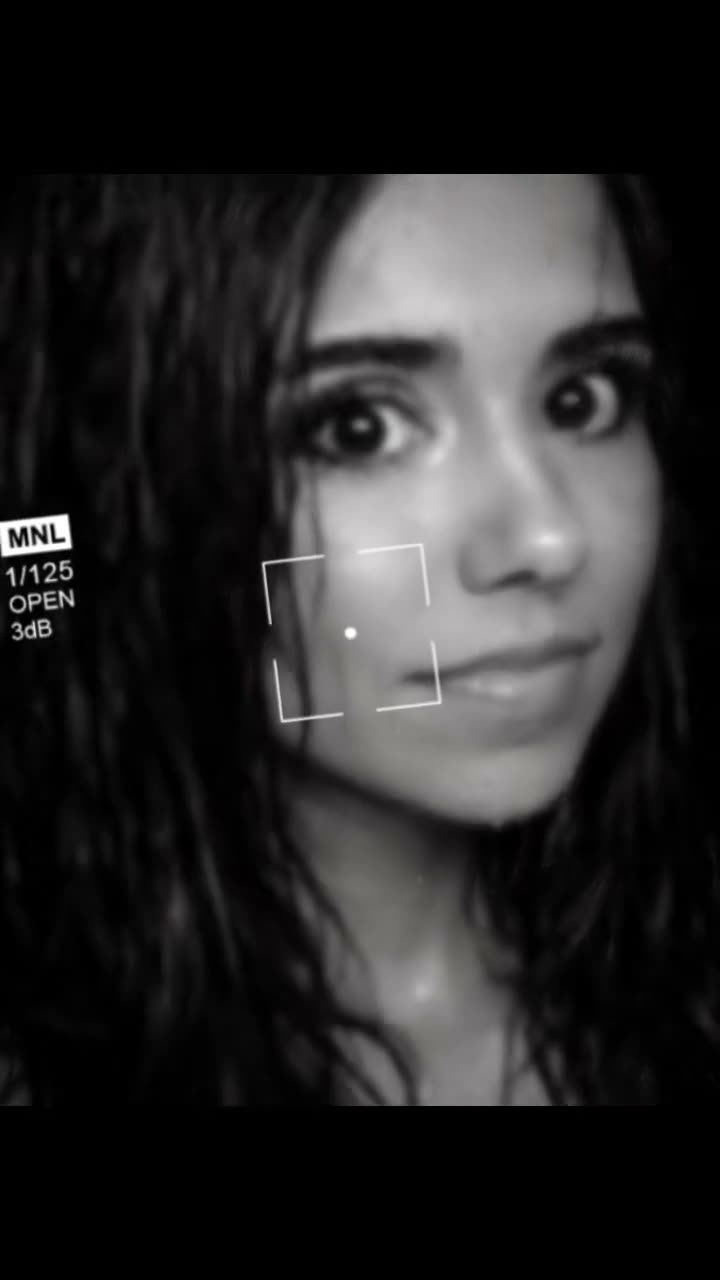
01What the Black and White Wet Face Portrait trend shows
The Black and White Wet Face Portrait style is a close portrait with wet hair, visible water droplets and a deep, nearly black background. Strong contrast keeps attention on the face and eyes. The linked TikTok post is a short demonstration of this still-image look. It was posted by @odessaraeperez on Nov 12, 2026. The post is an example of the style, not proof that the creator invented the wider format.
The page adapts that look to an image editor. You upload one adult portrait and create one new still image. The result does not move, and it should be described as an AI edit. The reference is useful for seeing the tone and framing before you begin, while the prompt below tells the editor which parts of your portrait to preserve.
| Time | Beat |
|---|---|
| Shot 1 | A close portrait appears against a nearly black background. |
| Shot 2 | Wet hair frames the face as droplets catch the light. |
| Shot 3 | The portrait holds in monochrome, with strong contrast around the eyes. |
02How to make the Black and White Wet Face Portrait AI photo from one portrait
The trend page opens the existing image editor with a prompt already filled in. You can review and change the wording before you create the image. There is no video render to wait for: this workflow makes one still picture. Use a photo you have permission to edit, and check the credit amount before submitting.
- Open the trend pageReview the linked reference post and the description so you know the close crop, wet hair, water drops and dark background the edit is aiming for.
- Start the photo editChoose Edit your photo on the trend page. The existing image editor opens with the portrait prompt filled in.
- Add one portraitUpload one clear portrait of an adult you have permission to edit. Do not use a group photo for this one-person edit.
- Review the promptRead the wording before you submit. It asks for a recognizable face, wet hair, visible droplets and a nearly black background. You can adjust it if one of those details needs to change.
- Create one still imageThe editor shows the current price of 5 credits for one image before you submit. Review the result when it is ready, then save it if it matches what you intended.
03Choose a portrait with the face visible
Start with one clear adult portrait that you own or have permission to edit. The editor needs a readable face to preserve recognizable features. The prompt adds wet hair, droplets and shadow, so a source image with the eyes and face visible gives the edit a clear starting point. The finished picture can still vary from the wording. Check the eyes and face before sharing it.
- Use one adult portrait, not a group photo.
- Keep the face in focus and visible.
- Leave enough room around the hair for the wet-hair treatment.
- Use a photo you have permission to edit.
- Review the final eyes, droplets and face before you save or share it.
04The Black and White Wet Face Portrait AI prompt
The trend page fills in an edit prompt, so you do not have to write one to use this page. Read it before creating the still. If you want to try the same portrait direction in another image editor that accepts a reference photo, this is the starting prompt used for the page. It asks for one adult, a close monochrome crop and realistic water details.
Use the uploaded photo of one consenting adult as the identity reference. Create one high-contrast black-and-white close-up portrait of the same adult, with realistic water droplets on the skin and wet hair framing the face. Preserve the person’s recognizable facial structure, skin tone, age and natural expression. Use a nearly black background with soft, deep shadows and sharp focus on the eyes. Keep clothing modest and the original portrait crop. Make one still image, not a video or collage. Do not add extra people, text, logos, camera overlays or a watermark.05What this image edit changes
This page uses a photo edit rather than a video template. The uploaded portrait guides a new still image: the face remains the intended subject while the editor adds a black-and-white treatment, damp hair, visible droplets and a shadowed background. It does not animate your portrait or create a moving rain scene. That distinction matters if you searched for a wet look portrait AI effect and expected a video. The output is one picture.
The prompt asks the image model to preserve recognizable facial structure, skin tone, age and natural expression. That is an instruction to the model, not a guarantee that every detail will stay unchanged. Generated details can shift. If the result does not look like the person in the photo, do not present it as an untouched photograph. Review the face and make another edit only if you want to spend the credits again.
06How many credits does one portrait edit use?
One image edit costs 5 credits on the current page. A new account starts with 25 welcome credits. If those credits are still available, that balance covers five image edits at the current price. Credits are shared across the site, so other image or video work can use some of the same balance. The create screen shows the price before you submit.
The linked post and this trend page are available to view without using image credits. The image itself is created only after you submit the edit. If you need more credits, the current shop lists a Week pass with 800 credits for $6.99 and a 1,000 credits pack for $9.90. Check the live pricing page before you buy, since a product price can change. The page does not charge separately for this particular portrait prompt.
| Option | Price | Credits |
|---|---|---|
| One image edit | 5 credits | 1 still image |
| New account welcome balance | No separate purchase | 25 welcome credits |
| Week pass | $6.99 | 800 credits |
| 1,000 credits pack | $9.90 | 1,000 credits |
07Check the image before you share it
Look at the eyes, face shape, hair and droplets in the finished image. The prompt asks for visible eyes and a dark background, but the image model can interpret those details differently. If the face is hard to recognize, use a sharper portrait and review the identity-preserving instructions. If droplets cover the eyes, edit the wording to make the eyes clear and the droplets lighter. If the background is too bright, ask for a nearly black background with deep shadows. These fixes follow the controls already available in the image prompt.
When you post your result, make clear that it is an AI-edited portrait. The linked example belongs to @odessaraeperez, so credit that creator when you refer to the source look. Do not imply that the creator made your image or that the picture records a real event. The idea works as a moody portrait: a close crop, dark space and water details give the face a studio-like feel without adding a separate scene.
You could caption it “A portrait in shadow and water” or “Monochrome, with a little storm in the frame.” Both lines describe the visual mood. They do not claim that the image is an unedited photo or that a real storm happened.
08Questions
- What is the Black and White Wet Face Portrait AI photo?
- It is one still portrait with wet hair, visible droplets, strong contrast and a dark background. The trend page makes an AI-edited image, not a video.
- Which AI makes the portrait?
- The existing image editor uses GPT Image with the prompt shown on the trend page. You can review the wording before creating the still.
- Can I use someone else’s photo?
- Use a photo you own or have permission to edit. Ask the person first if the portrait belongs to someone else.
- Will the edit keep my face exactly the same?
- The prompt asks the model to preserve recognizable features, but generated details can vary. Review the image before sharing it.
- Who made the original post?
- The linked TikTok post is by @odessaraeperez. We have not confirmed who first made the wider portrait style.
- How much does one image cost?
- The current image edit costs 5 credits for one still image. The editor shows the price before you submit.