01What happens in the Choosin Texas Emo trend
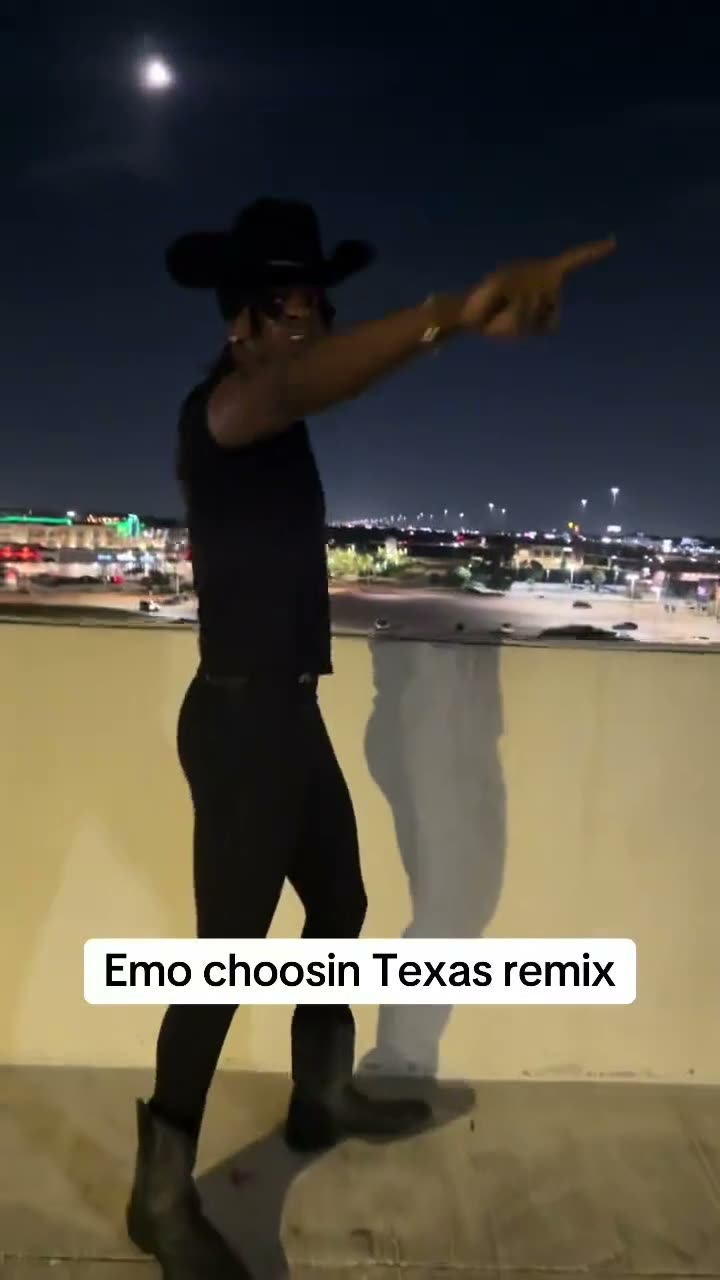
The Choosin Texas Emo example is a short rooftop dance remix. An adult in dark clothing and a cowboy hat faces the camera at night. The person bounces, leans toward the camera and moves their arms while distant city lights stay behind them. The linked TikTok post by @kobbapot is the visual reference on the trend page.
Use one adult photo to make a new AI video. Your photo plays the dancer, while the rooftop view and movement guide the scene. The output is silent.
| Time | Beat |
|---|---|
| Shot 1 | The dancer faces the camera in dark clothes and a cowboy hat. |
| Shot 2 | The person bounces in front of a rooftop parapet. |
| Shot 3 | The dancer leans closer and moves both arms. |
| Shot 4 | Distant city lights remain behind the final movement. |
02How to make the Choosin Texas Emo AI video from one photo
Start from the trend page so the correct reference clip and prompt are selected. Add one adult photo you have permission to use. The site assigns that person to the dancer role and sends the visual reference with the request.
The resolution choice changes the credit total. At 480p, the video uses 646 credits. At 720p, it uses 968 credits. Review the current button price before submitting. The amount appears before you spend, and a failed video returns its credits automatically.
- Open the trend pageRead the source description and creator credit on the Choosin Texas Emo page.
- Start your versionPress Create your own to open the existing single-photo video flow.
- Add one adult photoUpload a photo you own or have permission to edit. Confirm that permission when asked.
- Choose a resolutionThe 480p version uses 646 credits. The 720p version uses 968 credits. Check the amount on the button.
- Make and review the videoTap Make my video. Check the face, outfit, hat, movement and rooftop setting before you save or share it.
03Choose a photo that fits the dance
Use one adult photo for the dancer. A visible face helps you review the result. Since the reference includes full-body movement, a full-body portrait gives the editor more information about posture and clothing. Details can still change during generation.
Only upload a photo you own or have permission to edit. Ask the adult before creating or sharing an edit of them.
- Use one adult photo with a visible face.
- Choose a full-body portrait for the dance role.
- Use a photo you have permission to edit.
- Check the cowboy hat and rooftop details in the result.
- Describe the output as an AI edit when you share it.
04The Choosin Texas Emo AI prompt
There is no prompt field to write in on AI Trend Club. If you are using another video model that can accept a reference clip and a photo, the prompt below gives it the visual sequence and the boundaries. It keeps the description focused on the scene rather than naming a performer or reproducing lyrics.
The original clip has text on screen, but the video recipe does not need to recreate that label. Keep the focus on the adult, the rooftop and the movement. The generated result can vary, so inspect it before posting and add context that it is an AI remake.
Use the reference clip to guide a short vertical rooftop dance. Place the adult in the reference photo as the only dancer, wearing dark clothes and a cowboy hat. Keep the nighttime rooftop parapet, distant city lights, fixed camera view, bouncy steps and exaggerated arm movements. Let the dancer lean toward the camera near the end. Preserve one clear adult identity through every movement. Keep the video silent. Do not add lyrics, captions, readable text, another performer, logos, a watermark or a soundtrack.05CapCut template or AI video?
A CapCut template gives you an editing layout for footage that you record. You can arrange your own clips, apply cuts, and add text or an audio track. It does not put your photo into the rooftop reference scene by itself.
The AI video workflow uses the linked clip to guide a new scene, then places your photo in the dancer role. The setting and movement are generated around the photo. The output from this trend page is silent and does not include the original remix audio.
If you want sound after downloading, add a track that is available for your account to use. Do not add lyrics or claim that the source creator performed in your version. Keep the reference credit when you explain where the dance idea came from.
06Is the Choosin Texas Emo AI video free?
You can view the trend page and linked reference without paying. Creating a video uses credits. A new account starts with 25 welcome credits, enough for a few images but not a trend video. The video button shows the exact credit price before you submit, and failed videos return the credits automatically.
The Week pass costs $6.99 and includes 800 credits. That covers one 480p video at 646 credits. The 720p version uses 968 credits, so the 1,000-credit pack at $9.90 covers that setting. Check the amount shown on the page because the credit requirement depends on the resolution you choose.
| Option | Price | Credits |
|---|---|---|
| Week pass | $6.99 | 800 |
| 1,000 credits | $9.90 | 1,000 |
07Share the silent edit clearly
The generated video is silent. If you add a sound in TikTok or CapCut, use one your account can post. The trend page links to the example by @kobbapot.
Check the face, hat, dark clothes and rooftop before sharing. Say the video is an AI edit made with your photo. Short caption ideas:
- A rooftop dance, made with my photo.
- City lights and a quiet AI remix.
- My version of the rooftop dance scene.
08Questions
- Is there a Choosin Texas Emo AI template?
- The trend page provides a ready-made one-photo workflow based on the linked rooftop clip.
- Which AI makes the Choosin Texas Emo video?
- An AI video model follows the reference clip and uses your photo as the dancer. The site fills in the prompt for you.
- Can I make it on my phone?
- Yes. The trend page and creation flow run in a browser. Add one adult photo you have permission to use.
- Does it include the original remix or lyrics?
- No. The video output is silent and does not include the source audio or lyrics.
- Who posted the linked example?
- The linked TikTok remix is by @kobbapot and was posted on Sep 29, 2026. We link to it above.