01What happens in the Plant Your Face Tree trend
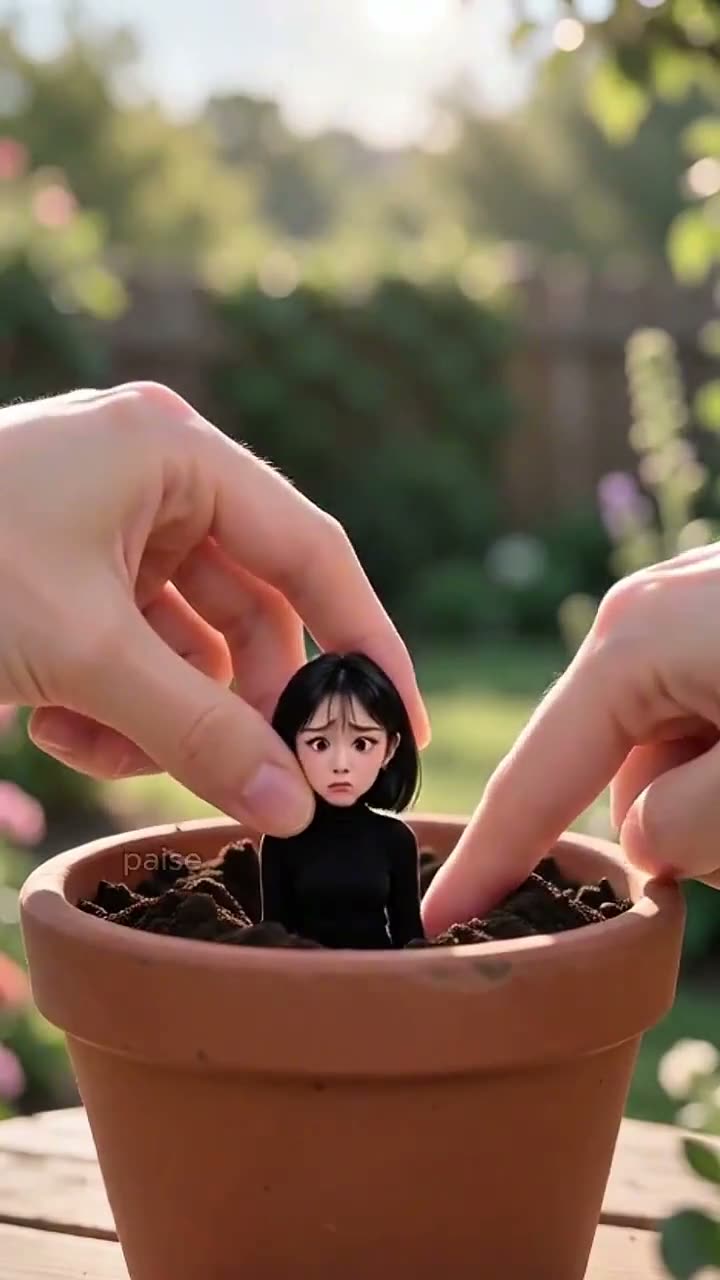
A hand sets a miniature version of you in a terracotta pot. After the soil is watered, a shoot appears and the camera pulls back to a canopy full of little copies of your face.
The source goes from a close planting shot to a wider view of the pot. That change in scale makes the reveal work: the figure is easy to spot at the start, then becomes small enough for the crown to take over the frame.
| Shot | What to look for |
|---|---|
| Planting | A hand lowers the small figure into the soil. |
| Watering | A watering can pours over the pot. |
| Growth | The green shoot rises as the shot widens. |
| Reveal | Little copies of the first face sit among the leaves. |
02How to plant your face in a tree video
- Open the trend pageFind Plant Your Face Tree on AI Trend Club and watch the linked clip before choosing a photo. The clip shows the complete reveal for one little figure, from planting to the faces in the canopy.
- Start with your portraitPress Create your own and add a clear portrait of one adult. Confirm that you have permission to use it. Keep the same upload for the whole scene: the face in the pot and the faces in the branches are meant to match.
- Check what the recipe doesThe scene, garden and planting hands come from the reference. Your photo tells the model who the small figure is. The changes in framing and scale are part of the effect, so you do not need a separate image of the tree.
- Choose a resolutionThe current quote is 277 credits in 480p or 415 credits in 720p. Check the amount on the button before submitting. Think about where you want to share the video and how important the small faces in the crown are on that screen.
- Render and reviewPress Make my video. Once the result is ready, watch it all the way through before downloading. Check that the figure is recognizable at the beginning and that the little faces toward the end look like versions of the same adult.
03Choose a photo that will read at small scale
Use one clear adult portrait with an unobstructed face. The model has to carry the same features from the closer planting shot to many much smaller shapes among the leaves. A photo that is easy to read at a glance gives it a clearer reference.
- Use a photo that shows only the intended lead.
- Keep the eyes and hairline visible.
- Choose even lighting so both sides of the face are readable.
- Skip heavy effects that flatten features or cover the eyes.
- If a group photo is all you have, use a clear solo portrait instead.
04Plant Your Face Tree AI prompt
AI Trend Club includes the recipe. If you are testing your own reference-driven video editor, describe the opening and ending together so the plant and the crown have the same lead.
Show a miniature illustrated version of the person in the reference photo being lowered into soil in a terracotta pot. Keep the hands, garden and watering can in place. Water the soil and let a green sprout rise behind the figure. Pull back as it grows into a leafy tree, then reveal little versions of the same face between the leaves. Keep the adult’s recognizable features across every copy. Hold briefly on the full crown and finish without added sound or text.05A reusable AI recipe or a manual template
A manual edit can arrange shots you already have. To build this sequence that way, you would need the planting shot, the growth shot and a matching crown image. A reference-driven editor uses the original timing and your portrait to create the transformation as one video.
If the rendering changes the face too much in the crown, inspect the planting shot first. A recognizable opening and inconsistent crown point to a problem with the copies. When both are hard to recognize, start with a clearer portrait. Keep the planting and growth shots in the timeline if you trim the result after downloading.
06Can I make the video for free?
You can watch the source clip and read the trend page without spending credits. A new account gets 25 welcome credits, enough for a few images. The full video uses the separate resolution quote above, and a failed video returns its credits automatically.
The Week pass and the credit pack are the lowest-priced entries shown here. Read the quote before submitting. Watching the source first gives you a chance to see whether the garden setup and the style of the final reveal are what you want.
| Option | Price | Credits |
|---|---|---|
| Week pass | $6.99 | 800 |
| 1,000 credits | $9.90 | 1,000 |
07Share the whole planting and reveal
Keep the ending visible long enough for people to notice the faces in the canopy. If you add a caption, avoid placing it over the pot or the crown, which are the visual anchors of the opening and ending.
The download is silent. You can add a sound after download or let the reveal stand on its own. Credit @webster.paisley if you are pointing people to the original.
- I grew a family tree of me.
- Look closely between the leaves.
08Questions
- Can I use a selfie?
- Yes. Use one clear selfie of an adult with an unobstructed face and even light.
- Do I add a face for each branch?
- Use one photo. The garden figure and the versions in the crown use that same identity.
- Is the sound included?
- The selected source and the template output are silent. Add sound after download if you want it.
- Who posted the original?
- The TikTok shown on the trend page was posted by @webster.paisley. The credited link opens the full post.