TrendingOriginal posted Oct 25, 2025
Photogenic Filter AI Trend
Turn one pose into a monochrome portrait.
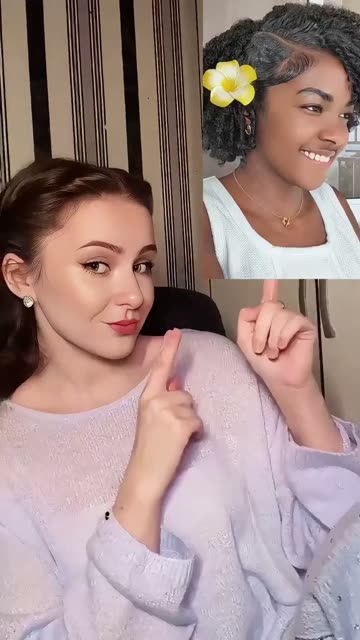
AI Trend Club makes the Photogenic Filter AI trend from one photo: a 7-second vertical video, usually ready in a few minutes, from $6.99, with a free preview first and no sign-up. A creator points to a portrait as the subject shifts from a color close-up to black-and-white stills. The edit has a slow-motion feel, then holds on the person’s expression. Add one photo to play the portrait subject in this 7-second vertical clip while the split-screen frame and transitions stay in place.
- 1 portrait photo
- 7 s vertical clip
- 9:16 for TikTok, Reels, Shorts
- Silent clip, add your own sound
See yourself in the scene before you pay. No sign-up · the video is from $6.99, failed videos refund · see the maker first
See yourself in the scene before you pay. No sign-up · the video is from $6.99, failed videos refund · see the maker first
What the Photogenic Filter video looks like
This is the original. Your photo replaces its lead, so your video follows the same shots with your face. No two runs come out exactly the same.
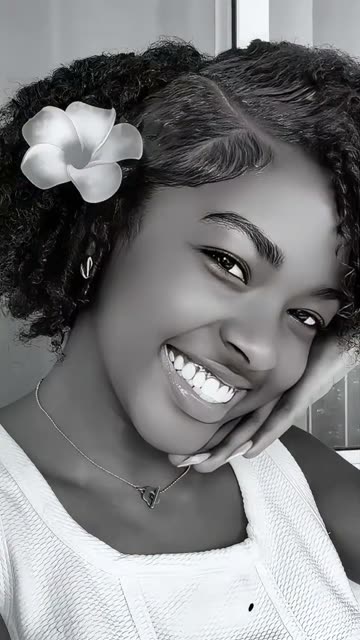
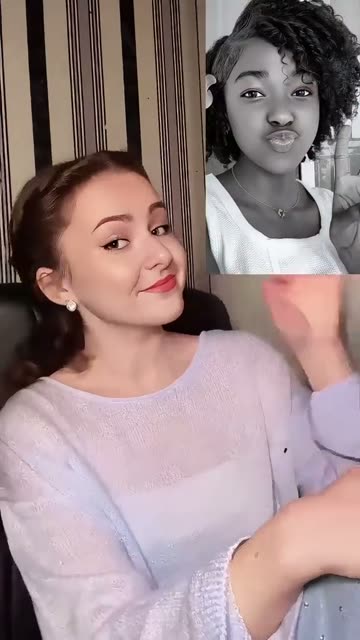
Posted by @xsnowo006 on TikTok on Oct 25, 2025, the matching effect clip shows a creator pointing toward a portrait before it shifts from color to black-and-white close-ups. Your photo takes the portrait subject’s place while the pointing creator, split-screen framing and transitions stay the same. Watch the original post
Also calledphotogenic filter aiphotogenic filter tutorialphotogenic effect filterphotogenic filter 2025
CategoryMemes & pranks
 0:00
 0:02
 0:03
 0:05
How to make the Photogenic Filter video
- 01
Add your photo
Portrait subject: use a clear photo of yourself.
Add your photo now - 02
Press Make my video
The button shows the price before anything is spent: 323 credits at 480p, 484 credits at 720p.
Open the maker - 03
Download and post
A vertical 9:16 MP4, with the trend’s sound or silent. Find it later in My videos.
Start your video
Which photo works best?
- Choose a clear photo of the person you want in the portrait.
- Keep the full face inside the frame.
- Use a front-facing portrait with one visible face.
Avoid
- Avoid a crop that cuts off the eyes or chin.
- Avoid a group photo with several possible subjects.
- Avoid a photo where the face points away from the camera.
What happens in your video
- 01
A creator points toward a portrait in a split-screen frame.
- 02
The portrait subject moves from color into a close-up.
- 03
The close-up turns black and white as the subject shifts pose.
- 04
The split-screen returns to close the short effect.
Where the trend came from
A matching effect post appeared on TikTok from @xsnowo006 on Oct 25, 2025. It pairs a pointing gesture with a portrait reveal, then moves through slow poses and monochrome stills.
The post had 269,000 views in a directory check on Oct 28, 2026. A check of the original TikTok post on Nov 21, 2026 showed 285,300 views and 15,300 likes.
What it means
The edit puts one portrait at the center of a quick reveal. The shift from color to black and white gives the pose a still-photo finish.
It suits a short post that spotlights one expression. The pointing gesture and monochrome close-up give the clip a simple visual rhythm.
How much it costs
| Quality | Length | Credits | From |
|---|---|---|---|
| Standard · 480p | 7 s | 323 | $6.99 |
| HD · 720p | 7 s | 484 | $6.99 |
Credits come from a plan or a credit pack. The $6.99 Week pass (800 credits) covers one standard video. A video that fails gives its credits back. See plans
What goes wrong, and the fix
| If… | Do this |
|---|---|
| The face looks hard to recognize | Try a clear, front-facing portrait with the face fully in frame. |
| The wrong person changes | Use one portrait photo with a single visible subject. |
| The monochrome look is unclear | Choose a clear portrait and keep the color-to-black-and-white change in the original clip. |
Photogenic Filter questions
What is the Photogenic Filter trend?
It is a short portrait effect where a creator points to a person as the image shifts from color to black-and-white close-ups.
How do I make the Photogenic Filter video?
Press Create your own, add one portrait photo and tap Make my video. There is no prompt to write.
How much does it cost?
From $6.99: the $6.99 Week pass (800 credits) covers one standard video. 323 credits at standard quality (480p), 484 at HD (720p). The exact number is on the button before you spend anything, and a failed video gives its credits back.
Can I make the Photogenic Filter video with a selfie?
Yes. Add one clear photo of yourself to play the portrait subject.
Who made the original Photogenic Filter clip?
@xsnowo006 posted the matching tutorial on TikTok on Oct 25, 2025. We link to it above.
Other AI video trends
 Original2M views on the originalHead Bop AI TrendHeadbop maker: one photo, four bopping heads.Free preview · from $6.99 · 1 photo
 Original473K views on the originalSmalltown Boy AI TrendTwo dancing characters trade places on camera.From $6.99 · 2 photos
 AI illustration147K tutorial views on Oct 302027 New Year AI TrendA new year, a higher view.Free preview · from $6.99 · 1 photoThe trend deskAll AI video trendsEvery trend traced to its original post.Browse
Make your own Photogenic Filter video
Add one photo and tap once. No prompt to write. 323 credits.
Create your own