New trendSource posted Oct 28, 2026
2027 New Year AI Trend
A new year, a higher view.
Climb past giant stone numbers, lift your arms, and watch the camera pull back to reveal 2027 above the mountains. Add one portrait to put yourself in the lead. This template follows a 5.5-second silent excerpt of the source video.
- 1 photo you add
- 6 s vertical clip
- 9:16 for TikTok, Reels, Shorts
- Silent clip, add your own sound
Ready in a few minutes · from 277 credits · failed videos refund their credits

What the 2027 New Year video looks like
This is the original. Your photo replaces its lead, so your video follows the same shots with your face. No two runs come out exactly the same.
A 5.5-second excerpt from the TikTok tutorial posted by @user4947097136093 on October 28, 2026. Your photo replaces the lead; the mountain setting, stone numbers, outfit and camera movement stay in the reference sequence. This is source footage, not a video generated by AI Trend Club. Watch the original post
Also calledhello 2027 aiwelcome 2027goodbye 2026 welcome 20272027 capcut template
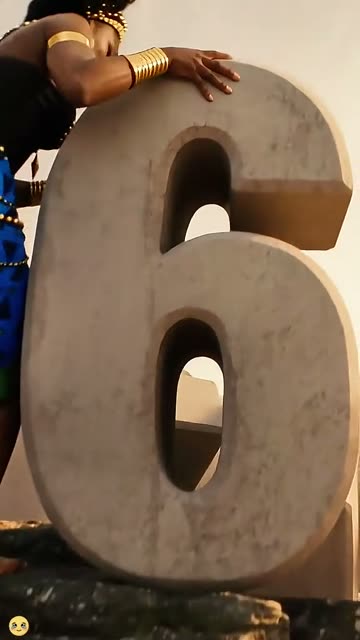 0:00
0:00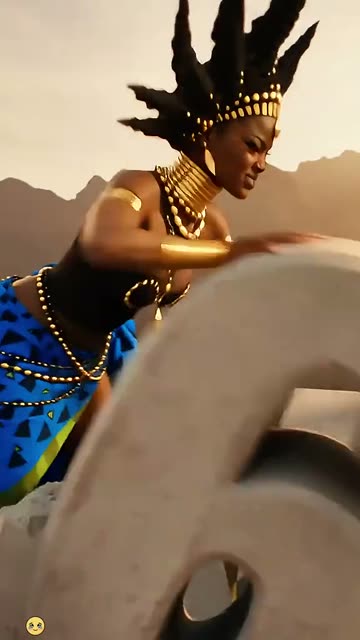 0:01
0:01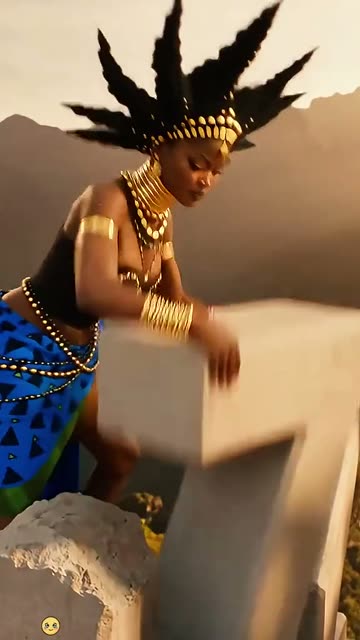 0:03
0:03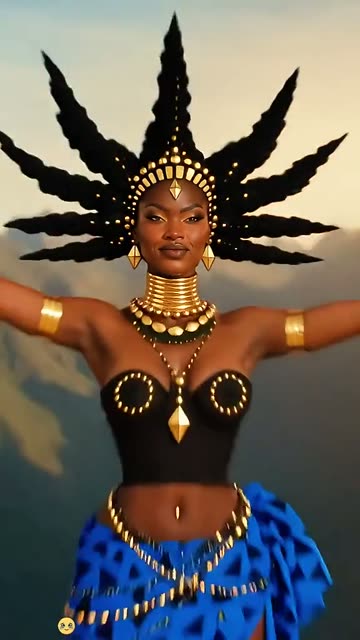 0:04
0:04
How to make the 2027 New Year video
- 01
Add your photo
The climber: one adult, face clear, shoulders visible.
- 02
Press Make my video
The button shows the price before anything is spent: 277 credits at 480p.
- 03
Download and post
A silent MP4 in the original clip’s shape. Add audio in TikTok or Reels when posting. Find it later in My videos.
Which photo works best?
- One consenting adult in the photo
- A sharp face in even light
- Head and shoulders fully visible
Avoid
- Group photos
- Heavy beauty filters or sunglasses
- A face cropped at the hairline
What happens in your video
- 01
The lead climbs beside enormous pale stone numbers on a mountain ledge.
- 02
The lead reaches across toward the next digit, moving into the new year.
- 03
Both arms open as the camera begins to pull back.
- 04
The wider view reveals 2027 against the mountain horizon.
Where the trend came from
The linked TikTok post from @user4947097136093, published on October 28, 2026, shows several versions of the effect and a phone tutorial. We use only its opening 5.5-second sequence. The full tutorial had about 147K views when checked on October 30, 2026; that is a count for the whole post, not this excerpt.
The source post also points to a CapCut template. The effect is also described as hello 2027 ai or welcome 2027. The broader phrase 2027 capcut template can refer to other New Year effects too. We have not established who first created this effect. AI Trend Club is independent of CapCut.
What it means
The move from the old year to 2027 turns a New Year greeting into a small visual story. Reaching the top and opening both arms makes the ending feel hopeful.
Use it for a personal year-end message or a welcome-to-2027 post. The setting and costume come from this reference; it is not an outfit-change tool.
How many credits it costs
| Quality | Length | Credits |
|---|---|---|
| Standard · 480p | 6 s | 277 |
Credits come from a plan or a credit pack. A video that fails gives its credits back. See plans
What goes wrong, and the fix
| If… | Do this |
|---|---|
| The face looks unlike me | Use a sharp portrait with a clear hairline and even lighting. |
| The numbers look distorted | Check the final digits before posting. AI can alter lettering and small details; this template is intended to preserve the source numbers. |
| The outfit is not mine | The reference keeps its black-and-gold top, blue patterned skirt and headdress. Your portrait supplies the identity, not a new costume. |
| The render failed | Credits return automatically for a failed generation. A completed result still needs your visual review. |
2027 New Year questions
What is the 2027 New Year AI trend?
A person climbs beside giant stone year numbers, raises both arms, and appears above 2027 as the camera pulls back over the mountains. This page covers that specific effect.
How do I make this video with my photo?
Press Create your own, upload one clear portrait of an adult who agreed to appear, review the credit cost, and select Make my video. No written prompt is needed.
How many credits does it cost?
277 credits at standard quality (480p). The exact number is on the button before you spend anything, and a failed video gives its credits back.
Is this the official CapCut template, and is it free?
No. AI Trend Club is a separate service that uses credits. The original post links to a CapCut template, but we have not verified its current generation or export price. Check the price shown there before continuing.
Is the cover a finished video result?
No. The cover is an AI illustration with no person in it. The attributed clip below is an excerpt of the creator’s tutorial. We have not published our own generated sample for this template.
Will the video have music?
This reference is silent. Add your own licensed audio in your editor or social app after downloading.
Who posted the source?
The displayed excerpt comes from @user4947097136093 on TikTok, posted October 28, 2026. We link to the full post above; this does not establish that the account invented the effect.
Other AI video trends
 AI illustrationOriginal posted Oct 13, 2026Transmission 5 Dance AI TrendBring a friend to the parking lot.692 credits · 2 photos
 Original2M+ likes on the originalStones to Castle AI TrendThey threw stones. You built a castle.692 credits · 1 photo
 Original306.5M views on #ghostprankGhost Filter Prank AI TrendA spooky spirit rises behind you.553 credits · 1 photoThe trend deskAll AI video trendsEvery trend traced to its original post.Browse
Make your own 2027 New Year video
Add one photo and tap once. No prompt to write. 277 credits.
Create your own