New trendOriginal posted Nov 14, 2026
Airport Transition AI Trend
One photo, two travel scenes.
AI Trend Club makes the Airport Transition AI trend from one photo: a 9-second vertical video, from $6.99, with a free preview first and no sign-up. At an airport, a traveler makes a circle with her fingers in front of the camera. The view switches to a night street, where she steps into the frame and turns. Add one adult portrait to take the lead’s place in both locations. The 9-second vertical clip includes its original sound.
- 1 photo you add
- 9 s vertical clip
- 9:16 for TikTok, Reels, Shorts
- Original sound included
Free preview first, no sign-up · Ready in a few minutes · 415 credits, from $6.99 · failed videos refund their credits
One photo · free preview, no sign-up · ready in minutes · failed videos refund
What the Airport Transition video looks like
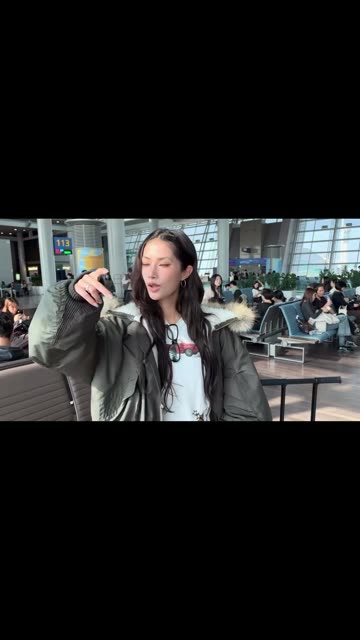
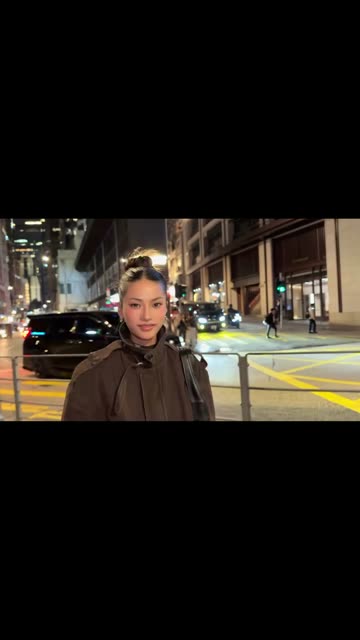
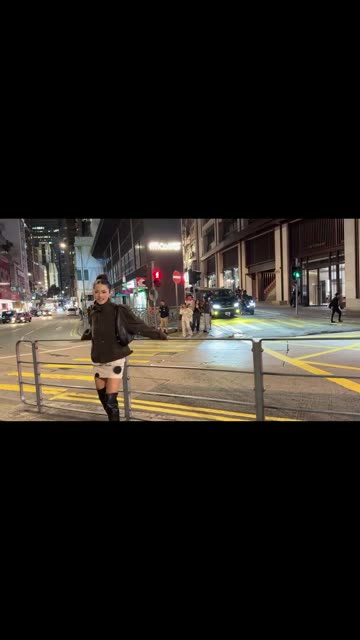
This is the original. Your photo replaces its lead, so your video follows the same shots with your face. No two runs come out exactly the same.
Posted by @31.ioa on Instagram on Nov 14, 2026, the original moves from an airport to a night street through a hand-circle transition. Your photo takes the traveler’s place in both scenes while the locations and transition stay the same. Watch the original post
Also calledairport transition aiairport transition videoairport transitionhow to make airport transition ai video
CategoryMemes & pranks
 0:00
 0:02
 0:05
 0:07
How to make the Airport Transition video
- 01
Add your photo
Traveler: use one adult portrait.
Add your photo now - 02
Press Make my video
The button shows the price before anything is spent: 415 credits at 480p.
Open the maker - 03
Download and post
A vertical 9:16 MP4, with the trend’s sound or silent. Find it later in My videos.
Start your video
Which photo works best?
- Use one adult portrait.
- Use the same photo for both locations.
- Choose the traveler you want to see in both scenes.
Avoid
- Do not upload a group photo.
- Do not add a second identity.
- Do not expect the airport or street to disappear.
What happens in your video
- 01
A traveler stands in an airport and raises one hand toward the camera.
- 02
Her fingers form a circle that fills the view.
- 03
The scene opens on a night street with the traveler in front.
- 04
She turns as the camera holds on the street setting.
Where the trend came from
On Nov 14, 2026, @31.ioa posted this travel transition on Instagram. The clip moves from an airport waiting area to a night street.
At the Nov 15 check, the post showed 183K likes. Its play count was not observable in the source check.
What it means
The finger circle gives the clip a clear cut between two locations. The same traveler appears again after the scene changes.
It suits a quick travel or city-change post made from one portrait. The hand motion provides a simple visual cue for the transition.
How much it costs
| Quality | Length | Credits |
|---|---|---|
| Standard · 480p | 9 s | 415 |
Credits come from a plan or a credit pack. The $6.99 Week pass (800 credits) covers one standard video. A video that fails gives its credits back. See plans
What goes wrong, and the fix
| If… | Do this |
|---|---|
| The traveler changes between scenes | Use one portrait for the full clip. |
| The transition is hard to see | Keep the hand-circle moment in the clip. |
| A different person appears | Choose one adult portrait and retry the template. |
| The render failed | Credits come back automatically. Try again with a clearer photo. |
Airport Transition questions
What is the Airport Transition trend?
It is a short video that moves from an airport to a night street through a circle made with the traveler’s fingers.
How do I make the Airport Transition video?
Press Create your own, add one photo and tap Make my video. There is no prompt to write.
How much does it cost?
From $6.99: the $6.99 Week pass (800 credits) covers one standard video. 415 credits at standard quality (480p), 934 at HD (720p). The exact number is on the button before you spend anything, and a failed video gives its credits back.
Can I use a pet photo?
This version is designed for a person in the traveler role. Use one adult portrait.
Who made the original?
@31.ioa posted the original on Instagram on Nov 14, 2026. We link to it above.
Other AI video trends
 Original193K views on the originalDance With Santa AI TrendA holiday dance from one photo.461 credits · 1 photo
 Original477K views on the originalStop the Wedding Dance AI TrendTake the seat and follow the hands.692 credits · 1 photo
 Original4.2M views on TikTokReaching Out Cat AI Video TrendA reach, a cut, an empty rug.231 credits · 1 photoThe trend deskAll AI video trendsEvery trend traced to its original post.Browse
Make your own Airport Transition video
Add one photo and tap once. No prompt to write. 415 credits.
Create your own