TrendingOriginal posted Oct 9, 2026
Werewolf Transformation AI Trend
Turn yourself into a howling dire wolf.
Watch your body shift as bones reshape, fangs sprout, and fur spreads across your skin. One photo places you in the middle of this 11-second vertical change. You end the scene standing tall as a dire wolf.
- 1 photo you add
- 11 s vertical clip
- 9:16 for TikTok, Reels, Shorts
- Original sound included
Ready in a few minutes · from 507 credits · failed videos refund their credits
What the Werewolf Transformation video looks like
This is the original. Your photo replaces its lead, so your video follows the same shots with your face. No two runs come out exactly the same.
Creator @coredrop2 shared the original video on TikTok on October 9, 2026, showing an AI figure morphing into a beast. Your photo takes the lead's place while the full-body shift and background remain. Watch the original post
Also calledai werewolf transformationwerewolf transformation trendai werewolf filter
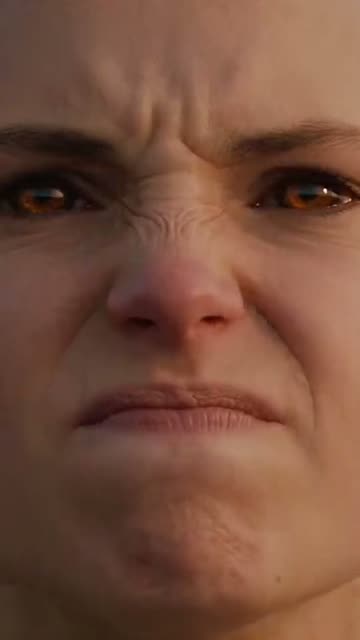 0:00
0:00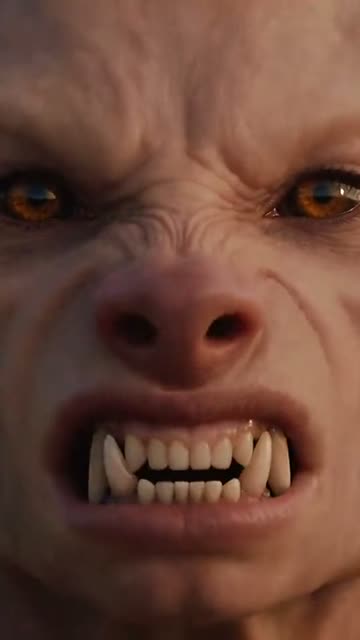 0:03
0:03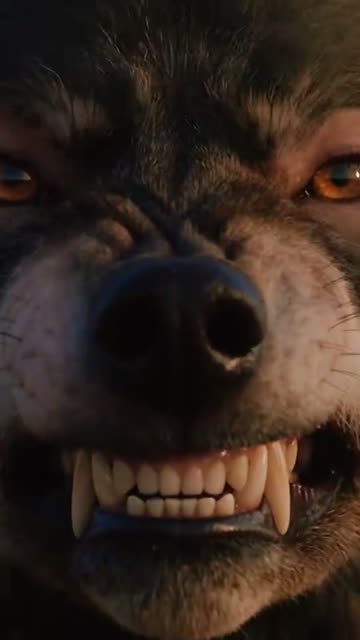 0:06
0:06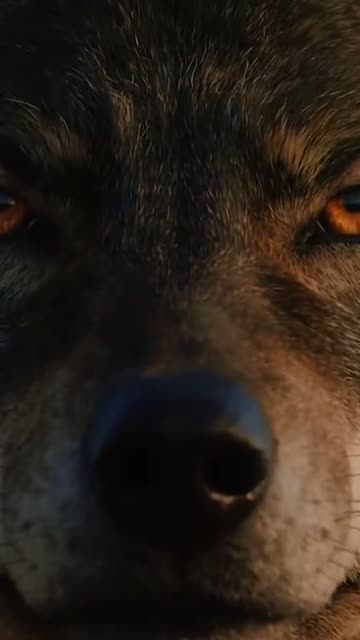 0:08
0:08
How to make the Werewolf Transformation video
- 01
Add your photo
The transforming werewolf: use a clear, front-facing solo photo.
- 02
Press Make my video
The button shows the price before anything is spent: 507 credits at 480p.
- 03
Download and post
A vertical 9:16 MP4, with the trend’s sound or silent. Find it later in My videos.
Which photo works best?
- Upload a centered portrait with clear lighting
- Look directly toward the camera lens
- Keep your hair off your face
Avoid
- Wearing sunglasses, hats, or masks
- Using blurry or dimly lit pictures
- Group photos with several people visible
What happens in your video
- 01
A person begins to grimace as the physical change starts.
- 02
The camera rotates while the jaw stretches into an animal snout and fangs emerge.
- 03
Thick wolf fur spreads rapidly across the face and entire body.
- 04
A full dire wolf emerges to take the character's place.
Where the trend came from
The concept gained traction on August 19, 2026, when creator @hencuy.cc shared a tutorial detailing a cinematic werewolf metamorphosis set in a dim room. Interest expanded heading toward Halloween, with monthly searches rising steadily through September.
In early October 2026, TikTok creator @coredrop2 sparked wider attention with a series of transformation videos. These included an October 4 clip in a snowy forest reaching over 287,000 views, an October 8 street scene gaining 420,800 views, and the October 9 close-up morph.
What it means
People share this video to celebrate Halloween season and enjoy a classic horror fantasy. It lets creators surprise friends with a dramatic monster makeover.
The clip appeals to fans of supernatural lore who want to view themselves as a mythical forest creature.
How many credits it costs
| Quality | Length | Credits |
|---|---|---|
| Standard · 480p | 11 s | 507 |
Credits come from a plan or a credit pack. A video that fails gives its credits back. See plans
What goes wrong, and the fix
| If… | Do this |
|---|---|
| The face looks distorted before changing | Upload a straight-on portrait with neutral lighting across your cheeks. |
| The wolf features blend unevenly | Choose a picture where your jawline and forehead are clearly visible. |
| The render failed | Credits come back automatically. Try again with a clearer photo. |
Werewolf Transformation questions
What is the AI Werewolf Transformation trend?
It is a trending vertical video that reshapes a person's photo into a snarling dire wolf with growing fur and fangs.
How do I make the AI Werewolf Transformation video?
Press Create your own, add one photo and tap Make my video. There is no prompt to write.
How many credits does it cost?
507 credits at standard quality (480p), 1,141 at HD (720p). The exact number is on the button before you spend anything, and a failed video gives its credits back.
Can I use a pet photo or a selfie?
You can upload a selfie or a photo of your pet to play the lead.
Who made the original?
TikTok creator @coredrop2 shared the featured clip on October 9, 2026. We link to it above.
Other AI video trends
 Original17.6M views on the originalBad Times AI TrendArgue with whoever is filming.692 credits · 1 photo
 Original4.1M views on Kevin Wai's clipBulin 47 AI TrendDance to the street freestyle beat.646 credits · 1 photo
 Original7 million likes on the originalPhone on the Train AI TrendRide the Paris metro into the city.692 credits · 1 photoThe trend deskAll AI video trendsEvery trend traced to its original post.Browse
Make your own Werewolf Transformation video
Add one photo and tap once. No prompt to write. 507 credits.
Create your own